Issue with yoloe-11s-seg model structure change when I optimize in hailomz

I’m converting yoloe-11s-seg model to hef.

Using hailomz parse to convert onnx to har is successful.

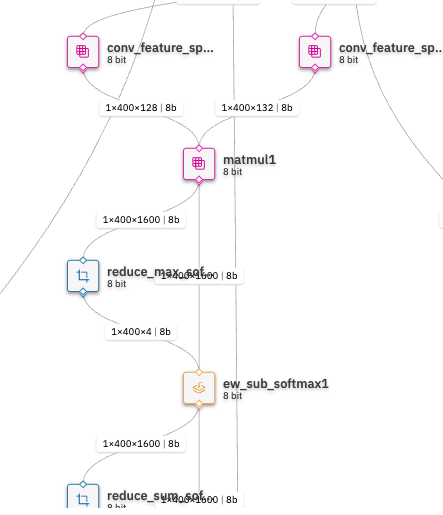
However, after quantizing the har file using hailomz optimize, the output of the Matmul1 layer changes to two during the hailomz compile process, resulting in the following error.

[error] Mapping Failed (allocation time: 8m 53s)
Failed to reach required FPS on the following layers:
Compilation failed with exception: More than one output is not supported for layer matmul1

[error] Failed to produce compiled graph
[error] BackendAllocatorException: Compilation failed: Failed to reach required FPS on the following layers:
Compilation failed with exception: More than one output is not supported for layer matmul1

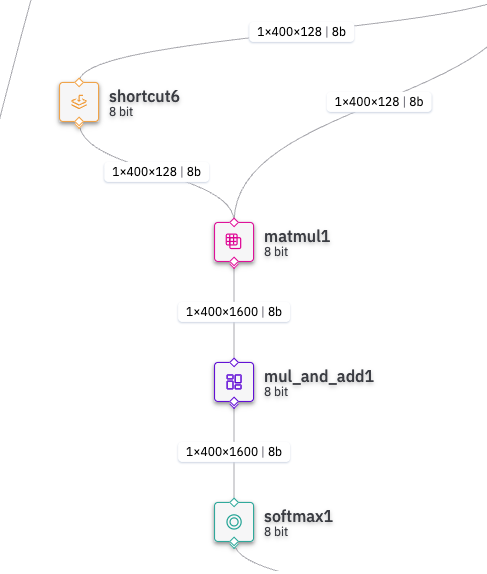
My analysis of this issue that after optimization, the model’s structure changes so that matmul1’s output is split into two. So, if we can avoid this process, the conversion should succeed. Is there a way to do this?

  • Before optimization har structure

  • After optimization har structure

Hey @HWANG_JUNYOUNG,

Welcome to the Hailo Community!

Your analysis is spot on. The issue occurs because hailomz optimize transforms your graph so that Matmul1 gets multiple outputs, but our compiler doesn’t support multi-output MatMul operations.

What’s happening:
The optimization process applies graph rewrites that sometimes split outputs to serve multiple consumers. In your case, this creates the unsupported multi-output MatMul scenario.

Solutions:

  1. Preprocess your ONNX - Ensure Matmul1 has single consumer before parsing by adding Identity nodes or using tools like onnx-simplifier

  2. Try QAT - Quantization Aware Training can avoid post-training structural changes

Hope this helps!

Thank you for your answer.
But In my hailomz, there are no –only-quantization argument and –disable-pass split_outputs argument.

I think this is because my hailomz version is 2.16.0.

Then, how can i solve this problem except Preprocess my onnx and QAT?

Hey @HWANG_JUNYOUNG I’m running into the same issue you mentioned. Did you find a solution? Any help would be greatly appreciated!

Hey @HWANG_JUNYOUNG and @Finn_Amini_Kaveh,

Try this approach to fix your issue:

Use a model script to control the optimization

You can create a .alls file to disable certain optimization steps that might be causing problems. Add this to your model script:

alls = [
    "pre_quantization_optimization(dead_layers_removal, policy=disabled)"
]

This disables specific pre-quantization optimizations that could be splitting your outputs. You might need to experiment with disabling other optimization passes too - the Hailo User Guide has details on which ones you can control.

Alternative approach: modify your optimization workflow

Try running optimization with a custom script that limits how much the compiler transforms your model:

from hailo_sdk_client import ClientRunner

HAR_IN = "model.har"
HAR_OUT = "model_quantized.har"
ALLS_FILE = "model_script.alls"
CALIB_PATH = "path/to/calibration/data"

runner = ClientRunner(har=HAR_IN)
runner.load_model_script(model_script=ALLS_FILE)
runner.optimize(calib_data=CALIB_PATH)
runner.save_har(HAR_OUT)

In your model_script.alls file, include:

normalize1 = normalization([0, 0, 0], [255, 255, 255])
model_optimization_flavor(optimization_level=0)
performance_param(compiler_optimization_level=max)

Setting optimization_level=0 tells the compiler to make fewer structural changes to your model, which should help preserve your original output structure.

Hope this helps, Let me know if you run into more issues!

I couldn’t solve the issue. But when i did the same process to other yolo11-seg models, like yolo11m-seg, yolo11l-seg, it did well.