Hailomz eval on custom yolov8n

I’m trying to run eval on custom yolov8n, trained to detect 7 classes. The command:

hailomz eval yolov8n --har yolov8n_custom.har --data-path datasets/data-v1/val --target emulator --hw-arch hailo8l --classes 7
<Hailo Model Zoo INFO> Start run for network yolov8n ...
<Hailo Model Zoo INFO> Initializing the runner...
<Hailo Model Zoo INFO> Chosen target is emulator
<Hailo Model Zoo INFO> Initializing the dataset ...
<Hailo Model Zoo INFO> Running inference...
[info] CPU postprocess does not exist in the model, ignoring the given argument `nms_score_threshold`
Processed: 0images [00:37, ?images/s]
Traceback (most recent call last):
  File "/opt/venv/bin/hailomz", line 33, in <module>
    sys.exit(load_entry_point('hailo-model-zoo', 'console_scripts', 'hailomz')())
  File "/app/hailo_model_zoo/hailo_model_zoo/main.py", line 122, in main
    run(args)
  File "/app/hailo_model_zoo/hailo_model_zoo/main.py", line 111, in run
    return handlers[args.command](args)
  File "/app/hailo_model_zoo/hailo_model_zoo/main_driver.py", line 401, in evaluate
    return infer_model_tf2(
  File "/app/hailo_model_zoo/hailo_model_zoo/core/main_utils.py", line 522, in infer_model_tf2
    return infer_callback(
  File "/app/hailo_model_zoo/hailo_model_zoo/core/infer/model_infer.py", line 63, in model_infer
    logits_batch = postprocessing_callback(output_tensors, gt_images=img_info)
  File "/opt/venv/lib/python3.10/site-packages/tensorflow/python/util/traceback_utils.py", line 153, in error_handler
    raise e.with_traceback(filtered_tb) from None
  File "/tmp/__autograph_generated_file_blmyxag.py", line 13, in tf__postprocessing_callback
    probs = ag__.converted_call(ag__.ld(postproc_callback), (), dict(endnodes=ag__.ld(endnodes), device_pre_post_layers=ag__.ld(device_pre_post_layers), gt_images=ag__.ld(gt_images), image_info=ag__.ld(image_info), **ag__.ld(postproc_info), **ag__.ld(kwargs)), fscope)
  File "/tmp/__autograph_generated_file4dq0cnxi.py", line 13, in tf__postprocessing_fn
    retval_ = ag__.converted_call(ag__.ld(postprocess_callback), (ag__.ld(endnodes), ag__.ld(device_pre_post_layers)), dict(**ag__.ld(kwargs)), fscope)
  File "/tmp/__autograph_generated_file84edmwkh.py", line 16, in tf__detection_postprocessing
    retval_ = ag__.converted_call(ag__.ld(postproc).postprocessing, (ag__.ld(endnodes),), dict(**ag__.ld(kwargs)), fscope)
  File "/tmp/__autograph_generated_filehsh6zl4d.py", line 54, in tf__postprocessing
    ag__.if_stmt(ag__.ld(self)._hpp, if_body_1, else_body_1, get_state_1, set_state_1, ('boxes', 'do_return', 'retval_', 'scores', 'endnodes'), 4)
  File "/tmp/__autograph_generated_filehsh6zl4d.py", line 44, in if_body_1
    ag__.if_stmt(ag__.converted_call(ag__.ld(kwargs).get, ('bbox_decoding_only', False), None, fscope), if_body, else_body, get_state, set_state, ('boxes', 'do_return', 'retval_', 'scores', 'endnodes'), 4)
  File "/tmp/__autograph_generated_filehsh6zl4d.py", line 38, in else_body
    retval_ = ag__.converted_call(ag__.ld(tf_postproc_nms), (ag__.ld(endnodes),), dict(labels_offset=ag__.ld(kwargs)['labels_offset'], score_threshold=0.0, coco_2017_to_2014=True), fscope)
  File "/tmp/__autograph_generated_filewb5rdk1d.py", line 55, in tf__tf_postproc_nms
    detections = ag__.converted_call(ag__.ld(tf).transpose, (ag__.ld(endnodes), [0, 1, 3, 2]), None, fscope)
ValueError: in user code:

    File "/app/hailo_model_zoo/hailo_model_zoo/core/main_utils.py", line 414, in postprocessing_callback  *
        probs = postproc_callback(
    File "/app/hailo_model_zoo/hailo_model_zoo/core/postprocessing/postprocessing_factory.py", line 52, in postprocessing_fn  *
        return postprocess_callback(endnodes, device_pre_post_layers, **kwargs)
    File "/app/hailo_model_zoo/hailo_model_zoo/core/postprocessing/detection_postprocessing.py", line 45, in detection_postprocessing  *
        return postproc.postprocessing(endnodes, **kwargs)
    File "/app/hailo_model_zoo/hailo_model_zoo/core/postprocessing/detection/nanodet.py", line 126, in postprocessing  *
        endnodes, labels_offset=kwargs["labels_offset"], score_threshold=0.0, coco_2017_to_2014=True
    File "/app/hailo_model_zoo/hailo_model_zoo/core/postprocessing/detection/detection_common.py", line 120, in tf_postproc_nms  *
        detections = tf.transpose(endnodes, [0, 1, 3, 2])

    ValueError: Dimension 3 in both shapes must be equal, but are 64 and 7. Shapes are [8,20,20,64] and [8,20,20,7].
        From merging shape 4 with other shapes. for '{{node Postprocessor/transpose/a}} = Pack[N=6, T=DT_FLOAT, axis=0](endnodes, endnodes_1, endnodes_2, endnodes_3, endnodes_4, endnodes_5)' with input shapes: [8,80,80,64], [8,80,80,7], [8,40,40,64], [8,40,40,7], [8,20,20,64], [8,20,20,7].

I’m thinking maybe it’s related to custom number of classes. Lools like setting “–classes 7” has no effect. Also tried to set (in yolov8n.yaml):

evaluation:
  classes: 7

hailomz version is 2.15.
Any tips? What else to try?
Has someone managed to run hailomz eval on a custom dataset? I followed the advice here in the forum to use the following function as a base:

I generate the dataset, but when I run:
hailomz eval --yaml hailo_model_zoo/cfg/networks/yolov8s.yaml --har yolov8s.har --data-path /home/hailo/shared/tfdata/mydata.tfrecord

I got:

Start run for network yolov8s …
Initializing the runner…
Chosen target is full_precision
Initializing the dataset …
dataset_name: coco_2017_detection
Running inference…
[info] Setting NMS score threshold to 0.001
Processed: 0images [00:00, ?images/s]
Processed: 383images [00:18, 20.51images/s]
creating index…
index created!
Traceback (most recent call last):
File “/workspace/.venv/bin/hailomz”, line 33, in
sys.exit(load_entry_point(‘hailo-model-zoo’, ‘console_scripts’, ‘hailomz’)())
File “/workspace/hailo_model_zoo/hailo_model_zoo/main.py”, line 122, in main
run(args)
File “/workspace/hailo_model_zoo/hailo_model_zoo/main.py”, line 111, in run
return handlersargs.command
File “/workspace/hailo_model_zoo/hailo_model_zoo/main_driver.py”, line 401, in evaluate
return infer_model_tf2(
File “/workspace/hailo_model_zoo/hailo_model_zoo/core/main_utils.py”, line 523, in infer_model_tf2
return infer_callback(
File “/workspace/hailo_model_zoo/hailo_model_zoo/core/infer/model_infer.py”, line 88, in model_infer
eval_metric.evaluate()
File “/workspace/hailo_model_zoo/hailo_model_zoo/core/eval/detection_evaluation.py”, line 259, in evaluate
coco_dt = self.coco_gt.loadRes(detections)
File “/workspace/.venv/lib/python3.10/site-packages/pycocotools/coco.py”, line 314, in loadRes
res.dataset[‘info’] = copy.deepcopy(self.dataset[‘info’])
KeyError: ‘info’

I’m using Hailo Model Zoo v2.15.0

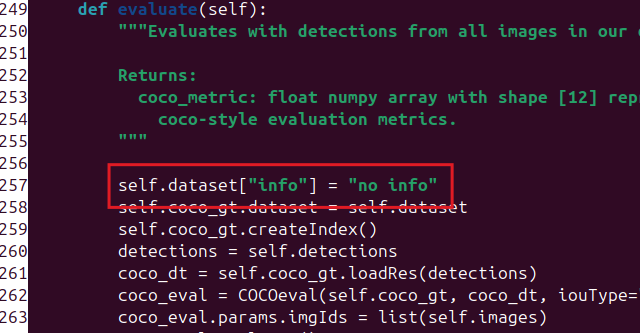
I found the source of the problem. The function evaluate in core/eval/detection_evaluation.py does not set the “info” entry of the dataset

and pycoco does not check it during loadRes:

As a workaround, I set the info as follows:

And now, the command works.

However, when I run:

hailomz eval --har /home/hailo/shared/yolov8n-16-bit/yolov8s.har --data-path ./coco_val2017.tfrecord --yaml hailo_model_zoo/cfg/networks/yolov8n.yaml --target full_precision

I got:

 <Hailo Model Zoo INFO> Start run for network yolov8s ...
<Hailo Model Zoo INFO> Initializing the runner...
<Hailo Model Zoo INFO> Chosen target is full_precision
<Hailo Model Zoo INFO> Initializing the dataset ...
dataset_name:  coco_2017_detection
<Hailo Model Zoo INFO> Running inference...
[info] Setting NMS score threshold to 0.001
Processed: 383images [00:18, 20.20images/s] 
creating index...
index created!
Loading and preparing results...
Converting ndarray to lists...
(38300, 7)
0/38300
DONE (t=0.06s)
creating index...
index created!
Running per image evaluation...
Evaluate annotation type *bbox*
DONE (t=0.01s).
Accumulating evaluation results...
Please run evaluate() first
DONE (t=0.00s).
 Average Precision  (AP) @[ IoU=0.50:0.95 | area=   all | maxDets=100 ] = -1.000
 Average Precision  (AP) @[ IoU=0.50      | area=   all | maxDets=100 ] = -1.000
 Average Precision  (AP) @[ IoU=0.75      | area=   all | maxDets=100 ] = -1.000
 Average Precision  (AP) @[ IoU=0.50:0.95 | area= small | maxDets=100 ] = -1.000
 Average Precision  (AP) @[ IoU=0.50:0.95 | area=medium | maxDets=100 ] = -1.000
 Average Precision  (AP) @[ IoU=0.50:0.95 | area= large | maxDets=100 ] = -1.000
 Average Recall     (AR) @[ IoU=0.50:0.95 | area=   all | maxDets=  1 ] = -1.000
 Average Recall     (AR) @[ IoU=0.50:0.95 | area=   all | maxDets= 10 ] = -1.000
 Average Recall     (AR) @[ IoU=0.50:0.95 | area=   all | maxDets=100 ] = -1.000
 Average Recall     (AR) @[ IoU=0.50:0.95 | area= small | maxDets=100 ] = -1.000
 Average Recall     (AR) @[ IoU=0.50:0.95 | area=medium | maxDets=100 ] = -1.000
 Average Recall     (AR) @[ IoU=0.50:0.95 | area= large | maxDets=100 ] = -1.000
<Hailo Model Zoo INFO> Done 383 images AP=-100.000 AP50=-100.000

What I’m doing wrong?

Any help is appreciated!

I see --har options uses yolov8s, but --yaml is set to yolov8n, maybe that’s the issue here?

1 Like

My issue was first the model didn’t have NMS postprocess indeed (maybe should be warning instead of info).
I created .tfrecord for my dataset, applied fix for KeyError: 'info' mentined by @Luiz_doleron , and now it’s all good:

$ hailomz eval yolov8n --har yolov8n.har --data-path /root/.hailomz/data/models_files/coco/2023-08-03/coco_val2017.tfrecord --target emulator --hw-arch hailo8l 
--classes 16 
<Hailo Model Zoo INFO> Start run for network yolov8n ... 
<Hailo Model Zoo INFO> Initializing the runner... 
<Hailo Model Zoo INFO> Chosen target is emulator 
<Hailo Model Zoo INFO> Initializing the dataset ... 
<Hailo Model Zoo INFO> Running inference... 
\[info\] Setting NMS score threshold to 0.001 
Processed: 1000images \[00:59, 16.72images/s\] 
creating index... 
index created! 
Loading and preparing results... 
Converting ndarray to lists... 
(100000, 7) 
0/100000 
DONE (t=0.54s) 
creating index... 
index created! 
Running per image evaluation... 
Evaluate annotation type \*bbox\* 
DONE (t=0.51s). 
Accumulating evaluation results... 
DONE (t=0.40s). 
Average Precision  (AP) @\[ IoU=0.50:0.95 | area=   all | maxDets=100 \] = 0.002 
Average Precision  (AP) @\[ IoU=0.50      | area=   all | maxDets=100 \] = 0.003 
Average Precision  (AP) @\[ IoU=0.75      | area=   all | maxDets=100 \] = 0.002 
Average Precision  (AP) @\[ IoU=0.50:0.95 | area= small | maxDets=100 \] = 0.012 
Average Precision  (AP) @\[ IoU=0.50:0.95 | area=medium | maxDets=100 \] = 0.001 
Average Precision  (AP) @\[ IoU=0.50:0.95 | area= large | maxDets=100 \] = 0.002 
Average Recall     (AR) @\[ IoU=0.50:0.95 | area=   all | maxDets=  1 \] = 0.095 
Average Recall     (AR) @\[ IoU=0.50:0.95 | area=   all | maxDets= 10 \] = 0.096 
Average Recall     (AR) @\[ IoU=0.50:0.95 | area=   all | maxDets=100 \] = 0.098 
Average Recall     (AR) @\[ IoU=0.50:0.95 | area= small | maxDets=100 \] = 0.029 
Average Recall     (AR) @\[ IoU=0.50:0.95 | area=medium | maxDets=100 \] = 0.087 
Average Recall     (AR) @\[ IoU=0.50:0.95 | area= large | maxDets=100 \] = 0.053 
<Hailo Model Zoo INFO> Done 1000 images AP=0.191 AP50=0.286

Damm… thank you! It fixed!

Could you please show me your yaml file with the pre and post processing, I have a similar problem!

I believe these could help you:
How to modify yolov8n.yaml file when compiling hailomz

And for post-processing, these should be the files to consider (taking to consideration input size and number of classes etc)

However, while it worked for some reason, my Precision and Recall are really bad compared to my original model

Was anyone able to achieve a good Average precision and recall?
My evaluation with the HAR-optimized model did not do well.

Accumulating evaluation results…
DONE (t=0.53s).
Average Precision (AP) @[ IoU=0.50:0.95 | area= all | maxDets=100 ] = 0.000
Average Precision (AP) @[ IoU=0.50 | area= all | maxDets=100 ] = 0.001
Average Precision (AP) @[ IoU=0.75 | area= all | maxDets=100 ] = 0.000
Average Precision (AP) @[ IoU=0.50:0.95 | area= small | maxDets=100 ] = 0.000
Average Precision (AP) @[ IoU=0.50:0.95 | area=medium | maxDets=100 ] = 0.000
Average Precision (AP) @[ IoU=0.50:0.95 | area= large | maxDets=100 ] = 0.002
Average Recall (AR) @[ IoU=0.50:0.95 | area= all | maxDets= 1 ] = 0.010
Average Recall (AR) @[ IoU=0.50:0.95 | area= all | maxDets= 10 ] = 0.011
Average Recall (AR) @[ IoU=0.50:0.95 | area= all | maxDets=100 ] = 0.011
Average Recall (AR) @[ IoU=0.50:0.95 | area= small | maxDets=100 ] = 0.001
Average Recall (AR) @[ IoU=0.50:0.95 | area=medium | maxDets=100 ] = 0.015
Average Recall (AR) @[ IoU=0.50:0.95 | area= large | maxDets=100 ] = 0.026
Done 1500 images AP=0.042 AP50=0.076

Hi @Ian_Ruvuto,

First, the two numbers in your own output are not in conflict, and reading them right changes what you are chasing.

Done 1500 images AP=0.042 AP50=0.076 is not a different result from the COCO block above it. It is the same result multiplied by 100. log_accuracy in hailo_model_zoo/core/infer/infer_utils.py:63-69 does norm_coeff = 100.0 if result.is_percentage else 1.0 and then formats with {:.3f}; detection eval never overrides is_percentage, which defaults to True in hailo_model_zoo/core/eval/eval_base_class.py:27-28, and _get_accuracy in hailo_model_zoo/core/eval/detection_evaluation.py:270-273 just hands back coco_eval.stats[0] and stats[1] — the very values pycocotools printed. So:

your log line actual COCO value what pycocotools printed
AP=0.042 0.00042 0.000
AP50=0.076 0.00076 0.001

Both reconcile exactly. Your AP is not 4%, it is 0.04% — effectively nothing is matching at all. The earlier Done 1000 images AP=0.191 AP50=0.286 in this thread is the same story: AP 0.0019, not 19%.

That matters because a near-zero AP is not a quantization signature. On a Hailo-8L (HailoRT 4.23, DFC 3.33) I measured a quantized yolov8n keeping ~100% of its COCO box mAP50 against the float model; the int8 step on a v8n detect head costs almost nothing, no matter how many classes you have. Quantization degrades an AP, it does not annihilate it. An AP of 0.0004 with non-zero recall means boxes are being produced and then scored against the wrong labels.

The control that settles it, same eval on the float model:

hailomz eval yolov8n --har yolov8n_custom.har --data-path my_val.tfrecord --target full_precision --hw-arch hailo8l

If full_precision also lands near zero, quantization is ruled out and the problem is entirely in the dataset/postprocess.

Two traps that produce this on a custom model:

  1. Ground truth. If the eval runs against the stock COCO tfrecord (coco_val2017.tfrecord), your custom class ids never match COCO’s categories and AP collapses to roughly this. You need a tfrecord built from your val split with your category ids, not the stock COCO one.

  2. The COCO label remap. The traceback earlier in this thread goes through detection/nanodet.pydetection_common.tf_postproc_nms(..., coco_2017_to_2014=True). That remap plus the COCO labels_offset changes the order of your class ids, so even correct boxes get scored against the wrong category. --classes 7 does not rewrite that path, which is why it looks like it has no effect. The postprocess config has to point at your own label space: classes = N, and no coco-2017→2014 mapping.

A quick sanity check before trusting any AP number: draw the raw detections on 4-5 images. If the boxes land on the objects but AP stays near zero, it is a label/GT mismatch and int8 is not your problem.

Hope this helps.