input-output channel mis match during inference

Hi, I have a custom model with few convolution layers. The input is RGB image and output is also RGB image (usually 16 bit but even 8 bit images are not working).

I had convert the model to hef using the below workflow

Parsing

hailo parser onnx /local/workspace/hap/ImgEnhanceNet_2blocks.onnx --net-name ImgEnhanceNet_2blocks --har-path /local/workspace/hap/ImgEnhanceNet_2blocks.parsed.har --input-format input=NCHW --tensor-shapes input=[1,3,2100,2100] --hw-arch hailo8 -y --parsing-report-path /local/workspace/hap/parsing_report.json

optimizing

hailo optimize /local/workspace/hap/ImgEnhanceNet_2blocks.parsed.har --calib-set-path /local/workspace/hap/calibration_data.npy --output /local/workspace/hap/ImgEnhanceNet_2blocks.optimized.har --hw-arch hailo8

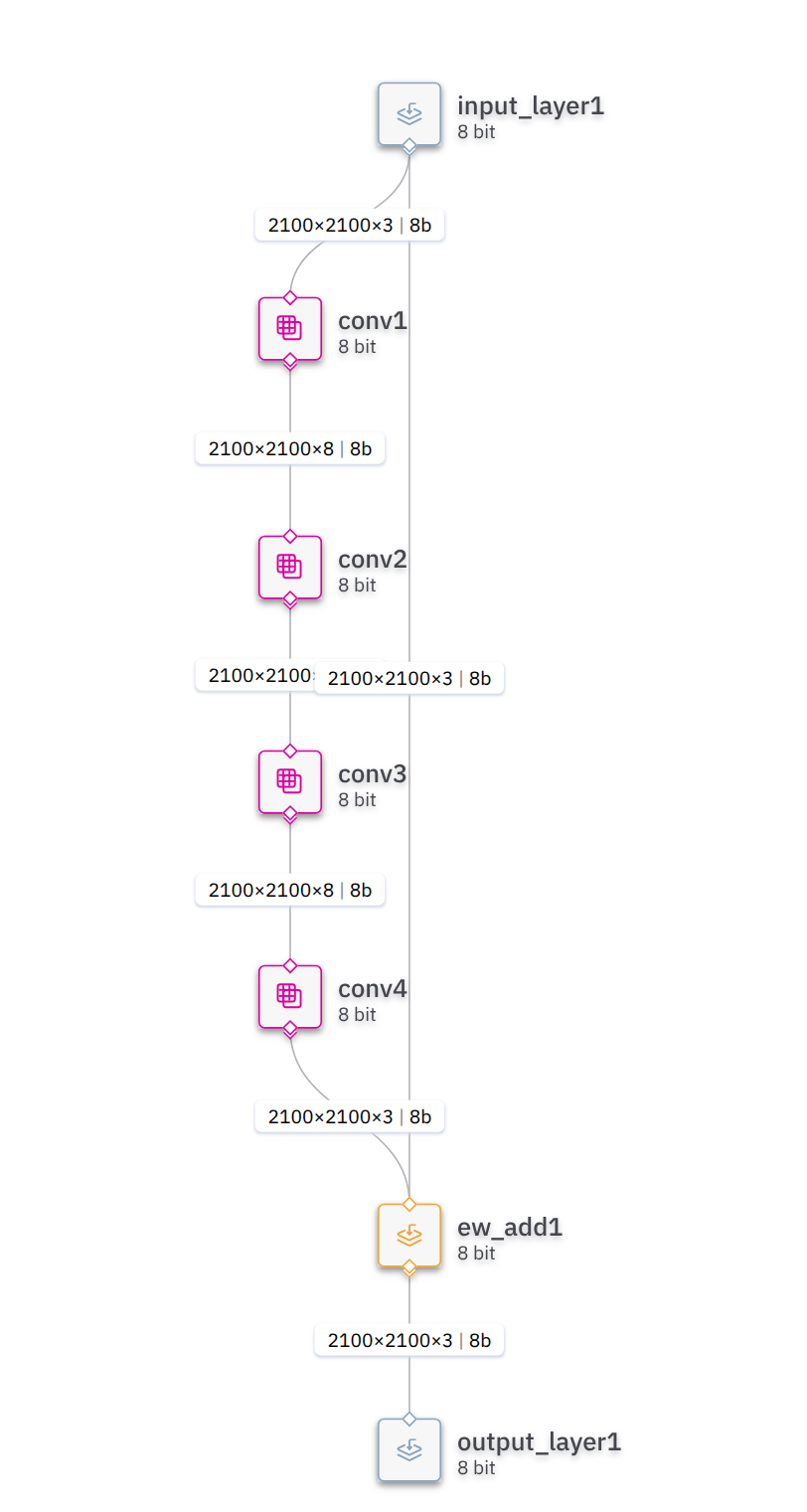
(I have attached the image from visualizer for optimized .har in this post
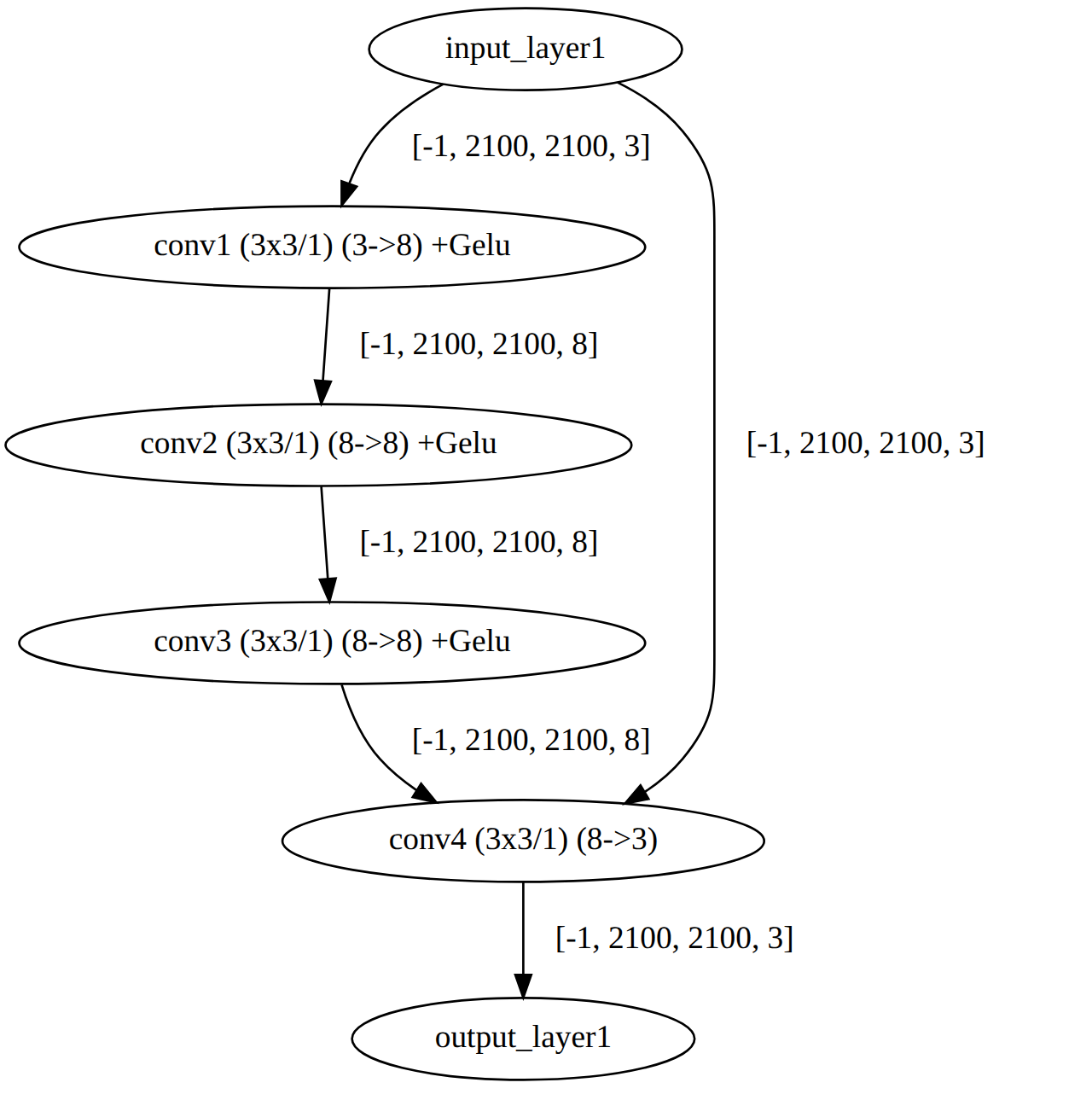

)

compiling

hailo compiler /local/workspace/hap/ImgEnhanceNet_2blocks.optimized.har --output-dir /local/workspace/hap --hw-arch hailo8.

Using the hailortcli, when I check the network, I get : hailortcli parse-hef ../ImgEnhanceNet_2blocks.hef
Architecture HEF was compiled for: HAILO8
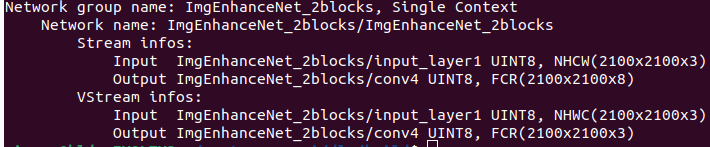
Network group name: ImgEnhanceNet_2blocks, Single Context
Network name: ImgEnhanceNet_2blocks/ImgEnhanceNet_2blocks
VStream infos:
Input ImgEnhanceNet_2blocks/input_layer1 UINT8, NHWC(2100x2100x3)
Output ImgEnhanceNet_2blocks/conv4 UINT8, FCR(2100x2100x3)

---------------> first, what is FCR ?? should it not be NHWC(2100x2100x3) at output as well ?

############

Now when I load the hef file in my c++ program, my log is : hap@hap:~/Image_Processing/HAP/hailo_hef/C++/build$ ./hailo_inference
[HailoRT] [warning] Desc page size value (1024) is not optimal for performance.
[Sun Jul 27 19:00:50 2025] [INFO] Input stream: ImgEnhanceNet_2blocks/input_layer1, Output stream: ImgEnhanceNet_2blocks/conv4
[Sun Jul 27 19:00:50 2025] [INFO] Input stream info: Name=ImgEnhanceNet_2blocks/input_layer1, Shape=[2100,2100,3], Format=UINT8
[Sun Jul 27 19:00:50 2025] [INFO] Output stream info: Name=ImgEnhanceNet_2blocks/conv4, Shape=[2100,2100,3], Format=UINT8
[Sun Jul 27 19:00:50 2025] [INFO] Allocated buffers: Input shape=[1,3,2100,2100], Output shape=[1,3,2100,2100]
[Sun Jul 27 19:00:50 2025] [INFO] Hailo HEF file loaded successfully
[Sun Jul 27 19:00:50 2025] [INFO] Output directory created at /home/hap/Image_Processing/HAP/hailo_hef/C++/processed_hailo/
[Sun Jul 27 19:00:50 2025] [INFO] Processing image: /home/hap/Image_Processing/HAP/Images/00010_042223313_800.tiff
[Sun Jul 27 19:00:50 2025] [INFO] Loading image: /home/hap/Image_Processing/HAP/Images/00010_042223313_800.tiff, Channels: 3, Width: 13376, Height: 9528
[Sun Jul 27 19:00:52 2025] [WARN] Failed to get GeoTransform, using default
[Sun Jul 27 19:00:52 2025] [INFO] Image load time: 1.904000 seconds
[Sun Jul 27 19:00:52 2025] [INFO] Applying white balancing…
[Sun Jul 27 19:00:55 2025] [INFO] White balance time: 2.932000 seconds
[Sun Jul 27 19:00:55 2025] [INFO] Processing 00010_042223313_800 with crops
[Sun Jul 27 19:00:55 2025] [INFO] Generated 35 crop locations
[Sun Jul 27 19:00:55 2025] [INFO] Number of crops: 35
[Sun Jul 27 19:00:55 2025] [DEBUG] Reading output stream with buffer size: 13230000 bytes
[HailoRT] [error] CHECK failed - Read size 13230000 must be 35280000
[Sun Jul 27 19:00:55 2025] [ERROR] Failed to read from output stream: Invalid argument
terminate called after throwing an instance of β€˜std::runtime_error’
what(): Output stream read failed
Aborted (core dumped)

– The output streams expects 35280000 which is 8x2100x2100 but the output of my model should have only 3 channels. Is there a bug in hailort version 4.22 ??

The class of my C++ code is : // Helper function to convert hailo_status to string
std::string status_to_string(hailo_status status) {
switch (status) {
case HAILO_SUCCESS: return β€œSUCCESS”;
case HAILO_INVALID_ARGUMENT: return β€œInvalid argument”;
case HAILO_UNINITIALIZED: return β€œNot initialized”;
case HAILO_OUT_OF_FW_MEMORY: return β€œOut of memory”;
case HAILO_NOT_FOUND: return β€œDevice or resource not found”;
case HAILO_INVALID_HEF: return β€œInvalid HEF file”;
case HAILO_INTERNAL_FAILURE: return β€œInternal failure”;
case HAILO_OUT_OF_HOST_MEMORY: return β€œOut of host memory”;
case HAILO_STREAM_ABORT: return β€œStream aborted”;
case HAILO_INVALID_OPERATION: return β€œInvalid operation”;
default: return β€œUnknown error (” + std::to_string(status) + β€œ)”;
}
}

// Helper function to convert hailo_format_type_t to string
std::string format_type_to_string(hailo_format_type_t format) {
switch (format) {
case HAILO_FORMAT_TYPE_UINT8: return β€œUINT8”;
case HAILO_FORMAT_TYPE_UINT16: return β€œUINT16”;
case HAILO_FORMAT_TYPE_FLOAT32: return β€œFLOAT32”;
default: return β€œUnknown format (” + std::to_string(static_cast(format)) + β€œ)”;
}
}

// Hailo Inference Class
class HailoInference {
private:
std::unique_ptrhailort::VDevice vdevice;
std::shared_ptrhailort::Hef hef;
std::vector<std::shared_ptrhailort::ConfiguredNetworkGroup> network_groups;
std::string input_name;
std::string output_name;
std::vector<int64_t> input_shape;
std::vector<int64_t> output_shape;
std::vector<std::vector<uint8_t>> input_buffers;
std::vector<std::vector<uint8_t>> output_buffers;
std::vector<std::reference_wrapperhailort::InputStream> input_streams;
std::vector<std::reference_wrapperhailort::OutputStream> output_streams;
int batch_size;
int output_channels;

public:
HailoInference(const std::string& hef_path, int batch_size) : batch_size(batch_size), output_channels(3) {
auto start = std::chrono::high_resolution_clock::now();

    // Create VDevice
    auto vdevice_exp = hailort::VDevice::create();
    if (!vdevice_exp) {
        log_message("ERROR", "Failed to create Hailo VDevice: " + status_to_string(vdevice_exp.status()));
        throw std::runtime_error("VDevice creation failed");
    }
    vdevice = std::move(vdevice_exp.value());

    // Load HEF file
    auto hef_exp = hailort::Hef::create(hef_path);
    if (!hef_exp) {
        log_message("ERROR", "Failed to load HEF file: " + hef_path + " - " + status_to_string(hef_exp.status()));
        throw std::runtime_error("HEF load failed");
    }
    hef = std::make_shared<hailort::Hef>(std::move(hef_exp.value()));

    // Configure network group
    auto configure_exp = vdevice->configure(*hef);
    if (!configure_exp) {
        log_message("ERROR", "Failed to configure network group: " + status_to_string(configure_exp.status()));
        throw std::runtime_error("Network group configuration failed");
    }
    network_groups = std::move(configure_exp.value());

    // Get input and output streams
    input_streams = network_groups[0]->get_input_streams();
    output_streams = network_groups[0]->get_output_streams();
    if (input_streams.empty() || output_streams.empty()) {
        log_message("ERROR", "Input or output streams not found");
        throw std::runtime_error("Stream error");
    }
    input_name = input_streams[0].get().name();
    output_name = output_streams[0].get().name();
    log_message("INFO", "Input stream: " + input_name + ", Output stream: " + output_name);

    // Log stream info
    for (const auto& stream : input_streams) {
        auto info = stream.get().get_info();
        log_message("INFO", "Input stream info: Name=" + std::string(info.name) + ", Shape=[" +
                    std::to_string(info.shape.height) + "," + std::to_string(info.shape.width) + "," +
                    std::to_string(info.shape.features) + "], Format=" + format_type_to_string(info.format.type));
    }
    for (const auto& stream : output_streams) {
        auto info = stream.get().get_info();
        log_message("INFO", "Output stream info: Name=" + std::string(info.name) + ", Shape=[" +
                    std::to_string(info.shape.height) + "," + std::to_string(info.shape.width) + "," +
                    std::to_string(info.shape.features) + "], Format=" + format_type_to_string(info.format.type));
        output_channels = info.shape.features;
    }

    // Set shapes
    input_shape = {batch_size, 3, 2100, 2100};
    output_shape = {batch_size, output_channels, 2100, 2100};
    size_t input_size = std::accumulate(input_shape.begin(), input_shape.end(), 1, std::multiplies<int64_t>());
    size_t output_size = std::accumulate(output_shape.begin(), output_shape.end(), 1, std::multiplies<int64_t>());

    // Allocate buffers for UINT8
    input_buffers.resize(batch_size, std::vector<uint8_t>(input_size / batch_size));
    output_buffers.resize(batch_size, std::vector<uint8_t>(output_size / batch_size));
    log_message("INFO", "Allocated buffers: Input shape=[" + std::to_string(input_shape[0]) + "," +
                std::to_string(input_shape[1]) + "," + std::to_string(input_shape[2]) + "," +
                std::to_string(input_shape[3]) + "], Output shape=[" + std::to_string(output_shape[0]) + "," +
                std::to_string(output_shape[1]) + "," + std::to_string(output_shape[2]) + "," +
                std::to_string(output_shape[3]) + "]");

    if (PROFILE_PROGRAM) {
        auto duration = std::chrono::duration_cast<std::chrono::milliseconds>(std::chrono::high_resolution_clock::now() - start).count() / 1000.0;
        log_message("PROFILE", "HailoInference constructor time: " + std::to_string(duration) + " seconds");
    }
}

std::pair<std::vector<uint8_t>, double> infer(const std::vector<uint8_t>& input_data) {
    auto start = std::chrono::high_resolution_clock::now();
    if (DETAILED_LOG) {
        log_message("DEBUG", "Starting inference with input size: " + std::to_string(input_data.size()) + " bytes");
    }

    size_t single_input_size = input_data.size() / batch_size;
    size_t single_output_size = std::accumulate(output_shape.begin() + 1, output_shape.end(), 1, std::multiplies<int64_t>());
    std::vector<uint8_t> output_data(single_output_size * batch_size);

    // Split input data into per-batch buffers
    for (int b = 0; b < batch_size; ++b) {
        std::copy(input_data.begin() + b * single_input_size,
                  input_data.begin() + (b + 1) * single_input_size,
                  input_buffers[b].begin());
    }

    // Write input data to stream
    for (int b = 0; b < batch_size; ++b) {
        auto status = input_streams[0].get().write(hailort::MemoryView(input_buffers[b].data(), single_input_size * sizeof(uint8_t)));
        if (status != HAILO_SUCCESS) {
            log_message("ERROR", "Failed to write to input stream: " + status_to_string(status));
            throw std::runtime_error("Input stream write failed");
        }
    }

    // Read output data from stream
    for (int b = 0; b < batch_size; ++b) {
        size_t expected_output_size = single_output_size * sizeof(uint8_t);
        log_message("DEBUG", "Reading output stream with buffer size: " + std::to_string(expected_output_size) + " bytes");
        auto status = output_streams[0].get().read(hailort::MemoryView(output_buffers[b].data(), expected_output_size));
        if (status != HAILO_SUCCESS) {
            log_message("ERROR", "Failed to read from output stream: " + status_to_string(status));
            throw std::runtime_error("Output stream read failed");
        }
    }

    // Copy outputs
    for (int b = 0; b < batch_size; ++b) {
        std::copy(output_buffers[b].begin(), output_buffers[b].end(),
                  output_data.begin() + b * single_output_size);
    }

    auto duration = std::chrono::duration_cast<std::chrono::milliseconds>(std::chrono::high_resolution_clock::now() - start).count() / 1000.0;
    if (DETAILED_LOG) {
        log_message("DEBUG", "Inference completed, output size: " + std::to_string(output_data.size()) + " bytes");
    }
    if (PROFILE_PROGRAM) {
        log_message("PROFILE", "Inference time: " + std::to_string(duration) + " seconds");
    }
    return {output_data, duration};
}

int get_output_channels() const { return output_channels; }

~HailoInference() {
    network_groups.clear();
    hef.reset();
    vdevice.reset();
}

};

###############
Also, originally my model (onnx) is suppose to process aerial and satellite images at RGB 16 bit, but I am not able to optimize and covert the onnx to 16 .har and then convert to 16 bit .hef file. Any recommendation to do this conversion so that I can run my inference code on raw 16 bit rgb images. --full-precision-only in the hailo optimize do work but when given the output of this to hailo compiler, it throws error that it needs the quantized model.

Any help is very much appreciated as we want to deploy with hailo8 accelerator on High Altitude Platform drone.
I have uploaded the .onnx, .hef and the parsing_report.json on my google drive if that helps. Thank you. : Hailo - Google Drive. It would be good if someone one in the hailo team could help me convert the .hef model for 16 bit image inference where the model could take in 16 bit tensor and process it and output 16 bit tensor.

Thank you.

Hey @Sandeep_Jangir,

Let me break down the FCR format for you in plain terms.

Understanding FCR Format

FCR stands for Features, Columns, Rows - this is how the Hailo chip organizes tensor data internally. The good news is you don’t need to get too deep into this because HailoRT always presents your data in the standard [H, W, C] format (height, width, channels). So when you see something like FCR(2100Γ—2100Γ—3), just think of it as a 2100Γ—2100 image with 3 color channels.

Getting the Buffer Size Right

Here’s where it gets tricky. You might think a 2100Γ—2100Γ—3 RGB image needs 13,230,000 bytes of memory. But the Hailo-8 chip actually pads the channels to multiples of 8, so you’d actually need 2100Γ—2100Γ—8 = 35,280,000 bytes.

Instead of guessing, here’s the reliable way to handle this:

  1. Ask HailoRT for the exact frame size

  2. Allocate your buffer based on that size

  3. Read the data and convert it back to your preferred format

// Get the actual buffer size needed
size_t raw_size = out_stream.get_frame_size();

// Allocate the buffer
std::vector<uint8_t> raw_buffer(raw_size);

// Read the data
out_stream.read(MemoryView(raw_buffer.data(), raw_size));

// Transform back to your 3-channel format
auto transform_ctx = OutputTransformContext::create(out_stream);
transform_ctx->transfer(raw_buffer.data(), output_data.data());

Using 16-Bit Precision

The Hailo-8 typically runs 8-bit quantized models, but you can enable 16-bit weights for better accuracy. Here’s how:

First, optimize your model with 16-bit settings:

hailo optimize your.parsed.har \
  --calib-set-path calibration_data.npy \
  --model-script \
  "model_optimization_config(compression_params, auto_16bit_weights_ratio=1); quantization_param(output_layer1, precision_mode=a16_w16)" \
  --output your.optimized.har \
  --hw-arch hailo8

Then configure your C++ application to handle 16-bit data:

auto info = input_streams[0].get().get_info();
input_streams[0].get().set_user_buffer_format({
    HAILO_FORMAT_TYPE_UINT16, 
    info.shape 
});

Hope this helps clarify things! Let me know if you need any other details.

Hi,

Thank you for the reply. I was on holidays so I could not check earlier.

Using HailoRT C++ API V4.22, the suggested workflow does not work as the functions are different.

// Get the actual buffer size needed
size_t raw_size = out_stream.get_frame_size();

// Allocate the buffer
std::vector<uint8_t> raw_buffer(raw_size);

// Read the data
out_stream.read(MemoryView(raw_buffer.data(), raw_size));

// Transform back to your 3-channel format
auto transform_ctx = OutputTransformContext::create(out_stream);
transform_ctx->transfer(raw_buffer.data(), output_data.data());

After looking into https://hailo.ai/developer-zone/documentation/hailort-v4-22-0/ and https://hailo.ai/developer-zone/documentation/hailort-v4-22-0/?sp_referrer=api%2Fc_api.html%23structhailo__transform__params__t, my workflow looks like :

// Perform inference on input data and return transformed output with inference time
std::pair<std::vector<uint8_t>, double> infer(const std::vector<uint8_t>& input_data) {
    auto start = std::chrono::high_resolution_clock::now();

    // Calculate sizes for input and output buffers
    size_t input_size = input_data.size();

    size_t output_size = output_streams[0].get().get_frame_size(); // ------> Actual frame size as suggested in the community post (e.g., 2100x2100x8)
    std::vector<uint8_t> raw_output(output_size); // Buffer for raw output
    // Copy input data to buffer
    std::copy(input_data.begin(), input_data.end(), input_buffer.begin());

    // Write input data to the input stream
    auto status = input_streams[0].get().write(hailort::MemoryView(input_buffer.data(), input_size * sizeof(uint8_t)));

    // Read the data
    status = output_streams[0].get().read(hailort::MemoryView(raw_output.data(), output_size));


// ------- New workflow after looking into documentation ------
    // Configure transformation parameters to convert 8-channel output to 3-channel RGB
    hailo_transform_params_t transform_params = {};
    transform_params.transform_mode = HAILO_STREAM_NO_TRANSFORM; 
    transform_params.user_buffer_format.type = HAILO_FORMAT_TYPE_AUTO; 
    transform_params.user_buffer_format.order = HAILO_FORMAT_ORDER_NHWC;

    // Create transformation context for output stream
    auto transform_ctx_exp = hailort::OutputTransformContext::create(output_streams[0].get(), transform_params);
    if (!transform_ctx_exp) {
        log_message("ERROR", "Failed to create OutputTransformContext: " + status_to_string(transform_ctx_exp.status()));
        throw std::runtime_error("OutputTransformContext creation failed");
    }
    std::unique_ptr<hailort::OutputTransformContext> transform_ctx = transform_ctx_exp.release();

    // Allocate buffer for transformed 3-channel output (2100x2100x3)
    size_t transformed_output_size = INFER_SIZE * INFER_SIZE * 3;
    std::vector<uint8_t> output_data(transformed_output_size);

    // Transform output to 3-channel format
    hailort::MemoryView src_view(raw_output.data(), output_size);
    hailort::MemoryView dst_view(output_data.data(), transformed_output_size);
    status = transform_ctx->transform(src_view, dst_view);
    if (status != HAILO_SUCCESS) {
        log_message("ERROR", "Failed to transform output data: " + status_to_string(status));
        throw std::runtime_error("Output data transform failed");
    }

    return {output_data};
}

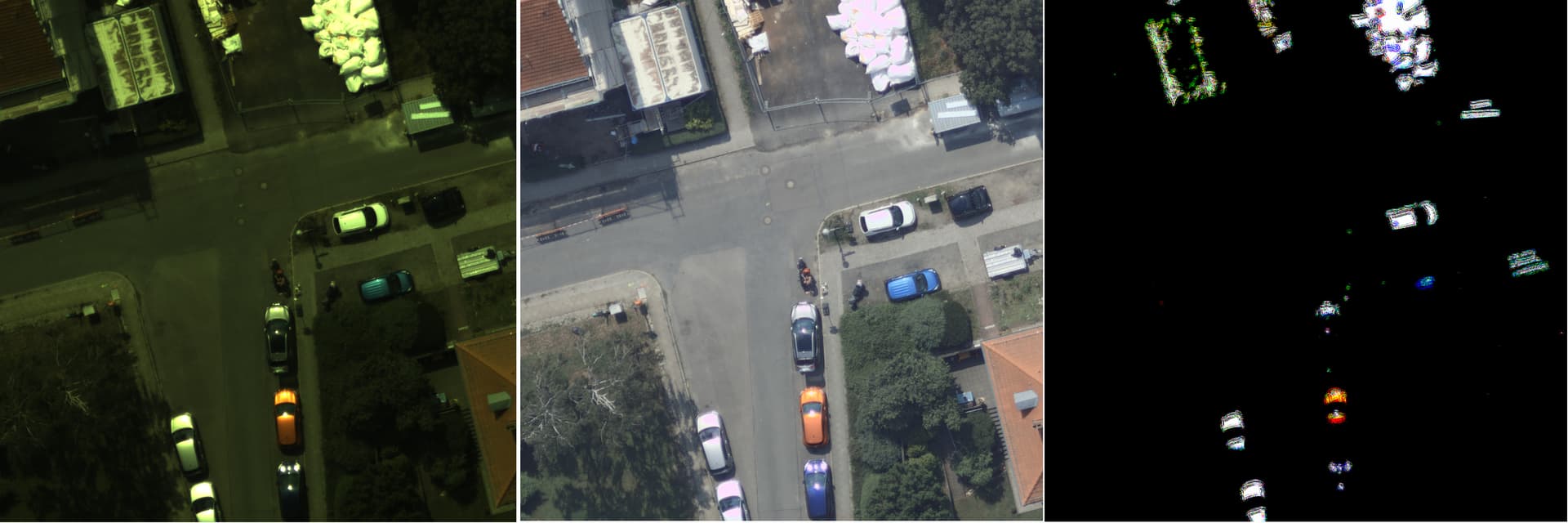
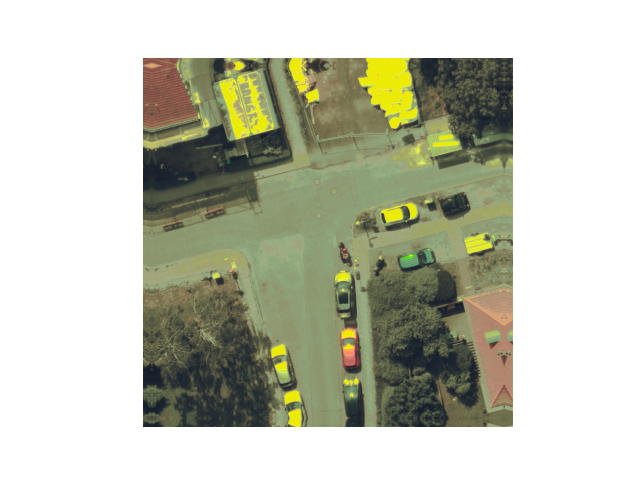
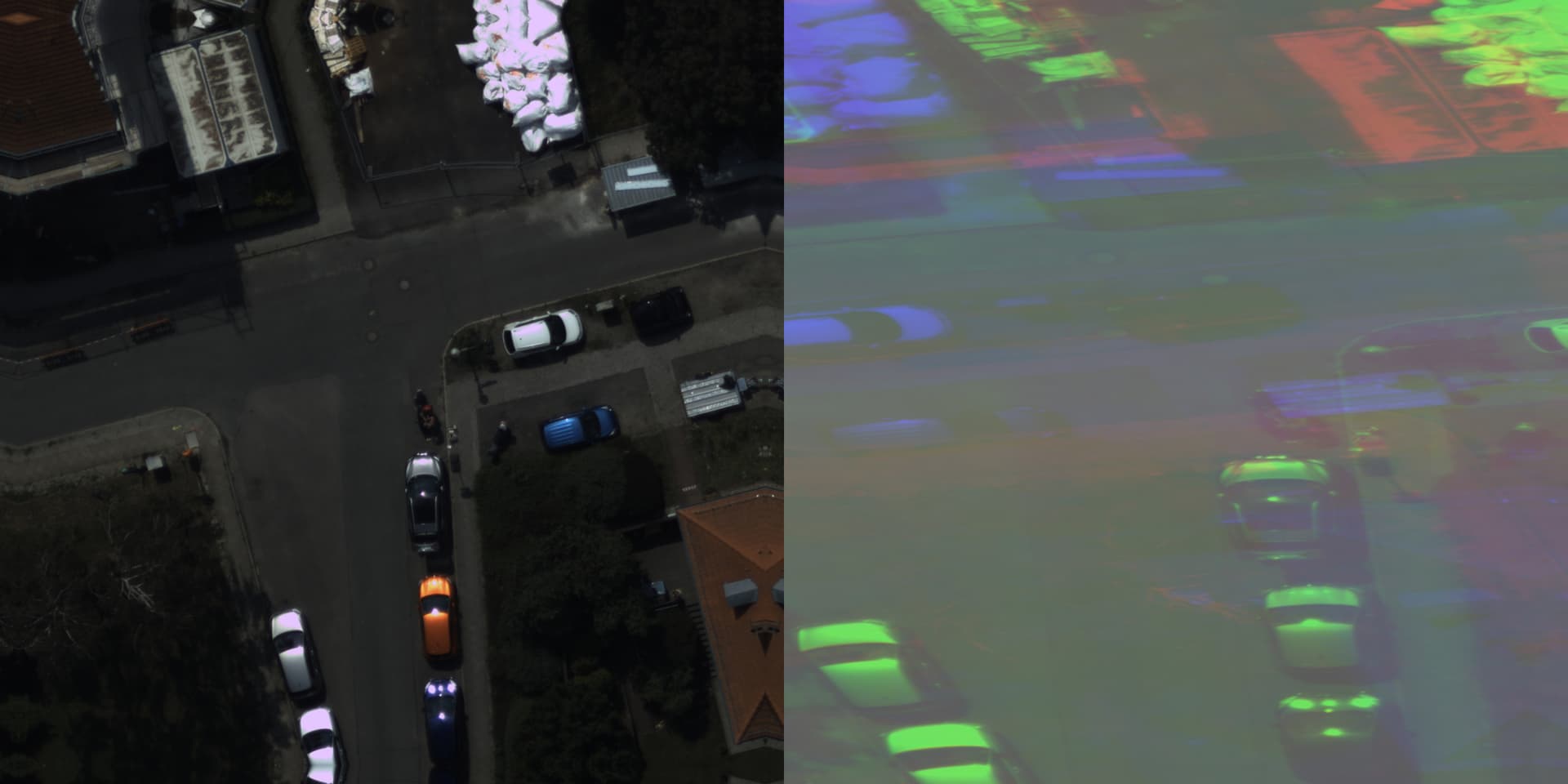
After this, the program is able to do the inference but the output looks weid as seen in the image below. Left is the image from the input buffer and right is the output after 3 channel configuration using above code.

THe output looks like the input image is futher cropped into subcrops, and the subcrops are resized to fill the image and overlayed on each other.

I dont know what to do. In case someone at hailo AI want to look at it, Hailo - Google Drive : It contain the c++ file, cmakelist and the image folder are in the drive link and one can just complie it.


The 16 bit model convertion also does not work giving me the error :

hailo optimize ImgEnhanceNet_2blocks.parsed.har --calib-set-path calibration_data.npy --model-script "model_optimization_config(compression_params, auto_16bit_weights_ratio=1); quantization_param(output_layer1, precision_mode=a16_w16)"   --output ImgEnhanceNet_2blocks_fp16.optimized.har   --hw-arch hailo8
[info] No GPU chosen and no suitable GPU found, falling back to CPU.
WARNING: All log messages before absl::InitializeLog() is called are written to STDERR
E0000 00:00:1755604729.104227    7157 cuda_dnn.cc:8310] Unable to register cuDNN factory: Attempting to register factory for plugin cuDNN when one has already been registered
E0000 00:00:1755604729.107539    7157 cuda_blas.cc:1418] Unable to register cuBLAS factory: Attempting to register factory for plugin cuBLAS when one has already been registered
[info] Current Time: 13:58:51, 08/19/25
[info] CPU: Architecture: x86_64, Model: AMD Ryzen 7 5800X 8-Core Processor, Number Of Cores: 16, Utilization: 0.7%
[info] Memory: Total: 62GB, Available: 56GB
[info] System info: OS: Linux, Kernel: 6.8.0-71-generic
[info] Hailo DFC Version: 3.32.0
[info] HailoRT Version: 4.22.0
[info] PCIe: No Hailo PCIe device was found
[info] Running `hailo optimize ImgEnhanceNet_2blocks.parsed.har --calib-set-path calibration_data.npy --model-script model_optimization_config(compression_params, auto_16bit_weights_ratio=1); quantization_param(output_layer1, precision_mode=a16_w16) --output ImgEnhanceNet_2blocks_fp16.optimized.har --hw-arch hailo8`
Traceback (most recent call last):
  File "/local/workspace/hailo_virtualenv/bin/hailo", line 8, in <module>
    sys.exit(main())
  File "/local/workspace/hailo_virtualenv/lib/python3.10/site-packages/hailo_sdk_client/tools/cmd_utils/main.py", line 111, in main
    ret_val = client_command_runner.run()
  File "/local/workspace/hailo_virtualenv/lib/python3.10/site-packages/hailo_platform/tools/hailocli/main.py", line 64, in run
    return self._run(argv)
  File "/local/workspace/hailo_virtualenv/lib/python3.10/site-packages/hailo_platform/tools/hailocli/main.py", line 104, in _run
    return args.func(args)
  File "/local/workspace/hailo_virtualenv/lib/python3.10/site-packages/hailo_sdk_client/tools/optimize_cli.py", line 109, in run
    self._runner.load_model_script(args.model_script)
  File "/local/workspace/hailo_virtualenv/lib/python3.10/site-packages/hailo_sdk_common/states/states.py", line 16, in wrapped_func
    return func(self, *args, **kwargs)
  File "/local/workspace/hailo_virtualenv/lib/python3.10/site-packages/hailo_sdk_client/runner/client_runner.py", line 498, in load_model_script
    raise InvalidArgumentsException(f"either model script is illegal or file path doesn't exist: {err_info}")
hailo_sdk_client.runner.exceptions.InvalidArgumentsException: either model script is illegal or file path doesn't exist: Model script parsing failed: Parsing failed at:
model_optimization_config(compression_params,auto_16bit_weights_ratio=1)>!<;quantization_param(output_layer1,precision_mode=a16_w16). Model script file not found in location: model_optimization_config(compression_params, auto_16bit_weights_ratio=1); quantization_param(output_layer1, precision_mode=a16_w16).

If you need anymore info, please let me know. Thanks in advance.

I am still getting the same kind of output. I am not able to figure out what is the problem to convert the 8 channel output to 3 channel RGB output.

Hi @Sandeep_Jangir ,

Looking at the code you shared, I see that you are using raw streams for inference. This means that the Hailo device expects the data already aligned in a certain format, and you are responsible of performing the right pre-post processing operations to get the correct result.

If there is no specific reason for you to work with raw streams, I would recommend looking at other HailoRT examples using InferModel API (recommended) or vstreams. These will allow you to configure the input/output transformation during the initial configuration, simplifying the code a lot.

Anyway, if you want to use raw streams, there are two points to consider by looking at your code:

  • As you can see from the stream infos, the model expects NHCW ordered data. This means you have to reorder the input buffer to match that format

  • To dequantize the output, you cannot simply rescale by 255. You must check the quantization info of your model and look for the scale and zero point values. You can access them from the quant_info structure, e.g. in your code:

    for (const auto& stream : output_streams) {
      auto info = stream.get().get_info();
      std::cout << info.quant_info.qp_scale << std::endl;
      std::cout << info.quant_info.qp_zp << std::endl;
    

    Once you have these values, you should first subtract the zero point from the output, then multiply by the scale factor. You can also achieve this by the transform context you are already using. Please check the HailoRT User Guide for more details.

Let us know if you succeed.
Also, do you have an example of expected output? By running the model both in Python / C++, the output is very similar to the original image.

Hi @pierrem , Thank you for your response. I have changed the program to use the vstreams. The pipeline is working now, thus when I give an input, i do get an output. This output is not the correct one though.

The image below shows, - left : raw 16 bit image without white balance , - center : infer from fp 32 onnx C++ program (same output using fp16 onnx or tensorRT model) , right : output from 8 bit hef model.

The original network is trained for 16 bit raw image, thus the model must be in fp16 for proper inference. I have mentioned the commands I follow to get the hef model in the first post of the thread.

I am also not able to convert to fp16 optimized model as suggest by another developer (also in the post).

I was looking at each step and I observed the following :

hailo parser onnx ImgEnhanceNet_2blocks.onnx   --net-name ImgEnhanceNet_2blocks   --har-path ImgEnhanceNet_2blocks.parsed.har   --input-format input=NCHW   --tensor-shapes input=[1,3,2100,2100]   --hw-arch hailo8
[info] No GPU chosen, Selected GPU 0
WARNING: All log messages before absl::InitializeLog() is called are written to STDERR
E0000 00:00:1756659830.838420    1456 cuda_dnn.cc:8310] Unable to register cuDNN factory: Attempting to register factory for plugin cuDNN when one has already been registered
E0000 00:00:1756659830.841893    1456 cuda_blas.cc:1418] Unable to register cuBLAS factory: Attempting to register factory for plugin cuBLAS when one has already been registered
[info] Current Time: 19:03:52, 08/31/25
[info] CPU: Architecture: x86_64, Model: AMD Ryzen 7 5800X 8-Core Processor, Number Of Cores: 16, Utilization: 0.1%
[info] Memory: Total: 62GB, Available: 58GB
[info] System info: OS: Linux, Kernel: 6.8.0-79-generic
[info] Hailo DFC Version: 3.32.0
[info] HailoRT Version: 4.22.0
[info] PCIe: No Hailo PCIe device was found
[info] Running `hailo parser onnx ImgEnhanceNet_2blocks.onnx --net-name ImgEnhanceNet_2blocks --har-path ImgEnhanceNet_2blocks.parsed.har --input-format input=NCHW --tensor-shapes input=[1,3,2100,2100] --hw-arch hailo8`
[info] Translation started on ONNX model ImgEnhanceNet_2blocks
[info] Restored ONNX model ImgEnhanceNet_2blocks (completion time: 00:00:00.01)
[info] Extracted ONNXRuntime meta-data for Hailo model (completion time: 00:00:00.03)
[info] Start nodes mapped from original model: 'input': 'ImgEnhanceNet_2blocks/input_layer1'.
[info] End nodes mapped from original model: '/Add'.
[info] Translation completed on ONNX model ImgEnhanceNet_2blocks (completion time: 00:00:01.03)
[info] Saved HAR to: /local/workspace/hap_hef/ImgEnhanceNet_2blocks.parsed.har

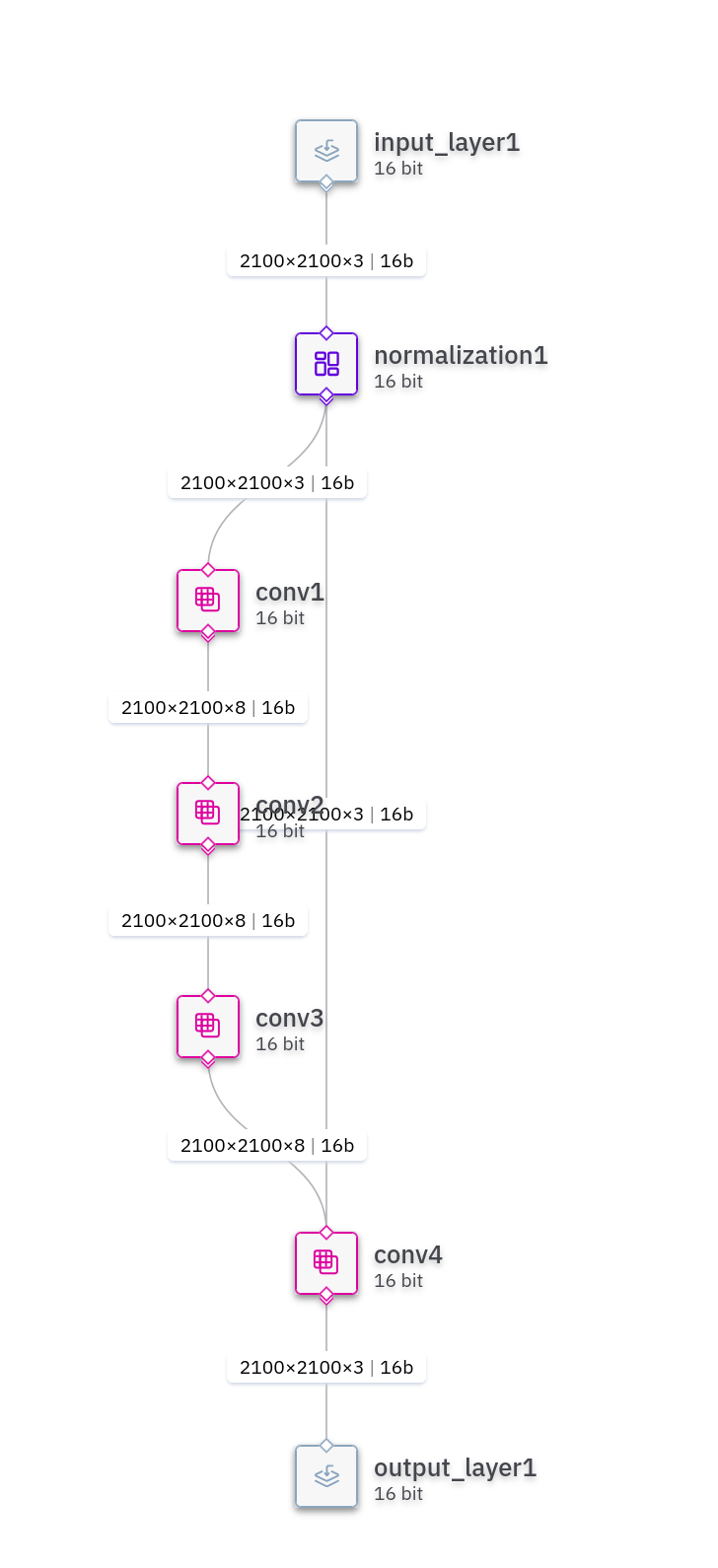
When checking the ImgEnhanceNet_2blocks.parsed.har model using the profiler as : hailo profiler ImgEnhanceNet_2blocks_fp16.optimized.har, it shows that the model is already in 8 bit as shown in the image below :

So I am really confused about the pipeline to go from onnx to 16bit hef model to do our inference. I have updated the files in my google drive (Hailo - Google Drive), it consist of C++ code and the onnx and the hef files in case you want to check and the raw image. Looking forward to find a solution to move forward.

Best,

Sandeep Kumar Jangir

Hi Sandeep,

Thanks for sharing the ONNX code, the pre/post-processing are more clear now, and I manage to reproduce your results both in C++ and in a minimal Python example.
Since the preprocessing code is the same for both ONNX and HEF, I suspect that the issue may be in the quantization.

Could you share some insights about the model conversion is performed? I want to make sure that the calibration and optimization are performed correctly.

In addition, I also created a some Python scripts that you can use to run the model using the emulator or the Hailo HW.
When running the model using the SDK_NATIVE emulator (i.e. after parsing), the results are identical to the onnxruntime. However, when running the model on the HW, I also get multiple zeros out of the inference.

Please check the quantization. You can try setting some layers to 16-bit
as suggested above. I recommend creating a separate file (e.g. model_script.alls), and add the following line to set the output to 16 bits:

quantization_param(output_layer1, precision_mode=a16_w16)

You can then pass the model script to the DFC using the --model-script model_script.alls argument
You can also try to set more layers to 16-bit. You can follow Tutorial #5 ( accessible via hailo tutorial from the SW Suite command line) to understand how to debug the accuracy using the Layer Analysis Tool and the HTML report.

Dear @pierrem , Thank you very much for for providing the python script. The are very helpful in quick debugging. In the past few days I have been reading the documentation : hailo_dataflow_compiler_v3.27.0_user_guide.pdf and my workflow is as follows.

  1. Convert the onnx to har using the parser.

    hailo parser onnx ImgEnhanceNet_2blocks.onnx   --net-name ImgEnhanceNet_2blocks   --har-path ImgEnhanceNet_2blocks.parsed.har   --input-format input=NCHW   --tensor-shapes input=[1,3,2100,2100]   --hw-arch hailo8 
    
  2. Optimize the ImgEnhanceNet_2blocks.parsed.har file as follows

  3. Generate the calibration set, in my case I create a directory of .npy file for 1500 files 16 bit images. (Not normalized as according to the documentation, normalization is added to the .all script in the beginning of the network) as shown below:

  4. import os
    import argparse
    import random
    import math
    import numpy as np
    from osgeo import gdal
    from tqdm import tqdm
    
    def create_calibration_dataset(image_folder, patch_height, patch_width, stride, max_patches_target):
        """
        Creates a memory-efficient and validated calibration dataset using np.memmap.
    
        This final version includes strict channel and shape validation to guarantee
        a valid output file and prevent the "allow_pickle=False" error.
        """
        if not os.path.isdir(image_folder):
            print(f"Error: The specified folder does not exist: {image_folder}")
            return
    
        supported_extensions = ('.tif', '.tiff')
        image_files = [f for f in sorted(os.listdir(image_folder)) if f.lower().endswith(supported_extensions)]
    
        if not image_files:
            print(f"Error: No TIFF images found in '{image_folder}'.")
            return
            
        print(f"Found {len(image_files)} images. Shuffling file list for diversity...")
        random.shuffle(image_files)
    
        num_images = len(image_files)
        patches_per_image = math.ceil(max_patches_target / num_images) if num_images > 0 else 0
        
        print(f"\nTargeting a total of ~{max_patches_target} patches.")
        print(f"Attempting to extract {patches_per_image} patches from each of {num_images} images.")
        print("-" * 30)
    
        output_filename = 'calibration_data.npy'
        
        # This list will temporarily hold the extracted, validated patches
        all_patches_in_ram = []
    
        # --- Data Collection and Validation Phase ---
        for image_name in tqdm(image_files, desc="Finding Valid Patches", unit="image"):
            if len(all_patches_in_ram) >= max_patches_target:
                break
                
            image_path = os.path.join(image_folder, image_name)
    
            try:
                gdal.PushErrorHandler('CPLQuietErrorHandler')
                dataset = gdal.Open(image_path)
                if dataset is None:
                    tqdm.write(f"  - Warning: Could not open {image_name}. Skipping.")
                    gdal.PopErrorHandler()
                    continue
                
                img_height, img_width, channel_count = dataset.RasterYSize, dataset.RasterXSize, dataset.RasterCount
    
                # --- CRITICAL VALIDATION 1: Image Dimensions ---
                if img_height < patch_height or img_width < patch_width:
                    tqdm.write(f"  - Skipping {image_name}: dimensions ({img_height}x{img_width}) are too small.")
                    gdal.PopErrorHandler()
                    continue
                
                # --- CRITICAL VALIDATION 2: Channel Count ---
                if channel_count not in [3, 4]:
                    tqdm.write(f"  - Skipping {image_name}: unsupported channel count ({channel_count}). Only 3 or 4 channels are supported.")
                    gdal.PopErrorHandler()
                    continue
    
                raw_array = dataset.ReadAsArray()
                img_src = np.ascontiguousarray(np.transpose(raw_array, (1, 2, 0)))
                gdal.PopErrorHandler()
    
                # Handle RGBA images by slicing off the alpha channel
                if channel_count == 4:
                    img_src = img_src[:, :, :3]
    
                # Generate all unique, valid patch locations
                available_locations = set()
                max_y = img_height - patch_height
                max_x = img_width - patch_width
                for y in range(0, img_height - patch_height + 1, stride):
                     for x in range(0, img_width - patch_width + 1, stride):
                        available_locations.add((y, x))
    
                available_locations = list(available_locations)
                
                num_to_take = min(patches_per_image, len(available_locations), max_patches_target - len(all_patches_in_ram))
                
                selected_locations = random.sample(available_locations, num_to_take)
    
                # Extract patches and perform final validation before adding to list
                for y_start, x_start in selected_locations:
                    patch = img_src[y_start : y_start + patch_height, x_start : x_start + patch_width, :]
                    
                    # --- CRITICAL VALIDATION 3: Final Patch Shape ---
                    expected_shape = (patch_height, patch_width, 3)
                    if patch.shape == expected_shape:
                        all_patches_in_ram.append(patch)
                    else:
                        tqdm.write(f"  - Corrupt patch in {image_name}! Expected {expected_shape}, got {patch.shape}. Skipping patch.")
    
    
            except Exception as e:
                tqdm.write(f"  - An error occurred while processing {image_name}: {e}")
                if gdal.GetErrorHandler() is not None:
                     gdal.PopErrorHandler()
    
        # --- File Writing Phase ---
        total_patches_to_create = len(all_patches_in_ram)
        if total_patches_to_create == 0:
            print("\nError: Could not extract any valid patches. Check image dimensions and channel formats.")
            return
            
        print(f"\nCollected {total_patches_to_create} valid patches. Now writing to disk...")
        
        # Create the memory-mapped file with the exact final shape
        final_shape = (total_patches_to_create, patch_height, patch_width, 3)
        if os.path.exists(output_filename):
            os.remove(output_filename)
        calibration_data = np.memmap(output_filename, dtype=np.uint16, mode='w+', shape=final_shape)
    
        # Write all validated patches to the file
        for i, patch in enumerate(tqdm(all_patches_in_ram, desc="Writing to file", unit="patch")):
            calibration_data[i] = patch
        
        calibration_data.flush()
        print("-" * 30)
        print("\n--- Summary ---")
        print(f"Total patches created: {total_patches_to_create}")
        print(f"Final dataset shape: {calibration_data.shape}")
        print(f"Data type: {calibration_data.dtype}")
        print(f"Successfully saved calibration data to: {output_filename}")
    
    
    if __name__ == '__main__':
        parser = argparse.ArgumentParser(description="Create a 16-bit calibration dataset (.npy) for Hailo model optimization.")
        parser.add_argument('--image_folder', type=str, required=True, help="Path to the folder containing 16-bit raw .tif images.")
        args = parser.parse_args()
    
        PATCH_HEIGHT = 2100
        PATCH_WIDTH = 2100
        STRIDE = PATCH_WIDTH // 2
        TOTAL_TARGET_PATCHES = 1500
    
        create_calibration_dataset(args.image_folder, PATCH_HEIGHT, PATCH_WIDTH, STRIDE, TOTAL_TARGET_PATCHES) 
    
    
  5. I create β€œforce_fp16.allsβ€œ to force all layers to be 16 bit and add normalization for 16 bit data in the beginning. The .all script contains the following :

  6. normalization1 = normalization([0.0, 0.0, 0.0], [65535.0, 65535.0, 65535.0])
    # This command configures the rest of the model for 16-bit quantization.
    model_optimization_config(compression_params, auto_16bit_weights_ratio=1)
    
  7. Optimize. Below are the command and the log:

  8. hailo optimize ImgEnhanceNet_2blocks.parsed.har --calib-set-path ../calibration_data_dir/  --model-script ../force_fp16.alls --output ./ImgEnhanceNet_2blocks.optimized.calib.fp16.har   --hw-arch hailo8 
    					[info] No GPU chosen, Selected GPU 0
    					WARNING: All log messages before absl::InitializeLog() is called are written to STDERR
    					E0000 00:00:1757104756.684882   10867 cuda_dnn.cc:8310] Unable to register cuDNN factory: Attempting to register factory for plugin cuDNN when one has already been registered
    					E0000 00:00:1757104756.688348   10867 cuda_blas.cc:1418] Unable to register cuBLAS factory: Attempting to register factory for plugin cuBLAS when one has already been registered
    					[info] Current Time: 22:39:18, 09/05/25
    					[info] CPU: Architecture: x86_64, Model: AMD Ryzen 7 5800X 8-Core Processor, Number Of Cores: 16, Utilization: 0.2%
    					[info] Memory: Total: 62GB, Available: 57GB
    					[info] System info: OS: Linux, Kernel: 6.8.0-79-generic
    					[info] Hailo DFC Version: 3.32.0
    					[info] HailoRT Version: 4.22.0
    					[info] PCIe: No Hailo PCIe device was found
    					[info] Running `hailo optimize ImgEnhanceNet_2blocks.parsed.har --calib-set-path ../calibration_data_dir/ --model-script force_fp16.alls --output ./ImgEnhanceNet_2blocks.optimized.calib.fp16.har --hw-arch hailo8`
    					[info] Loading model script commands to ImgEnhanceNet_2blocks from force_fp16.alls
    					[info] Starting Model Optimization
    					I0000 00:00:1757104760.067030   10867 gpu_device.cc:2022] Created device /job:localhost/replica:0/task:0/device:GPU:0 with 21240 MB memory:  -> device: 0, name: NVIDIA GeForce RTX 3090, pci bus id: 0000:2b:00.0, compute capability: 8.6
    					I0000 00:00:1757104760.257007   10867 gpu_device.cc:2022] Created device /job:localhost/replica:0/task:0/device:GPU:0 with 21240 MB memory:  -> device: 0, name: NVIDIA GeForce RTX 3090, pci bus id: 0000:2b:00.0, compute capability: 8.6
    					[info] Using default optimization level of 2
    					[info] Model received quantization params from the hn
    					I0000 00:00:1757104820.603901   10867 gpu_device.cc:2022] Created device /job:localhost/replica:0/task:0/device:GPU:0 with 21196 MB memory:  -> device: 0, name: NVIDIA GeForce RTX 3090, pci bus id: 0000:2b:00.0, compute capability: 8.6
    					I0000 00:00:1757104820.812866   10867 gpu_device.cc:2022] Created device /job:localhost/replica:0/task:0/device:GPU:0 with 21196 MB memory:  -> device: 0, name: NVIDIA GeForce RTX 3090, pci bus id: 0000:2b:00.0, compute capability: 8.6
    					[info] MatmulDecompose skipped
    					[info] Starting Mixed Precision
    					[info] Model Optimization Algorithm Mixed Precision is done (completion time is 00:00:00.02)
    					[info] LayerNorm Decomposition skipped
    					[info] Starting Statistics Collector
    					[info] Using dataset with 64 entries for calibration
    					Calibration:   0%|                                                                                                                                                                                                                | 0/64 [00:00<?, ?entries/s]I0000 00:00:1757104843.198014   11102 cuda_dnn.cc:529] Loaded cuDNN version 90501
    					Calibration: 100%|β–ˆβ–ˆβ–ˆβ–ˆβ–ˆβ–ˆβ–ˆβ–ˆβ–ˆβ–ˆβ–ˆβ–ˆβ–ˆβ–ˆβ–ˆβ–ˆβ–ˆβ–ˆβ–ˆβ–ˆβ–ˆβ–ˆβ–ˆβ–ˆβ–ˆβ–ˆβ–ˆβ–ˆβ–ˆβ–ˆβ–ˆβ–ˆβ–ˆβ–ˆβ–ˆβ–ˆβ–ˆβ–ˆβ–ˆβ–ˆβ–ˆβ–ˆβ–ˆβ–ˆβ–ˆβ–ˆβ–ˆβ–ˆβ–ˆβ–ˆβ–ˆβ–ˆβ–ˆβ–ˆβ–ˆβ–ˆβ–ˆβ–ˆβ–ˆβ–ˆβ–ˆβ–ˆβ–ˆβ–ˆβ–ˆβ–ˆβ–ˆβ–ˆβ–ˆβ–ˆβ–ˆβ–ˆβ–ˆβ–ˆβ–ˆβ–ˆβ–ˆβ–ˆβ–ˆβ–ˆβ–ˆβ–ˆβ–ˆβ–ˆβ–ˆβ–ˆβ–ˆβ–ˆβ–ˆβ–ˆβ–ˆβ–ˆβ–ˆβ–ˆβ–ˆβ–ˆβ–ˆβ–ˆβ–ˆβ–ˆβ–ˆβ–ˆβ–ˆβ–ˆβ–ˆβ–ˆβ–ˆβ–ˆβ–ˆβ–ˆβ–ˆβ–ˆβ–ˆβ–ˆβ–ˆβ–ˆβ–ˆβ–ˆβ–ˆβ–ˆβ–ˆβ–ˆβ–ˆβ–ˆβ–ˆβ–ˆβ–ˆβ–ˆβ–ˆβ–ˆβ–ˆβ–ˆβ–ˆβ–ˆβ–ˆβ–ˆβ–ˆβ–ˆβ–ˆβ–ˆβ–ˆβ–ˆβ–ˆβ–ˆβ–ˆβ–ˆβ–ˆβ–ˆβ–ˆβ–ˆβ–ˆβ–ˆβ–ˆβ–ˆβ–ˆβ–ˆβ–ˆβ–ˆβ–ˆβ–ˆβ–ˆβ–ˆβ–ˆβ–ˆβ–ˆβ–ˆβ–ˆβ–ˆβ–ˆβ–ˆβ–ˆβ–ˆβ–ˆβ–ˆβ–ˆβ–ˆβ–ˆβ–ˆβ–ˆβ–ˆβ–ˆβ–ˆβ–ˆβ–ˆβ–ˆβ–ˆβ–ˆβ–ˆβ–ˆβ–ˆβ–ˆβ–ˆβ–ˆβ–ˆβ–ˆβ–ˆβ–ˆβ–ˆβ–ˆ| 64/64 [00:29<00:00,  2.17entries/s]
    					[info] Model Optimization Algorithm Statistics Collector is done (completion time is 00:00:29.64)
    					[info] Starting Fix zp_comp Encoding
    					[info] Model Optimization Algorithm Fix zp_comp Encoding is done (completion time is 00:00:00.00)
    					[info] Matmul Equalization skipped
    					[info] Starting MatmulDecomposeFix
    					[info] Model Optimization Algorithm MatmulDecomposeFix is done (completion time is 00:00:00.00)
    					I0000 00:00:1757104859.868250   10867 gpu_device.cc:2022] Created device /job:localhost/replica:0/task:0/device:GPU:0 with 21250 MB memory:  -> device: 0, name: NVIDIA GeForce RTX 3090, pci bus id: 0000:2b:00.0, compute capability: 8.6
    					I0000 00:00:1757104860.150142   10867 gpu_device.cc:2022] Created device /job:localhost/replica:0/task:0/device:GPU:0 with 21250 MB memory:  -> device: 0, name: NVIDIA GeForce RTX 3090, pci bus id: 0000:2b:00.0, compute capability: 8.6
    					[info] Finetune encoding skipped
    					[info] Bias Correction skipped
    					[info] Adaround skipped
    					[info] Starting Quantization-Aware Fine-Tuning
    
    
    					[warning] Dataset is larger than expected size. Increasing the algorithm dataset size might improve the results
    					[info] Using dataset with 1024 entries for finetune
    					Epoch 1/4
    					E0000 00:00:1757104997.195568   10867 meta_optimizer.cc:966] layout failed: INVALID_ARGUMENT: Size of values 0 does not match size of permutation 4 @ fanin shape inStatefulPartitionedCall/SelectV2-2-TransposeNHWCToNCHW-LayoutOptimizer
    					I0000 00:00:1757104998.443404   11433 cuda_dnn.cc:529] Loaded cuDNN version 90501
    					128/128 ━━━━━━━━━━━━━━━━━━━━ 226s 2s/step - _distill_loss_ImgEnhanceNet_2blocks/conv4: 0.8275 - total_distill_loss: 0.8275  
    					Epoch 2/4
    					128/128 ━━━━━━━━━━━━━━━━━━━━ 202s 2s/step - _distill_loss_ImgEnhanceNet_2blocks/conv4: 0.3874 - total_distill_loss: 0.3874
    					Epoch 3/4
    					128/128 ━━━━━━━━━━━━━━━━━━━━ 202s 2s/step - _distill_loss_ImgEnhanceNet_2blocks/conv4: 0.2510 - total_distill_loss: 0.2510
    					Epoch 4/4
    					128/128 ━━━━━━━━━━━━━━━━━━━━ 202s 2s/step - _distill_loss_ImgEnhanceNet_2blocks/conv4: 0.2175 - total_distill_loss: 0.2175
    					[info] Model Optimization Algorithm Quantization-Aware Fine-Tuning is done (completion time is 00:13:52.97)
    					I0000 00:00:1757105827.863185   10867 gpu_device.cc:2022] Created device /job:localhost/replica:0/task:0/device:GPU:0 with 21257 MB memory:  -> device: 0, name: NVIDIA GeForce RTX 3090, pci bus id: 0000:2b:00.0, compute capability: 8.6
    					I0000 00:00:1757105828.164106   10867 gpu_device.cc:2022] Created device /job:localhost/replica:0/task:0/device:GPU:0 with 21257 MB memory:  -> device: 0, name: NVIDIA GeForce RTX 3090, pci bus id: 0000:2b:00.0, compute capability: 8.6
    					[info] Starting Layer Noise Analysis
    					Full Quant Analysis:   0%|                                                                                                                                                                                                      | 0/2 [00:00<?, ?iterations/s]I0000 00:00:1757105838.377486   11843 cuda_dnn.cc:529] Loaded cuDNN version 90501
    					[warning] GPU memory has been exhausted. Layer Noise Analysis will not generate statistics. Try either:1) Lower batch size using the command: model_optimization_config(checker_cfg, batch_size=1). 2) Disable the algorithm using the command: model_optimization_config(checker_cfg, policy=disabled). 3) Force using CPU by setting the CUDA_VISIBLE_DEVICES environment variable to non-exsits GPU
    					Full Quant Analysis:   0%|                                                                                                                                                                                                      | 0/2 [00:26<?, ?iterations/s]
    					[info] Model Optimization Algorithm Layer Noise Analysis is done (completion time is 00:00:26.61)
    					[info] Model Optimization is done
    					[info] Saved HAR to: /local/workspace/hap_hef/ImgEnhanceNet_2blocks.optimized.calib.fp16.har
    
  9. Compile the optimized har to hef. Below are the command and the log

    1. hailo compiler ImgEnhanceNet_2blocks.optimized.calib.fp16.har  --output-dir ./     --hw-arch hailo8
      		[info] No GPU chosen, Selected GPU 0
      		WARNING: All log messages before absl::InitializeLog() is called are written to STDERR
      		E0000 00:00:1757097803.987654    4020 cuda_dnn.cc:8310] Unable to register cuDNN factory: Attempting to register factory for plugin cuDNN when one has already been registered
      		E0000 00:00:1757097803.990993    4020 cuda_blas.cc:1418] Unable to register cuBLAS factory: Attempting to register factory for plugin cuBLAS when one has already been registered
      		[info] Current Time: 20:43:25, 09/05/25
      		[info] CPU: Architecture: x86_64, Model: AMD Ryzen 7 5800X 8-Core Processor, Number Of Cores: 16, Utilization: 0.5%
      		[info] Memory: Total: 62GB, Available: 57GB
      		[info] System info: OS: Linux, Kernel: 6.8.0-79-generic
      		[info] Hailo DFC Version: 3.32.0
      		[info] HailoRT Version: 4.22.0
      		[info] PCIe: No Hailo PCIe device was found
      		[info] Running `hailo compiler ImgEnhanceNet_2blocks.optimized.calib.fp16.har --output-dir ./ --hw-arch hailo8`
      		[info] Compiling network
      		[info] To achieve optimal performance, set the compiler_optimization_level to "max" by adding performance_param(compiler_optimization_level=max) to the model script. Note that this may increase compilation time.
      		[info] Loading network parameters
      		[info] Starting Hailo allocation and compilation flow
      		[info] Building optimization options for network layers...
      		[info] Successfully built optimization options - 0s 88ms
      		[info] Trying to compile the network in a single context
      		[info] Using Single-context flow
      		[info] Resources optimization params: max_control_utilization=75%, max_compute_utilization=75%, max_compute_16bit_utilization=75%, max_memory_utilization (weights)=75%, max_input_aligner_utilization=75%, max_apu_utilization=75%
      		[info] Validating layers feasibility
      
      		Validating ImgEnhanceNet_2blocks_context_0 layer by layer (100%)
      
      
      		● Finished                                   
      
      		[info] Layers feasibility validated successfully
      		[info] Running resources allocation (mapping) flow, time per context: 59m 59s
      		Context:0/0 Iteration 4: Trying parallel mapping...  
      		          cluster_0  cluster_1  cluster_2  cluster_3  cluster_4  cluster_5  cluster_6  cluster_7  prepost 
      		 worker0  *          *          *          *          V          V          V          *          V       
      		 worker1  *          *          *          *          *          *          *          *          V       
      		 worker2                                                                                                  
      		 worker3  *          *          *          *          V          V          V          *          V       
      
      		  00:00
      		Reverts on cluster mapping: 0
      		Reverts on inter-cluster connectivity: 0
      		Reverts on pre-mapping validation: 0
      		Reverts on split failed: 0
      
      		[info] Iterations: 4
      		Reverts on cluster mapping: 0
      		Reverts on inter-cluster connectivity: 0
      		Reverts on pre-mapping validation: 0
      		Reverts on split failed: 0
      		[info] +-----------+---------------------+---------------------+--------------------+
      		[info] | Cluster   | Control Utilization | Compute Utilization | Memory Utilization |
      		[info] +-----------+---------------------+---------------------+--------------------+
      		[info] | cluster_4 | 12.5%               | 3.1%                | 20.3%              |
      		[info] | cluster_5 | 6.3%                | 1.6%                | 7.8%               |
      		[info] | cluster_6 | 6.3%                | 1.6%                | 3.9%               |
      		[info] +-----------+---------------------+---------------------+--------------------+
      		[info] | Total     | 3.1%                | 0.8%                | 4%                 |
      		[info] +-----------+---------------------+---------------------+--------------------+
      		[info] Successful Mapping (allocation time: 55s)
      		[info] Compiling kernels of ImgEnhanceNet_2blocks_context_0...
      		[info] Bandwidth of model inputs: 201.874 Mbps, outputs: 201.874 Mbps (for a single frame)
      		[info] Bandwidth of DDR buffers: 0.0 Mbps (for a single frame)
      		[info] Bandwidth of inter context tensors: 0.0 Mbps (for a single frame)
      		[info] Building HEF...
      		[info] Successful Compilation (compilation time: 0s)
      		[info] Compilation complete
      		[info] Saved HEF to: /local/workspace/hap_hef/ImgEnhanceNet_2blocks.hef
      		[info] Saved HAR to: /local/workspace/hap_hef/ImgEnhanceNet_2blocks_compiled.har
      

When given ImgEnhanceNet_2blocks.optimized.calib.fp16.har as the input to your emulate.py program I get proper output but the compiled hef file is now producing total back image and still not working. I have been though documentation to see if there a problem in pre or post processing, but I am unable to find any.

ImgEnhanceNet_2blocks.optimized.calib.fp16.har now have all the layers as 16 bit as seen in the image below:

I have updated my google drive with folder and files :

  1. NEW_COMPLIED which has new complied files from parser, optimizer and compiler using commands given above
  2. NEW_Small_Calibration_data has sample of 128 calibration 16 bit data (could not upload 1500 .npy files as they are 40 GB) and the script create_np_calibrated_data_directory.py used to create the calibrated data.

I hope you can provide some insights why the hef is not working properly. Thank you in advance.

@Sandeep_Jangir if you plan to use normalization on chip and full 16-bit, there are a few points to consider:

  • Avoid double normalization in your C++ code (and also in the Python script, if you use it for testing the HEF)
  • Set the input format in your C++ code to UINT16. For the output, you can use 16-bit format or float32 (if you let HailoRT dequantize the data)
  • When testing the model with the Python script, please avoid normalization on the host and also use SDK_FP_OPTIMIZED as backend for debugging purposes. The SDK_NATIVE runs emulation on the model after parsing, skipping modifications (like normalization) that you may have included in the model script. In contrast, SDK_FP_OPTIMIZED includes the normalization layer, but still keeps the data in FP32. This is useful to check the preprocessing flow without worrying about quantization accuracy. If you normalize twice, you will get a black output at this point.
  • After testing the model and getting good results with SDK_FP_OPTIMIZED, move to SDK_QUANTIZED for accuracy evaluation.

I was able to get some output with the quantized emulation and also with the Python inference code using the HEF :

The results are better than before but still worse than those of the native model. If the results are not good enough, I would recommend checking the accuracy of the model (activations distribution, scatter plots, …) using the Layer Analysis Tool, as suggested in my previous post.

@pierrem . Thank you for your suggestion. Currently, the ImgEnhanceNet_2blocks.optimized.calib.fp16.har using emulate.py program is working and giving me proper output, but the hef file that was generated using the steps described before is not yielding me any output but just the black image.

β€œI was able to get some output with the quantized emulation and also with the Python inference code using the HEF : β€œ - Sorry if I did not understand your reply but Did you use the quantized har and complied hef that I provided to your output ? I think your output with hef is correct if you did not white-balance the raw image first.

I can start the suggested optimization for my programs once I get the hef file working and giving output.

Hi @Sandeep_Jangir,
Yes, I used your HEF file and the following script, which I modified removing the normalization on host:

#!/usr/bin/env python3

import numpy as np
import matplotlib.pyplot as plt
import cv2


from hailo_platform import (HEF, VDevice, HailoStreamInterface, InferVStreams, ConfigureParams,
    InputVStreamParams, OutputVStreamParams, InputVStreams, OutputVStreams, FormatType)


HEIGHT = 2100
WIDTH = 2100

hef_path = "./new_models/ImgEnhanceNet_2blocks.hef"
image_path = './converted_8bit_crop_0_0.png'


def preprocessing():

    img = cv2.imread(image_path)
    img = cv2.cvtColor(img, cv2.COLOR_BGR2RGB)

    img = img.astype(np.float32)

    # Normalize 16-bit to [0, 1]
    #img /= 255.0

    # Truncate values above 1.0 to 1.0
    #_, img = cv2.threshold(img, 1.0, 1.0, cv2.THRESH_TRUNC)

    # Set values below 0.0 to 0.0 (though this is redundant since we normalized from 16-bit)
    #_, img = cv2.threshold(img, 0.0, 0.0, cv2.THRESH_TOZERO)

    img16 = (img.astype(np.uint16) << 8)  # as we used a 8 bit iamge, I am rescaling to 16 bit to simulate the 16 bit input
    img = img16
    img = np.expand_dims(img, axis=0)
    
    return img


class HailoInference:
    hef_path = ""

    def __init__(self):
        self.hef = None
        self.infer_img = None

    def load_model(self):
        self.infer_img = preprocessing()
        return

    def run_inference(self):
        # The target can be used as a context manager ("with" statement) to ensure it's released on time.
        # Here it's avoided for the sake of simplicity
        target = VDevice()

        # Loading compiled HEFs to device:
        self.hef = HEF(hef_path)
            
        # Configure network groups
        configure_params = ConfigureParams.create_from_hef(hef=self.hef, interface=HailoStreamInterface.PCIe)
        network_groups = target.configure(self.hef, configure_params)
        network_group = network_groups[0]
        network_group_params = network_group.create_params()

        # Create input and output virtual streams params
        # Quantized argument signifies whether or not the incoming data is already quantized.
        # Data is quantized by HailoRT if and only if quantized == False .
        input_vstreams_params = InputVStreamParams.make(network_group, format_type=FormatType.UINT16, quantized=False)
        output_vstreams_params = OutputVStreamParams.make(network_group, format_type=FormatType.FLOAT32)

        input_vstream_info = self.hef.get_input_vstream_infos()[0]
        output_vstream_info = self.hef.get_output_vstream_infos()[0]

        input_scale = input_vstream_info.quant_info.qp_scale
        input_zero_point = input_vstream_info.quant_info.qp_zp
        output_scale = output_vstream_info.quant_info.qp_scale
        output_zero_point = output_vstream_info.quant_info.qp_zp

        print(f"Input scale: {input_scale}, Input zero point: {input_zero_point}")
        print(f"Output scale: {output_scale}, Output zero point: {output_zero_point}")

        # using TF NMS format, according to documentation the output will be a numpy.ndarray of shape [class_count, BBOX_PARAMS, detections_count] padded with empty bboxes
        with InferVStreams(network_group, input_vstreams_params, output_vstreams_params) as infer_pipeline:
            with network_group.activate(network_group_params):
                infer_results = infer_pipeline.infer(self.infer_img)
                results = infer_results["ImgEnhanceNet_2blocks/conv4"]

                results = (results * 255.0).clip(0, 255)
                self.display_results(results)

        return

    def display_results(self, results):
        
        image = results[0].astype(np.uint8)
        plt.imshow(image)
        plt.axis('off')
        plt.show()

        return


    def run(self):
        self.load_model()
        self.run_inference()
        return


def main():
    print("Inference started")
    engine = HailoInference()
    engine.run()
    print("Inference completed")
    return


if __name__ == '__main__':
    exit(main())

In your C++ code, assuming you are using 16-bit non normalized inputs, you can modify the infer() method in this way:

    std::pair<std::vector<float32_t>, double> infer(const std::vector<uint16_t>& input_data) {
        auto start = std::chrono::high_resolution_clock::now();

        if (DETAILED_LOG) {
            log_message("DEBUG", "Starting inference with input size: " + std::to_string(input_data.size() * sizeof(uint16_t)) + " bytes");
        }

        // Prepare input data map - use element count for vector construction
        std::map<std::string, std::vector<uint16_t>> input_data_map;
        input_data_map[input_name] = input_data;

        std::map<std::string, std::vector<float32_t>> output_data_map;
        size_t output_element_count = output_shape[1] * output_shape[2] * output_shape[3]; // H * W * C (elements)
        size_t output_frame_size = output_element_count * sizeof(float32_t);
        output_data_map[output_name] = std::vector<float32_t>(output_element_count);
        
        // Prepare MemoryView maps - use BYTE SIZE, not element count
        std::map<std::string, hailort::MemoryView> input_views;
        input_views[input_name] = hailort::MemoryView(
            input_data_map[input_name].data(), 
            input_data_map[input_name].size() * sizeof(uint16_t)
        );

        std::map<std::string, hailort::MemoryView> output_views;
        output_views[output_name] = hailort::MemoryView(
            output_data_map[output_name].data(), 
            output_data_map[output_name].size() * sizeof(float32_t) 
        );

        // Perform inference
        hailo_status status = pipeline->infer(input_views, output_views, 1); // Single frame inference
        if (status != HAILO_SUCCESS) {
            log_message("ERROR", "Inference failed: " + status_to_string(status));
            throw std::runtime_error("Inference failed");
        }
        // Convert output to float vector
        std::vector<float> output_data_float(output_element_count);
        std::memcpy(output_data_float.data(), output_data_map[output_name].data(), output_frame_size);

        auto duration = std::chrono::duration_cast<std::chrono::milliseconds>(std::chrono::high_resolution_clock::now() - start).count() / 1000.0;
        if (DETAILED_LOG) {
            log_message("DEBUG", "Inference completed, output size: " + std::to_string(output_data_float.size()) + " bytes");
        }
        if (PROFILE_PROGRAM) {
            log_message("PROFILE", "Inference time: " + std::to_string(duration) + " seconds");
        }
        return {output_data_float, duration};
    }

You also have to set the HAILO_FORMAT_TYPE_UINT16 format to the input vstream.
The output format can be either HAILO_FORMAT_TYPE_UINT16 (if you dequantize the data yourself) or HAILO_FORMAT_TYPE_FLOAT32, if you let HailoRT do it. In the example, I used float32 as output

Thank you very much @pierrem for confirming that my hef file was working. I realized I was using an old hef file on my target computer. I can confirm that I also get the same output like yours with both python and C++ even after white-balancing. Now that I have proper steps to get to the hef file, I will start checking the accuracy of the model with the layer analysis tool.

I thank you again for your help during this whole process. I will mark this thread as solved.

1 Like