Hello, I am trying to implement a cascaded YOLO detection → ReID tracking pipeline using the guidance from:
-
TAPPAS Guide 3.1.6 (Face Detection & Landmarking pipeline)
-
TAPPAS Guide 5.1.0 (Cascaded Networks Structure)
-
Hailo blog : User Guide 3: Simplifying Object Detection on a Hailo Device Using DeGirum PySDK
My environment uses HEF models from Hailo Model Zoo
hailortcli fw-control identify
Executing on device: 0001:01:00.0 Identifying board Control Protocol Version: 2 Firmware Version: 5.0.0 (release,app) Logger Version: 0 Device Architecture: HAILO10H
hailortcli parse-hef /home/ysj/7_reID_YJI/models/repvgg_a0_person_reid_512.hef
Architecture HEF was compiled for: HAILO15H Network group name: repvgg_a0_person_reid_512, Single Context Network name: repvgg_a0_person_reid_512/repvgg_a0_person_reid_512 VStream infos: Input repvgg_a0_person_reid_512/input_layer1 UINT8, NHWC(256x128x3) Output repvgg_a0_person_reid_512/fc1 UINT8, NC(512)
hailortcli parse-hef /home/ysj/7_reID_YJI/models/yolov8m.hef
Architecture HEF was compiled for: HAILO15H Network group name: yolov8m, Multi Context - Number of contexts: 5 Network name: yolov8m/yolov8m VStream infos: Input yolov8m/input_layer1 UINT8, NHWC(640x640x3) Output yolov8m/yolov8_nms_postprocess FLOAT32, HAILO NMS BY CLASS(number of classes: 80, maximum bounding boxes per class: 100, maximum frame size: 160320) Operation: Op YOLOV8 Name: YOLOV8-Post-Process Score threshold: 0.200 IoU threshold: 0.70 Classes: 80 Max bboxes per class: 100 Image height: 640 Image width: 640
I attempted to build a pipeline:
#!/usr/bin/env bash
set -euo pipefail

# YOLO → ReID

YOLO_HEF=/home/…/yolov8m.hef
YOLO_POST_SO=/usr/lib/aarch64-linux-gnu/hailo/tappas/post_processes/libyolo_hailortpp_post.so
YOLO_FUNC=yolov8m

REID_HEF=/home/…/repvgg_a0_person_reid_512.hef
REID_POST_SO=/usr/lib/aarch64-linux-gnu/hailo/tappas/post_processes/libre_id.so
REID_FUNC=filter

CROP_POST_SO=/usr/lib/aarch64-linux-gnu/hailo/tappas/post_processes/cropping_algorithms/libdetection_croppers.so
CROP_FUNC=all_detections
#CROP_POST_SO=/usr/lib/aarch64-linux-gnu/hailo/tappas/post_processes/cropping_algorithms/libre_id.so
#CROP_FUNC=track_counter  # create_crops

DBUG_POST_SO=/usr/lib/aarch64-linux-gnu/hailo/tappas/post_processes/libdebug.so
DBUG_FUNC=dump_tensors_to_npy # print_roi_bboxs dump_tensors_to_npy filter identity sleep10

VIDEO_DEV=/dev/video0
QUEUE=“leaky=downstream max-size-buffers=30 max-size-bytes=0 max-size-time=0”
SCHED=“scheduling-algorithm=1 vdevice-group-id=group1”
CROPPER=“internal-offset=true drop-uncropped-buffers=true use-letterbox=true”
VIDEO=“framerate=30/1,interlace-mode=progressive,pixel-aspect-ratio=1/1”
DBUG=“hailofilter so-path=$DBUG_POST_SO function-name=$DBUG_FUNC qos=false ! queue $QUEUE !”

YOLO_PIPELINE=“videoscale ! video/x-raw,format=RGB,height=640,width=640,$VIDEO !
queue $QUEUE !
hailonet name=YOLO hef-path=$YOLO_HEF $SCHED !
queue $QUEUE !
hailofilter so-path=$YOLO_POST_SO function-name=$YOLO_FUNC qos=false !
queue $QUEUE !
hailotracker class-id=1 debug=true !
queue $QUEUE”

REID_PIPELINE=“videoconvert ! videoscale ! video/x-raw,format=RGB,height=256,width=128,$VIDEO !
queue $QUEUE !
hailonet name=REID hef-path=$REID_HEF $SCHED !
queue $QUEUE”

GST_DEBUG=3 gst-launch-1.0 -ev
v4l2src device=$VIDEO_DEV ! videoconvert !
tee name=t hailomuxer name=hmux
t. ! queue $QUEUE ! hmux.
t. ! $YOLO_PIPELINE ! hmux.
hmux. ! queue $QUEUE !
hailocropper name=cropper so-path=$CROP_POST_SO function-name=$CROP_FUNC $CROPPER
hailoaggregator name=agg
cropper.src_0 ! queue $QUEUE ! agg.sink_0
cropper.src_1 ! $REID_PIPELINE ! $DBUG agg.sink_1
agg. ! hailofilter so-path=$REID_POST_SO function-name=$REID_FUNC qos=false ! queue $QUEUE !
hailooverlay local-gallery=true ! videoconvert !
fpsdisplaysink video-sink=xvimagesink name=hailo_display sync=false text-overlay=true
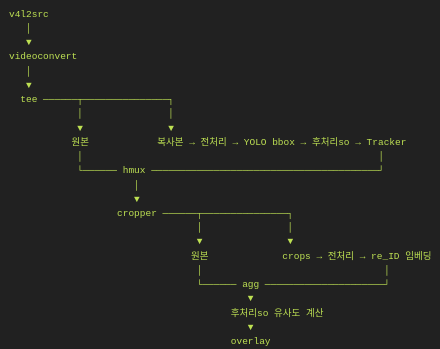
The strange issue is:
1. ReID embeddings ARE being generated
-
I can confirm that the ReID post-process runs.
-
Debug output shows
“repvgg_a0_person_reid_512_fc1.npy”embedding files saved for each detection.
2. But all bounding boxes become a single red color
-
No unique color per ID
-
No identity text (ID number) shown
-
Only “tracked” / “lost” labels appear (only hailotracker behavior)
3. Even though ReID is connected, the output looks identical to standalone hailotracker
-
The tracking is NOT improved by appearance embeddings
-
The result is completely different from what a true ReID-based tracker should produce
4. If I remove hailotracker, YOLO results appear normally
(no ReID, no IDs, only basic detection boxes)
5. I expected:
-
Consistent IDs (e.g., ID1, ID2…)
-
Colored boxes per ID
-
Appearance-based re-assignment between frames
But instead I only see:
-
“tracked/new/lost” labels from hailotracker
-
No IDs
-
No color differentiation
-
All boxes red
 My suspicion
It seems like:
-
repvggdoes generate embeddings,
but does NOT output them in the tensor format thatlibre_id.soexpects,
OR -
My cascaded hailofilter order/connection is incorrect,
OR -
The
.npyoutputs mean embeddings exist,
but they are not being passed forward on the buffer metadata,
solibre_id.sois ignoring them.
I could not find documentation describing the exact required format for libre_id.so to consume custom ReID embeddings, so I am unsure whether my pipeline is correct.
My Questions
-
In a cascaded network, what is the correct way to pass ReID embeddings to
libre_id.so?- Is there a required tensor name or metadata field?
-
Does hailotracker expect a specific tensor layout for embeddings
(e.g.,hailo_emborembedding_vector)? -
Why does hailooverlay show only red boxes and no IDs even though embeddings exist?
Any help would be greatly appreciated
If needed I can upload:
-
Full GStreamer pipeline command
-
Logs
-
Screenshots
-
Example
.npyembeddings
Thank you very much in advance for your time and guidance!