Heron hunting project: Rasperry-Pi - AI HAT+ - Frigate - custom model not working.

Hi all,

I have a Pi5 with AI HAT+ and I use PI OS Lite for my project. I’m pretty new to all this and need a bit help.

The goal of my project is detecting ‘herons’ who come visit my pond and in the end I want to scare them away. I’m using a simple Reolink camera and Frigate with a custom trained model in order to detect them.

All seems to be working fine as Frigate starts, I see my camera feed and no errors or warnings are mentioned in the Frigate logs.
After a while, when a motion is send to the HAILO8L chip for processing (Green box around object in debug view Frigate), Frigate suddenly stops and the watchdogs restarts Frigate. Without motion, the system remains stable. When detection is processed again the reboot happens again, and again, …

Below the last part of my Frigate log when things start to go wrong:

2025-10-20 19:20:04.039774449 [2025-10-20 19:20:04] frigate.api.fastapi_app INFO : FastAPI started
2025-10-20 19:20:11.052746746 Process detector:hailo:
2025-10-20 19:20:11.052753394 Traceback (most recent call last):
2025-10-20 19:20:11.052755097 File “/usr/lib/python3.11/multiprocessing/process.py”, line 314, in _bootstrap
2025-10-20 19:20:11.052756190 self.run()
2025-10-20 19:20:11.052757449 File “/opt/frigate/frigate/util/process.py”, line 41, in run_wrapper
2025-10-20 19:20:11.052758338 return run(*args, **kwargs)
2025-10-20 19:20:11.052759283 ^^^^^^^^^^^^^^^^^^^^
2025-10-20 19:20:11.052760394 File “/usr/lib/python3.11/multiprocessing/process.py”, line 108, in run
2025-10-20 19:20:11.052761412 self._target(*self._args, **self._kwargs)
2025-10-20 19:20:11.052762949 File “/opt/frigate/frigate/object_detection/base.py”, line 136, in run_detector
2025-10-20 19:20:11.052764005 detections = object_detector.detect_raw(input_frame) 2025-10-20 19:20:11.052765079 ^^^^^^^^^^^^^^^^^^^^^^^^^^^^^^^^^^^^^^^
2025-10-20 19:20:11.052766283 File “/opt/frigate/frigate/object_detection/base.py”, line 86, in detect_raw
2025-10-20 19:20:11.052767375 return self.detect_api.detect_raw(tensor_input=tensor_input)
2025-10-20 19:20:11.052771301 ^^^^^^^^^^^^^^^^^^^^^^^^^^^^^^^^^^^^^^^^^^^^^^^^^^^^^
2025-10-20 19:20:11.052772486 File “/opt/frigate/frigate/detectors/plugins/hailo8l.py”, line 370, in detect_raw
2025-10-20 19:20:11.052774968 if det.shape[0] < 5:
2025-10-20 19:20:11.052775690 ~~~~~~~~~^^^
2025-10-20 19:20:11.052776523 IndexError: tuple index out of range

I’m using docker-compose to run Frigate and the Frigate part in my docker-compose.yml looks like this:

frigate:
container_name: frigate
image: ghcr.io/blakeblackshear/frigate:stable
restart: unless-stopped
privileged: true
shm_size: “512mb”
devices:
- /dev/hailo0:/dev/hailo0
volumes:
- ./frigate/config:/config
- ./frigate/media:/media
- /etc/localtime:/etc/localtime:ro
ports:
- “5000:5000”
- “8554:8554”
- “8555:8555/tcp”
- “8555:8555/udp”
environment:
- TZ=Europe/Brussels

Below some info about my custom model
(initially trained in colab: !yolo task=detect mode=train model=yolov8s.pt data=/content/datasets/maker-nano-2/data.yaml epochs=100 batch=16 imgsz=640 plots=True –> afterwards compiled and quantized)

{
“ConfigVersion”: 11,
“Checksum”: “638865bab42d64cfb46af36e36ceb761ea4cb0437384badeb60c77efea4b3cd8”,
“DEVICE”: [
{
“DeviceType”: “HAILO8L”,
“RuntimeAgent”: “HAILORT”,
“SupportedDeviceTypes”: “HAILORT/HAILO8L, HAILORT/HAILO8”,
“EagerBatchSize”: 1
}
],
“PRE_PROCESS”: [
{
“InputN”: 1,
“InputH”: 640,
“InputW”: 640,
“InputC”: 3,
“InputQuantEn”: true
}
],
“MODEL_PARAMETERS”: [
{
“ModelPath”: “Heron_detection–640x640_quant_hailort_multidevice_1.hef”
}
],
“POST_PROCESS”: [
{
“OutputPostprocessType”: “DetectionYoloHailo”,
“OutputNumClasses”: 1,
“LabelsPath”: “labels_Heron_detection.json”
}
]
}

My frigate.yml:

mqtt:
host: 192.168.0.100
port: 1883
topic_prefix: frigate
user: hendrik
password: xxxxxxxxx

detectors:
hailo:
type: hailo8l
device: PCIe

model:
path: /config/models/Heron_detection.hef
labelmap_path: /config/labelmap/heron.txt
input_pixel_format: rgb
width: 640
height: 640
input_tensor: nhw
input_dtype: int
model_type: yolo-generic

database:
path: /config/frigate.db

logger:
default: info
logs:
frigate.detectors.hailo: debug
frigate.object_detection: debug

birdseye:
enabled: false

objects:
track:
- heron

ffmpeg:
hwaccel_args: preset-rpi-64-h264

go2rtc:
streams:
reolink_main:
- rtsp://admin:piwsij-9zetsU-peqnap@192.168.0.154/h265Preview_01_main
reolink_sub:
- rtsp://admin:piwsij-9zetsU-peqnap@192.168.0.154/h264Preview_01_sub

cameras:
reiger_cam:
detect:
enabled: true
width: 640
height: 640
fps: 3
ffmpeg:
inputs:
- path: rtsp://localhost:8554/reolink_sub
roles:
- detect
- path: rtsp://localhost:8554/reolink_main
roles:
- record
snapshots:
enabled: true
bounding_box: true
crop: false
retain:
default: 10
objects:
track:
- heron
filters:
heron:
min_score: 0.15
threshold: 0.25
min_area: 50
max_area: 999999
motion:
threshold: 30
contour_area: 10
improve_contrast: true
version: 0.16-0

Any help would be welcome as I’m stuck at this point.

Many thanks in advance.
I did some additional research and came to the following conclusion myself, maybe someone can confirm my vision.

  1. Updated Docker-compose file:

    frigate:
    container_name: frigate
    image: ghcr.io/blakeblackshear/frigate:stable
    restart: unless-stopped
    privileged: true
    shm_size: “512mb”
    devices:

    • /dev/hailo0:/dev/hailo0
      volumes:
    • ./frigate/config:/config
    • ./frigate/media:/media
    • /etc/localtime:/etc/localtime:ro
      -/usr/lib/libhailort.so.4.21.0:/usr/local/lib/libhailort.so.4.21.0:ro
      -/usr/lib/libhailort.so.4.21.0:/usr/local/lib/libhailort.so.4:ro

      ports:
    • “5000:5000”
    • “8554:8554”
    • “8555:8555/tcp”
    • “8555:8555/udp”
      environment:
    • TZ=Europe/Brussels
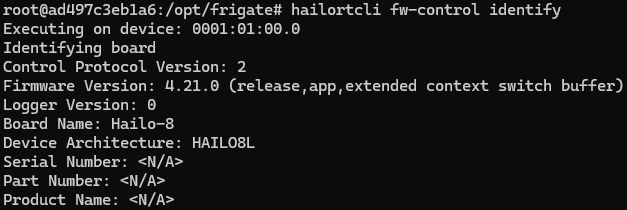
  2. Checked device and runtime:
    hailortcli --version # 4.21.0
    hailortcli scan # shows 0001:01:00.0
    hailortcli fw-control identify # chip: HAILO8L

==> Ok, device recognized and firmware loaded

  1. Checked my model: ==> Ok.
    → Input = NHWC 640×640×3 UINT8
    → Output = YOLOv8 NMS FLOAT32 (class-by-class)

4\. Performed runtime-test:

Inference is ok. :white_check_mark:
But when I check for warnings I still have messages like these:
*- hailo_vdma_buffer_map+0x14c/0x628 [hailo_pci]

  • hailo_vdma_ioctl+0x12c/0x268 [hailo_pci]*

So I think the problem I have might be caused by a mismatch between Kernel and Hailo Suite version.

Kernel: 6.12.47+rpt-rpi-2712
Hailo Suite: 4.21.0

Possible solution:

  1. Downgrade Kernel

  2. Upgrade Hailo to 4.23

What would be the best thing to do?

Hey @Hendrik_Mys,

Welcome to the Hailo Community!
You’re absolutely right—there is a mismatch there. You’ve got two paths forward:

  1. Stick with the 4.21 driver and use the ready-made Docker image from Frigate
  2. Run the updated Docker with 4.23 instead

Here’s my take: I’d recommend staying on 4.21 for about a week or so. The hailo-all package is moving to 4.23 very soon, and we’re updating all the apps to match. We’re also working with Frigate to get their Docker image updated to 4.23 as well. Once that lands, it’ll make using the Frigate Docker setup much more straightforward.

In the meantime, we’ll be updating our guide to cover the 4.23 setup, which should make the whole process clearer for everyone.

Hopefully the transition should be smooth!

Hi Omria,

thanks for the reply.

In the meantime, I managed to ‘solve’ the mismatch between the Kernel and Hailo suite version. Unfortunately the error remains:

***File “/opt/frigate/frigate/detectors/plugins/hailo8l.py”, line 370, in detect_raw
***IndexError: det.shape[0] < 5.

To check the function of the AI HAT+ and the HAILO chip, I loaded a standard model from the Hailo Model Zoo and this works :slight_smile: .

I think we can conclude here that:

  • Pi 5 :white_check_mark:
  • Frigate :white_check_mark:
  • AI HAT+ (Hailo8l) :white_check_mark:

So for me the only reason it could still fail is my custom model to detect ‘Herons’.
Some research made me conclude this: (of course correct me if I’m mistaking)

The ‘IndexError: det.shape[0] < 5’ occured because my Hailo model (.hef) gave a raw Yolo output: [1, 5, 8400] and not a ready to use format for Frigate (x1, y1, x2, y2, score, class). Does Frigate expect post NMS boxes :thinking: .
Because the post processing is missing, Frigate gives an empty or 0-dimensional array whch triggers the index error.

Because I have no hardware available which is suitable to make my custom model, I used Colab to do the training of the model. This gave me a .pt-file.
For the conversion to a .hef-file, I used Degirum.

Does my reasoning sound logical?
Is there a way to solve this and what is the best way?

Or maybe, just have a bit of patience for the Updates (very hard :rofl: )

Thanks for the advice!

Hi @Hendrik_Mys

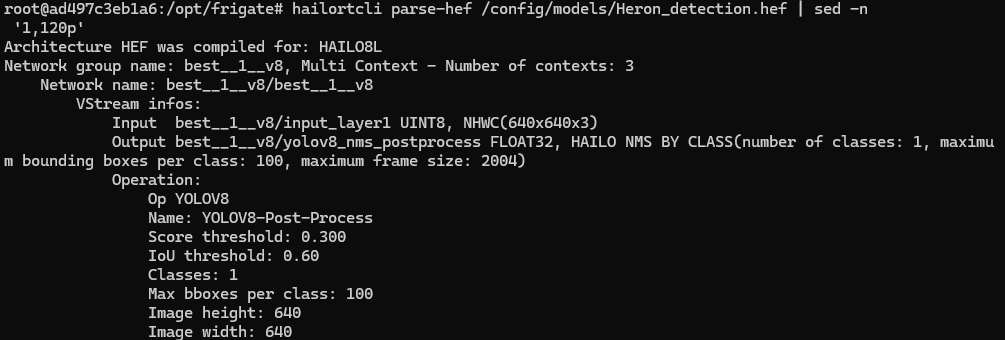
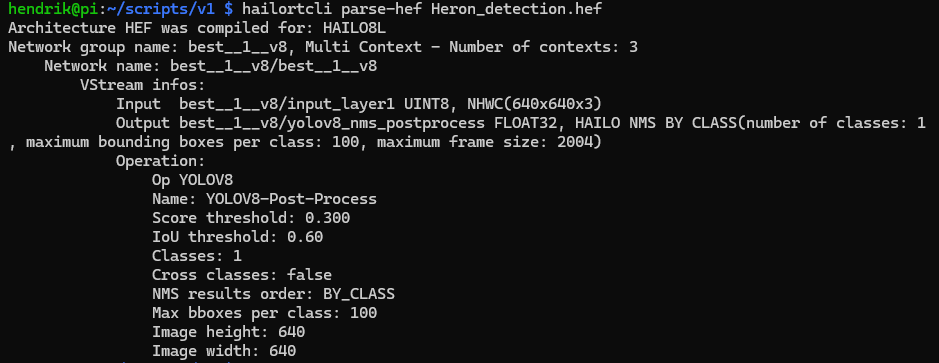
In your previous post, you shared the output of parsing the hef file and it can be seen from your screenshot that the output of your model hef is after NMS and not the YOLO output [1,5,8400].

Hi @shashi,

Thanks for the reply.
Indeed, my answer is in the post I did myself. My model seems to be good, Frigate works with other models so normally everything should be fine.

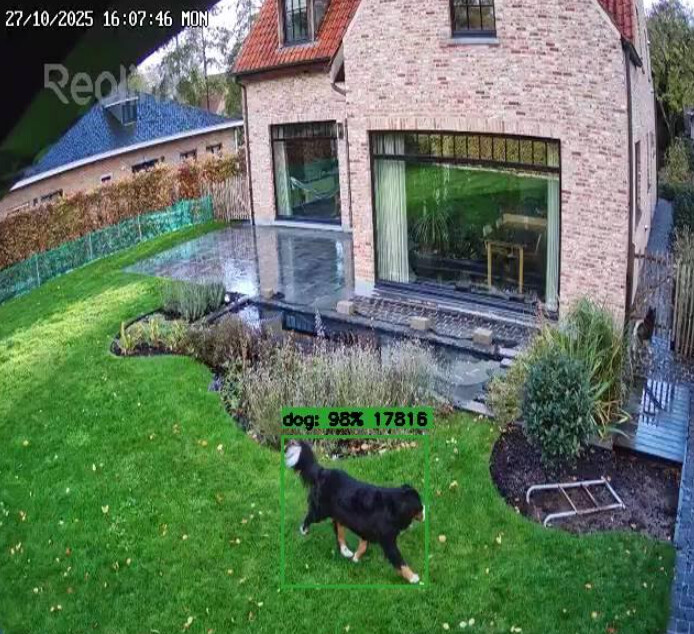
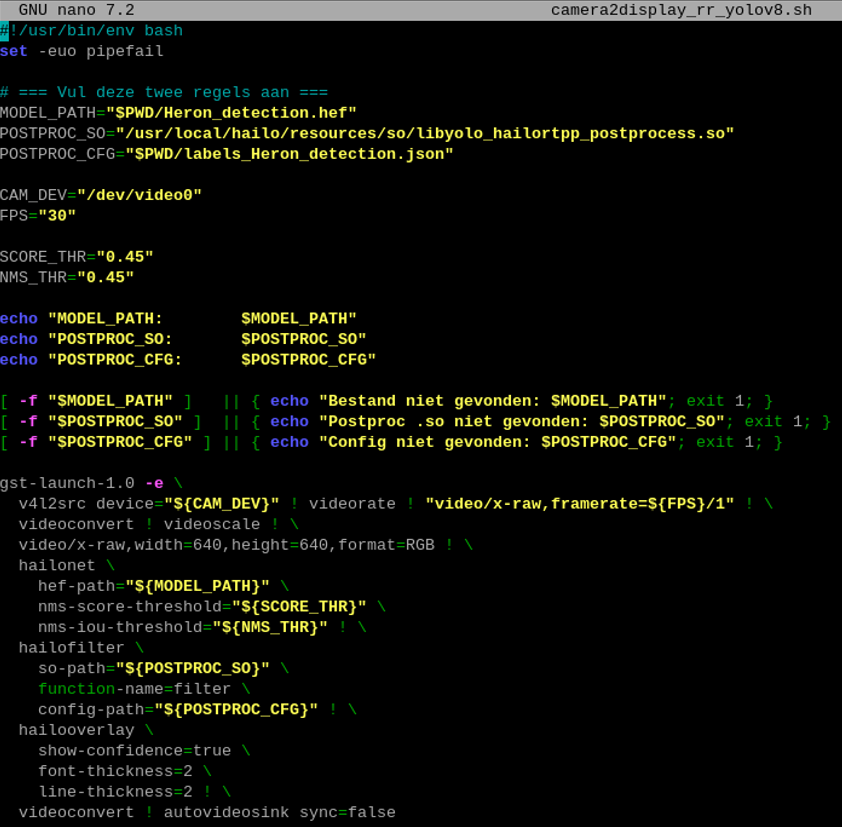
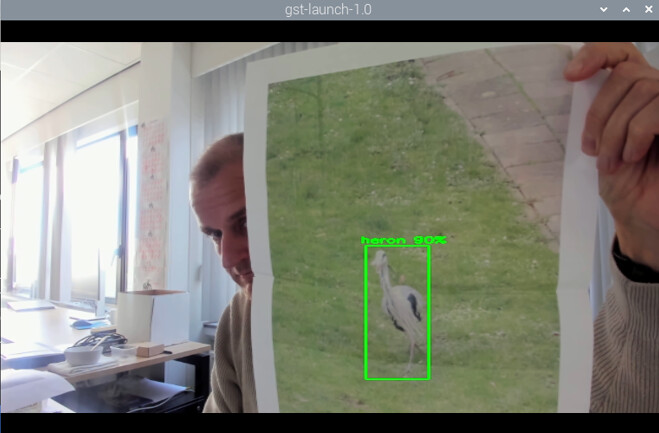
To do an extra check of the model, I tried a small Python script to run my model:

Below the result of the test.

So the model if fine for sure :partying_face: .

To be completely sure, I rebuild my setup from scratch and I use a very simple frigate configuration based on what I found here in the community ( Hailo official integration with Frigate ) and using a simple USB camera:

mqtt:
enabled: false

ffmpeg:
hwaccel_args: preset-rpi-64-h264

detectors:
hailo8l:
type: hailo8l
device: PCIe

detect:
enable: true

snapshots:
enabled: true
retain:
default: 7

model:
path: /config/model_cache/heron.hef

cameras:
usb_cam:
ffmpeg:
inputs:
-path: /dev/video0
input_args:
-f
v4l2
-input_format
mjpeg
roles:
detect
record

This all still results in Frigate getting stuck and stopping detection with errors like:

  • *if det.shape[0] < 5:
  • IndexError: tuple index out of range

To be honest, no ideas anymore at the moment, so any idea/remark/help would be great.

Thanks.

Hey @Hendrik_Mys,

Based on what we’ve discussed, I think the issue is one of two things:

  1. Your HEF’s postprocessing might not be compatible with Frigate’s implementation. It’s strange since both use NMS, but this could still be causing the problem.

  2. Version mismatch - this is important:

    • If you’re on Frigate 4.21, use model zoo 2.15
    • If you’re on Frigate 4.20, use model zoo 2.14 or earlier
    • If you’re on Frigate 4.23, use model zoo 2.16 or 2.17

    (Something changed in the inference and HEF file handling between versions)

Can you let me know which Frigate version you’re running and which model zoo version you used to compile the model?

Hey Omria,

I used the DeGirum online conversion tool to convert my ‘*.pt’ model to ‘*.hef’. I did not explicitly select a model zoo version in the UI, so I’m not sure which model zoo version was used under the hood.

I’m running Frigate in Docker on a Raspberry Pi 5 (Pi OS Bookworm).
Frigate version: 0.16.2-4d58206.

Hey @Hendrik_Mys ,

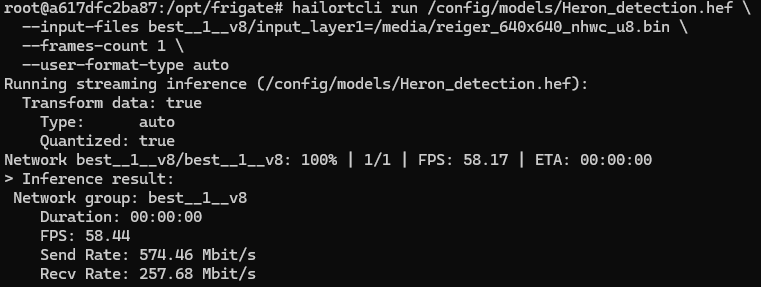
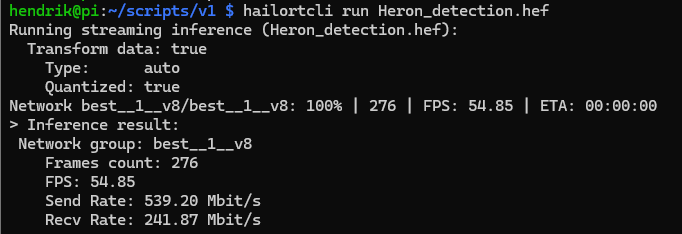
Can you run :

hailortcli parse-hef {model}
hailortcli run {model}!

Hey Omria,

here the results:

Kind regards,

Hendrik

Hey @Hendrik_Mys ,

The current code in Frigate is trying to iterate over detections and access array indices that don’t exist in the structure your single-class model outputs. It’s expecting a certain detection shape, but when your model returns results in this specific format, the array dimensions don’t match up - hence the tuple index error that’s causing Frigate to crash.

I don’t know yet if its a bug for all models with nms and works with the default yolov6n or just for youre custom model , i will look into this further as i plan on updating some of the detection code in frigate ( i wrote the current one , so if this is a bug i will fix it )

For you , I’d recommend updating the detect_raw function in Frigate to handle your custom model properly. Here’s a modified version with better validation:

def detect_raw(self, tensor_input):
    tensor_input = self.preprocess(tensor_input)
    if isinstance(tensor_input, np.ndarray) and len(tensor_input.shape) == 3:
        tensor_input = np.expand_dims(tensor_input, axis=0)
    request_id = self.input_store.put(tensor_input)
    try:
        _, infer_results = self.response_store.get(request_id, timeout=1.0)
    except TimeoutError:
        logger.error(
            f"Timeout waiting for inference results for request {request_id}"
        )
        if not self.inference_thread.is_alive():
            raise RuntimeError(
                "HailoRT inference thread has stopped, restart required."
            )
        return np.zeros((20, 6), dtype=np.float32)
    threshold = 0.4
    all_detections = []
    
    # Handle HAILO NMS BY CLASS format
    if isinstance(infer_results, list):
        for class_id, detection_set in enumerate(infer_results):
            if not isinstance(detection_set, np.ndarray) or detection_set.size == 0:
                continue
            # detection_set shape is (num_detections, 5) where 5 = [y_min, x_min, y_max, x_max, score]
            if len(detection_set.shape) != 2 or detection_set.shape[1] != 5:
                continue
            for det in detection_set:
                score = float(det[4])
                if score < threshold:
                    continue
                # Format: [class_id, score, y_min, x_min, y_max, x_max]
                all_detections.append([class_id, score, det[0], det[1], det[2], det[3]])
    if len(all_detections) == 0:
        detections_array = np.zeros((20, 6), dtype=np.float32)
    else:
        detections_array = np.array(all_detections, dtype=np.float32)
        if detections_array.shape[0] > 20:
            detections_array = detections_array[:20, :]
        elif detections_array.shape[0] < 20:
            pad = np.zeros((20 - detections_array.shape[0], 6), dtype=np.float32)
            detections_array = np.vstack((detections_array, pad))
    return detections_array

Give this a try and let me know if it resolves the issue!

Hey Omria,

thanks a lot for all the effort!

I updated the ‘detect_raw’ function in Frigate, and YES this is a very nice workaround.
I tested Frigate with this update en detection’s are made. :partying_face:

I used the default yolov6n and this works without any problem. So unfortunately, at the moment, my custom model is the only one which fails in Frigate. :man_shrugging:

Again thanks for the help. Hopefully, a quick fix can be found for the Frigate problem.

Kind regards,

Hendrik

1 Like