Hey @Jubesh_Joseph,
Welcome to the community!
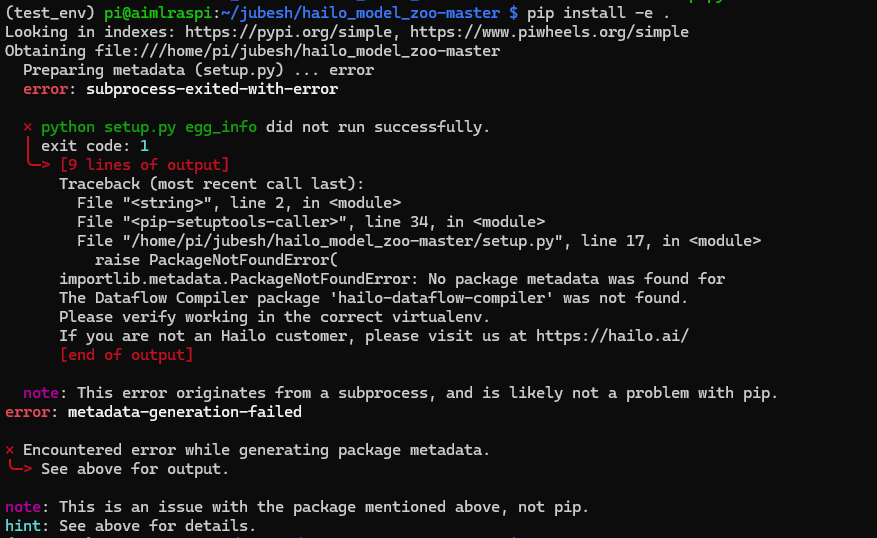
You’ll need to install the DFC (data flow compiler) in your virtual environment to get the hailo-model-zoo working. You can grab it from the developer zone:
Let me know if you need any help with the setup!
Continuing the discussion from Hailo-dataflow-compiler not found:
ok, so do i need to install it on the target device? in order to run some inference using the target?
No, the DFC and Hailo Model Zoo are just for compiling your models. When it comes to actually deploying them, you’ll need the HailoRT driver and HailoRT itself.
So basically, you’ll want to install the DFC on whatever PC you’re using for compilation, and then install HailoRT and the driver on your target device (like your RPi5 or whatever you’re deploying to).
Hope that clears things up!
ok i got it, thanks omria.
1 Like
Hello. Have same problem
DFC is installed":
$ pip list | grep hailo-dataflow-compiler
hailo-dataflow-compiler 3.33.0
but:
hailo_model_zoo$ pip install -e .
…
importlib.metadata.PackageNotFoundError: No package metadata was found for
The Dataflow Compiler package ‘hailo-dataflow-compiler’ was not found.
1 Like
Hey @Oleksii_Khrenov,
Welcome to the Hailo Community!
There are a couple of things that might be causing this issue:
- Version check: Which version of the MZ are you running - 2.17 or 2.16? If you’re on a 5.x version, that’s the issue right there. The 5.x versions are specifically for H10, so you’ll need to switch to either 2.17 or 2.16 for your setup.
- Virtual environment: Are you working within a virtual environment? I’d recommend trying this in a venv rather than installing directly to your system packages - that often clears up dependency conflicts.
Could you open a new topic for this? That way we can dive deeper into troubleshooting and keep everything organized. Happy to help you get this sorted!