Hi, I tested yolov8m on Asus UGen300 (Hailo-10H via USB 3.1) using the hailortcli benchmark tool, but the FPS is significantly lower than the Model Zoo reference.
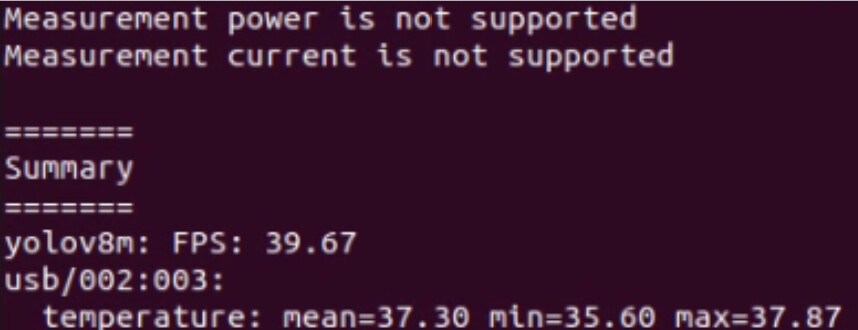
Command: hailortcli benchmark yolov8m.hef --power-mode ultra_performance
Result: 39.67 FPS
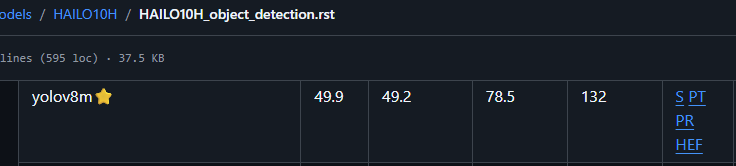
Model Zoo reference: 49.9 FPS
Is this gap due to USB 3.1 vs PCIe Gen3 x4 bandwidth?
Also, on Hailo-8, hailortcli run can be used to monitor in/out bandwidth. On UGen300 (Hailo-10H), this command doesn’t seem to work — is this a hardware limitation of the USB interface, or am I using it incorrectly?
Hi @Hans_Weber,
Do you have 3A port?
Can you please run hailortcli fw-control identify and share the result?
Thanks,
Michael.
Hi @Hans_Weber,
Can you please share also:
lsusb -t -v in both good vs bad infer times?dmesg log?
Thanks,
Hi Michael
I wanted to share an update regarding our recent performance testing and bring up two specific issues we encountered.
1. USB 3.1 Performance Improvement & Thermal Shutdown Issue
We confirmed that the root cause of the previous low performance was indeed the USB interface. When connected via USB 3.1 (10Gbps), the inference speed almost doubled and successfully matched the benchmark.
However, after switching to the USB 3.1 interface, we started experiencing thermal shutdowns during our long-term stress tests.
Test Environment: Room temperature ~25°C
(Temperature data was logged at 1 minute intervals with ‘hailortcli monitor’ command)
- Command Used (12-hour test):
hailortcli benchmark yolov8m.hef --power-mode ultra_performance -t 43200
- Observations:
-
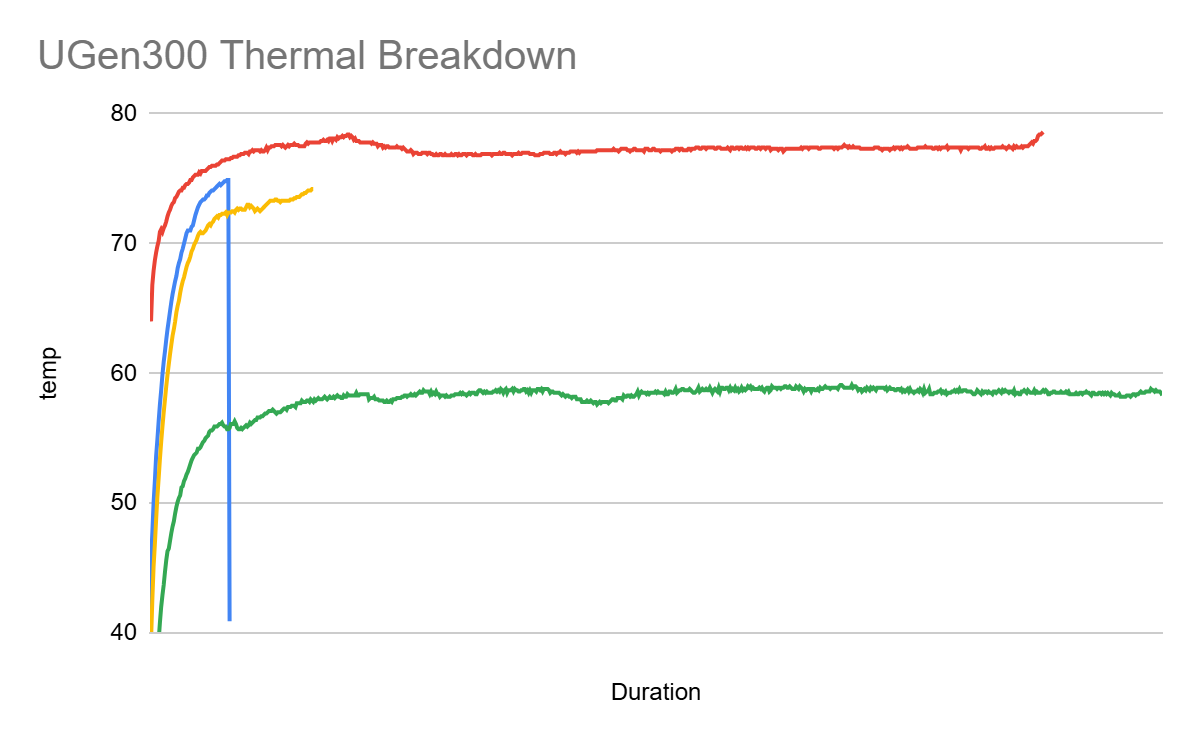
USB 2.0 connection: Performance was lower, but the system operated stably with normal temperatures.(Green Line)
-
USB 3.1 (10Gbps) connection: Performance doubled, but thermal shutdown occurred in all three test iterations (stopping at 1 hour(blue Line), 2 hours(yellow Line), and 10 hours(red Line) respectively).
Are there any recommended thermal management guidelines or corrections we should apply to our command or setup?
2. Inquiry on Batch Size Performance
|
Hailo 10H (MZ git)_batch_1 |
UGen300 USB3.1(batch 1) |
Hailo 10H (MZ git)_batch_8 |
UGen300 USB3.1(batch 8) |
| yolov5m |
111 |
110.96 |
175 |
111.01 |
| yolov5s |
250 |
201.06 |
304 |
203.92 |
| yolov6n |
546 |
211.65 |
547 |
214.04 |
| yolov7 |
54.9 |
54.9 |
85 |
54.94 |
| yolov8l |
40 |
39.95 |
61 |
39.95 |
| yolov8m |
78.5 |
78.5 |
132 |
78.48 |
| yolov8n |
378 |
171.89 |
388 |
182.22 |
| yolov8s |
166 |
166.26 |
261 |
166.39 |
| yolov8x |
25.8 |
25.7 |
38.6 |
25.69 |
| yolov9c |
54.5 |
54.48 |
90.1 |
54.51 |
We also noticed that the inference throughput (FPS) on our UGen300 setup remains virtually identical between Batch 1 and Batch 8, even though the Hailo 10H benchmark shows scaling.
As shown in the table below, yolov8m reaches 132 FPS on the Hailo benchmark with Batch 8, but remains at ~78.5 FPS on our UGen300 setup.
Here are the commands we used:
Could you please verify if these commands are correct for benchmarking batch performance? If the commands are correct, could you explain why we are not seeing a performance difference between batch 1 and batch 8?
Best regards,
Hi @Hans_Weber ,
May I kindly ask for the following details we need in order to fully diagnose the issue?
- What thermal solution are you using? Were these tests done with the official ASUS case?
- You mentioned USB 2.0 vs USB 3.1 Gen 2 (10 Gbps) - I want to double-check that it was indeed USB 2.0 and not USB 3.1 Gen 1 (5 Gbps)?
- What was the connector type in both cases?
- What is the port port power rating in both cases (3A)?
- Can you please run with
hailortcli monitor and plot the “on die voltage”? We currently suspect a power issue rather than a thermal one.
Regarding --power-mode ultra_performance: this flag is not relevant for Hailo-10H (it only applies to Hailo-8).
Thanks,
Hi Michael
Thank you for your response. Please find the details below to help clarify the testing environment and address your queries:
-
Thermal Solution & Case: The tests were conducted using the official ASUS case as provided out-of-the-box. No modifications or custom thermal solutions were applied.
-
USB Connection Speed & Connector Type:
Current Setup (Benchmark achieved): We are currently using the official C-to-C cable included with the ASUS UGen300 package. As shown in the lsusb -t output below, it is successfully operating at 10 Gbps (USB 3.1 Gen 2):/: Bus 02.Port 1: Dev 1, Class=root_hub, Driver=xhci_hcd/9p, 20000M/x2|__ Port 1: Dev 4, … Driver=, 10000M
Previous Setup: The lower performance observed previously was indeed due to a 5 Gbps bottleneck caused by a longer, third-party C-to-C cable. Switching to the official bundled cable resolved the link speed issue and aligned the benchmark performance with the Hailo Model Zoo guidelines.
-
Port Power Rating: The device is connected to a Thunderbolt-supported Type-C port (ACPI: SSDT … TbtTypeC). I thought this port can provide enough power within the required standards. If there is a specific method or log you require to verify the exact current handshake (e.g., 3A), please let me know.
-
On-Die Voltage (hailortcli monitor): We monitored the “On Die Voltage” during the runs. The voltage remains remarkably stable, fluctuating only between a minimum of 792 mV and a maximum of 798 mV.
Thanks
1 Like
Hi Hailo
Additionally, we are trying to benchmark an LLMhef file obtained from the Hailo GenAI Model Zoo.
Although we followed the HailoRT documentation to execute commands such as benchmark, run, and run2, the execution is not working as expected.
Could you please provide the correct, verified methods or exact commands required to measure the inference speed of language models? If there is a specific user guide or a reference script dedicated to LLM benchmarking that we might have missed, please let me know.
Thanks
1 Like
Hi @Hans_Weber,
Regarding "if there is a specific method or log you require to verify the exact current handshake":
Can you please run hailortcli fw-control identify? If it’s 1.5A or 0.9A, there is a warning saying so. If the port does support 3A, there is no warning.
Something like:
“USB-C source electrical current advertised: 0.9A. The module may run in reduced-performance mode. For full performance, use a USB-C port that advertises 3.0A.”
In addition, can you please run hailortcli run2 -t 43200 --measure-temp set-net /path-to/yolov8m.hef?
We manage to reproduce that the monitor had stopped monitoring, but the infer is still alive.
run2 will always get output to see that the device is alive, while when running with benchmark for 12h , there is not output from the tool, so monitoring that stopped can be misleading here in a sense.
Thanks,
1 Like
Hi @Hans_Weber,
The standard hailortcli benchmark (and run /run2 ) commands are designed for traditional vision models with fixed input/output shapes. They measure FPS, latency, and power for streaming CNN-style inference. They do not support autoregressive token generation required by LLMs.
Please Use the GenAI examples from HailoRT tutorials - they wrap the C++ API with the proper KV-cache management and autoregressive generation, and then it should be easy to calculate times. Please see here:
However:
The accelerator is strongest in workloads that are compute-heavy up front, not workloads dominated by token-by-token (TBT) generation. In practice, this means it shines when you need the CPU available and responsive while running generative AI applications with the following profiles:
- Fast execution of encoders – turning visual, audio or text input into prompt embedding
- Short time to first token (TTFT) – when interactivity and user experience are critical
- Large prefill – when ingesting fresh data, in which the input context is larger than the output response
- Multi-stage pipelines – when sequential processing is needed, in which the output of one model becomes the input of the next
For example: VLMs map naturally to the strengths, because the image encoder is a high-compute stage that produces a compact token embedding as output. The Hailo-10H enables event triggering, logging, indexing, captioning, and smart search using free text, using a 2B-parameter model, which would be prohibitively slow to run on the CPU alone.
Thanks,
Hi Michael
Thank you for the quick and detailed guidance. I was able to confirm that the benchmark performance figures are very close to the Hailo gen ai Model Zoo git hub.
The model load time seems to take slightly longer on UGen300 compared to the time stated on GitHub. Is this difference caused by the variation between PCIe Gen 3 x4 lanes and USB 3.1 10Gbps? It’s not an issue for our use case, but I’m just asking out of curiosity.
Thanks
Hi @Hans_Weber,
Theoretically yes - 10 Gbps and 32 Gbps are only theoretical numbers, and huge effect for example is on the disk type (the HEF is read from the disk).
Thanks,
1 Like