Tracking messes up instance segmentation in example pipeline app

I am running into an issue running the python instance_segmentation pipeline app example. The segmentation masks do not match the image very well.

I was saving the frames of my custom app for review, and I noticed that the segmentation masks did not match the images. After spending a while trying to figure out what went wrong, I tried the python example app and noticed the same issues.

At this point, I realized that the last time I had seen good segmentation masks was before I added tracking to my app, so I removed it from the example’s instance_segmentation_pipeline.py file. With that removed, the segmentation masks align as expected.

I made a small edit to the example code to output a few frames for review:
Before edit to instance_segmentation_pipeline.py:
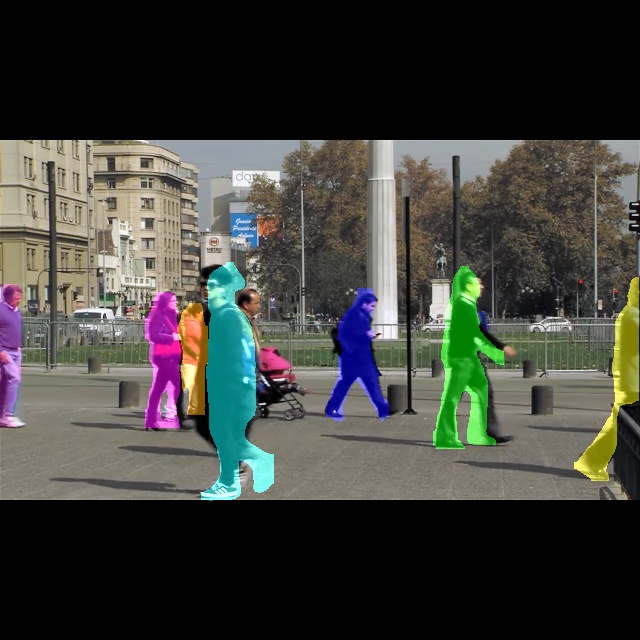
After edit to line 171 of instance_segmentation_pipeline.py:

        pipeline_string = (
            f"{source_pipeline} ! "
            f"{infer_pipeline_wrapper} ! "
            # f"{tracker_pipeline} ! "
            f"{user_callback_pipeline} ! "
            f"{display_pipeline}"
        )
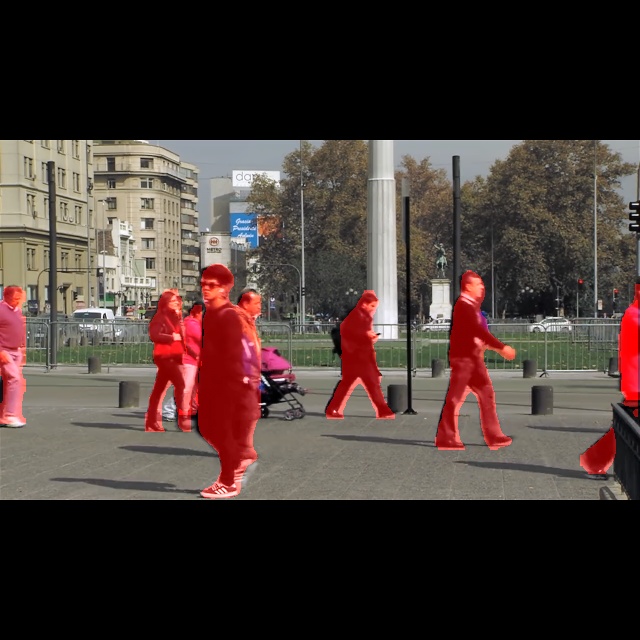

(note, the lack of different colors is due to all detection’s having the same id due to the removed tracking)

In some frames the mask looks like it was held from a prior frame. In others the mask doesn’t fit any surrounding frame.

Just to make sure I didn’t break anything, I did a “git restore” & “git cleanup” on the hailo-apps directory to remove any changes that may be causing it. I still get the same results.

At one point I thought it might be an issue with the default yolov5m_seg model, so I tried the yolov8m_seg. It took a bit to get it working, since the postprocessing c++ code for that model didn’t exists, but once I did I saw the same behavior.

Can anyone else confirm if this behavior?

I am using an RPi5 with a relatively fresh install of Raspberry PI OS (62-bit), with a Hailo8 AI+ hat.

$ hostnamectl
 Static hostname: xxxxxxxxxxxxxxx
       Icon name: xxxxxxxxxxxxxxx
      Machine ID: xxxxxxxxxxxxxxx
         Boot ID: xxxxxxxxxxxxxxx
Operating System: Debian GNU/Linux 13 (trixie)    
          Kernel: Linux 6.12.75+rpt-rpi-2712
    Architecture: arm64


$ hailortcli fw-control identify
Executing on device: 0001:01:00.0
Identifying board
Control Protocol Version: 2
Firmware Version: 4.23.0 (release,app,extended context switch buffer)
Logger Version: 0
Board Name: Hailo-8
Device Architecture: HAILO8

Hi @Mark_R,

The HailoTracker uses a Kalman filter to keep objects alive through brief detection misses (if they occur).

The tracker creates a predicted bounding box and carries forward all the old metadata unchanged - including the segmentation mask from the last real detection. So you get a stale pixel-level mask from frame N shown on frame N+i at a new predicted box position.

Thanks,

Hello,

I am not sure that my issue is stale masks due to a detection miss. The following images show it a bit clearer. The masks do not align with any of the prior frames, but if I remove tracking the masks align nicely. This is most noticeable by looking at the detection of the front tire on frames 3 and 4.

If the Kalman filter is passing the masks unchanged, then I would expect the detection to match either the current frame or a previous frame. That is not what I see. Is it possible that the sample code is grabbing the predicted state of the Kalman filter instead of the unchanged mask?

First 4 frames of a sample video with tracking enabled:


Frames processed with tracking removed:


Hi,

Thanks @Mark_R, I previously described a bit different phenomena. The issue you’re referring not related to detection gaps, rather during normal operation:

  1. Inference runs and produces a detection with a fresh segmentation mask. The mask pixels are computed relative to the raw detected bounding box.
  2. The tracker matches this detection to an existing track and runs a Kalman filter update, which smooths the bounding box position (blending the new raw detection with the predicted state).
  3. The tracker then overwrites the detection’s bounding box with this Kalman-smoothed position - but the mask data stays unchanged.

So the mask was generated for the raw detection bbox, but gets rendered inside a smoothed bbox that’s been shifted by the Kalman filter. That’s why the mask doesn’t align with the current frame (the box has moved) or any prior frame (the mask is fresh, not stale).

For bounding boxes, this smoothing is the whole point of tracking - it reduces jitter. For pixel-level masks, it’s destructive because the mask silhouette was computed to fit the object at one exact position but gets drawn at a different, smoothed position.

So for detection misses: stale mask + predicted bbox. For matches: fresh mask + smoothed bbox. Both are wrong for masks, but for different reasons.

Hope now my explanation is more clear.

Thanks,

Thanks @Michael for taking the time to look into this and write up an explanation. That seem to fit with what I am seeing.
Is there any way to get the unfiltered bounding box?

I don’t see how to edit a post, so I’m just adding an update.

I managed to get it working by patching in another callback before the tracker. The first callback logs the detection info. The post-tracker callback then matches the logged detections to the tracker IDs, and handles the final post-processing tasks.

I’ll need to work on the matching to make it robust when there are several nearby detections, but for now it is meeting my needs.

1 Like

Hi @Mark_R happy to hear and very nice solution, kudos!