Subject: Hailo-10H (AI HAT+) - Firmware load failed: DDR Safety Fatal Interrupt (Error -110)

Hi Hailo Community,
I am experiencing a persistent firmware loading failure with my Hailo-10H module on a Raspberry Pi 5 (using the official Raspberry Pi AI HAT+ and the official 27W Power Supply). I have been troubleshooting this for 3 weeks and suspect a hardware issue with the DDR subsystem on the module.
Environment:
Host: Raspberry Pi 5 (16GB)
OS: Raspberry Pi OS (Debian Trixie / Kernel 6.12)
Kernel Page Size: Switched to 4KB (kernel8.img)
Driver Version: 5.2.0 (compiled via DKMS for the current kernel)
Boot Parameters: iommu=off, pcie_aspm=off, dtparam=pciex1_gen=2 (also tested on Gen 1)
The Issue:
The driver successfully probes the device, reads the SKU-ID (6), and writes the customer_certificate.bin, scu_fw.bin, and the signed DTB. However, it consistently fails at Stage 2 (SOC firmware / image-fs) with a timeout error -110.
Critical SCU Log Output:
The SCU log reveals a fatal hardware interrupt during DDR initialization:
text
[ 10.206903] hailo1x 0001:01:00.0: SCU log:
[ 10.206905] hailo1x 0001:01:00.0: [ 0.000000] SCU-FW v1.9.0 [b9f32b9a]
[ 0.000000] [FWK] Module initialization complete!
[ 0.048765] [BOOT] SCU-FW notified PCIe host, ready to receive boot DTB image
[ 0.063746] [BOOT] PCIe host completed sending boot DTB image
[ 0.084734] [SAFETY] SCU failure: safety fatal interrupt
[ 0.084910] [SAFETY] safety_agg_status = 0x00000080
[ 0.085078] [DDR] DDR failed: unexpected safety fatal interrupt
[ 0.085276] [DDR] subsys: 0x7C068008=0x00000020 (mask=0x00000037)
Kód používajte opatrne.

Steps already taken:
Verified all firmware files are present in /lib/firmware/hailo/hailo10h/.
Ensured 4KB PAGE_SIZE is active.
Disabled IOMMU and ASPM.
Tested with PCIe Gen 1 for signal integrity.
Performed multiple cold boots (30s power-off).
Checked the FPC cable connection (shielded 35mm cable).
Since the SCU explicitly reports a Safety Fatal Interrupt and DDR failure immediately after the DTB transfer, is this a confirmed hardware defect? Could it be a power delivery issue on the AI HAT+ or a faulty DDR controller on the Hailo-10H module itself?
Any guidance on whether this requires an RMA would be greatly appreciated.
Thanks!

Hi @user562 ,

Can you please confirm that the official installation procedure works for you?
https://www.raspberrypi.com/documentation/computers/ai.html

Then trying to install our official hailo-apps examples: GitHub - hailo-ai/hailo-apps

Thanks,

Of course, I followed the official procedure first. Followed the official Raspberry Pi installation procedure for the Hailo-10H (AI HAT+2), which failed at the firmware loading stage with a timeout error. Attempts using alternative methods, including one from RonsTechHub, resulted in the same error message: “hailo1x 0001:01:00.0: Timeout waiting for firmware file”. The user emphasizes that a previous SCU log indicated a Safety Fatal Interrupt related to DDR failure, preventing the hailo1x driver from activating the board and running hailo-apps examples.

@user562 , can you please try the cleanup procedure here? Raspberry Trixie Error with Guide (Pi 5, AI Hat 2) - #18 by Michael

I can also do a clean install with an RPI Connect account, which I’ll let you know and you can connect directly. I’ve tried that so many times that I know what the result will be. I should get a new PCIex cable today. Maybe that will make a difference.

Hi,

Let’s manually upgrade to HailoRT 5.2.0 (not via sudo apt install hailo-h10-all):
First step perform above cleaning.
Second step - download from Hailo developer zone: https://hailo.ai/developer-zone/

  1. HailoRT debian
  2. PCIe driver debian
    Install them via sudo apt install (first PCIe driver), then reboot.

I tried this way over 10 times. Without installing sudo apt install hailo-h10-all. But I’ll try again.

@user562 Are you currently running HailoRT 5.2.0?

YES

[ 9.955554] hailo1x 0001:01:00.0: Timeout waiting for firmware file
[ 9.955559] hailo1x 0001:01:00.0: Failed writing SOC firmware on stage 2
[ 9.956362] hailo1x 0001:01:00.0: SCU log:
[ 9.956364] hailo1x 0001:01:00.0: [ 0.000000] SCU-FW v1.9.0 [b9f32b9a] (based on SCP-Firmware v2.14.0 [98f81610], Hailo SCMI v0.50.0)
[ 0.000000] [CC] LCS: 5
[ 0.000000] [MERCURY_FUSES_INFO] ULT ID: 0060C1AB682CA15000004E79
[ 0.000000] [MERCURY_FUSES_INFO] H265 fuse out is set
[ 0.000000] [MERCURY_FUSES_INFO] ISP fuse out is set
[ 0.006234] [FWK] Module initialization complete!
[ 0.028004] [MBIST] ISP subserver is not supported, skipping vision mbist
[ 0.028226] [MBIST] H265 subserver is not supported, skipping H265 mbist
[ 0.048765] [BOOT] SCU-FW notified PCIe host, ready to receive boot DTB image
[ 0.055206] [BOOT] PCIe host completed sending boot DTB image
[ 0.076227] [SAFETY] SCU failure: safety fatal interrupt
[ 0.076402] [SAFETY] safety_agg_status = 0x00000080
[ 0.076571] [DDR] DDR failed: unexpected safety fatal interrupt
[ 0.076769] [DDR] subsys: 0x7C068008=0x00000020 (mask=0x00000037)
[ 0.076989] [DDR] error bits:
[ 0.077109] [DDR] - bit
[ 9.956371] hailo1x 0001:01:00.0: Firmware load failed
[ 9.956422] hailo1x 0001:01:00.0: Failed activating board -110
[ 9.956438] hailo1x 0001:01:00.0: probe with driver hailo1x failed with error -110

@user562 Driver & HailoRT are installed Debian’s or compiled from source?

I tried it anyway. With the same result.

I’ll try replacing the PCIex cable. I’ve been trying everything for over three weeks now.

@user562

  1. Looking back at your first post, I see you already tried 5.2.0.
  2. There may be a hardware issue. If so, we can provide PCIe test scripts so we can investigate further.
  3. Before that, we still think there might be an installation mix‑up between versions.
  4. Could you please start with a fresh SD card (Trixie) and follow the official sudo apt install hailo-h10-all install for 5.1.1?

I will install fresh Trixie and follow the official instructions exactly.
I will let you know the result.

1 Like

Clean install Raspberry Pi OS (64-bit) Trixie

sudo raspi-config —> Enable PCIe Gen 3.0 —> reboot

sudo apt update
sudo apt full-upgrade -y
sudo rpi-eeprom-update -a
sudo reboot

sudo apt install dkms
sudo apt install hailo-h10-all

log:
Setting up h10-hailort-pcie-driver (5.1.1) …
WARNING: apt does not have a stable CLI interface. Use with caution in scripts.
build-essential/stable,now 12.12 arm64 [installed]
Failed to install PCIe driver to the DKMS tree. Trying to install PCIe driver without DKMS
Please reboot your computer for the installation to take effect.

sudo reboot

hailortcli fw-control identify
null


modinfo hailo1x_pci | grep version
version: 5.1.1
srcversion: 91E9D74EDE47C04DA180EBD
vermagic: 6.12.62+rpt-rpi-2712 SMP preempt mod_unload modversions aarch64

dpkg -l | grep hailo
ii h10-hailort 5.1.1 arm64 AI acceleration runtime library for Hailo hardware
ii h10-hailort-pcie-driver 5.1.1 all Hailo PCIe driver and firmware for AI hardware acceleration
ii hailo-h10-all 5.1.1 all Hailo-10 support (metapackage)
ii hailo-models 1.0.0-2 all AI models for Hailo modules
ii hailo-tappas-core 5.1.0 arm64 Core components of the Hailo TAPPAS platform
ii python3-h10-hailort 5.1.1-1 arm64 HailoRT Python API, which wraps the runtime library
ii python3-hailo-tappas 5.1.0 arm64 Python binding for tappas
ii rpicam-apps-hailo-postprocess 1.11.1-1 arm64 Raspberry Pi AI HAT+ post-processing plugin for rpicam-apps

dmesg | grep -i hailo
[ 2.614886] hailo1x_pci: loading out-of-tree module taints kernel.
[ 2.615456] hailo1x: Init module. driver version 5.1.1
[ 2.615534] hailo1x 0001:01:00.0: Probing on: 1e60:45c4…
[ 2.615539] hailo1x 0001:01:00.0: Probing: Allocate memory for device extension, 11240
[ 2.615554] hailo1x 0001:01:00.0: enabling device (0000 → 0002)
[ 2.615559] hailo1x 0001:01:00.0: Probing: Device enabled
[ 2.615589] hailo1x 0001:01:00.0: Probing: mapped bar 0 - 00000000f56ff192 16384
[ 2.615593] hailo1x 0001:01:00.0: Probing: mapped bar 2 - 00000000da44aec6 4096
[ 2.615596] hailo1x 0001:01:00.0: Probing: mapped bar 4 - 000000001bc3e9a4 16384
[ 2.615599] hailo1x 0001:01:00.0: Probing: Setting max_desc_page_size to 4096, (PAGE_SIZE=16384)
[ 2.615607] hailo1x 0001:01:00.0: Probing: Enabled 64 bit dma
[ 2.615611] hailo1x 0001:01:00.0: Disabling ASPM L0s
[ 2.615615] hailo1x 0001:01:00.0: Successfully disabled ASPM L0s
[ 2.619954] hailo1x 0001:01:00.0: Writing file hailo/hailo10h/customer_certificate.bin
[ 2.624965] hailo1x 0001:01:00.0: File hailo/hailo10h/customer_certificate.bin written successfully
[ 2.624972] hailo1x 0001:01:00.0: Writing file hailo/hailo10h/scu_fw.bin
[ 2.682950] hailo1x 0001:01:00.0: File hailo/hailo10h/scu_fw.bin written successfully
[ 2.739038] hailo1x 0001:01:00.0: Board SKU-ID is: 6
[ 2.739047] hailo1x 0001:01:00.0: Writing file hailo/hailo10h/u-boot-6.dtb.signed
[ 2.748185] hailo1x 0001:01:00.0: File hailo/hailo10h/u-boot-6.dtb.signed written successfully
[ 7.907574] hailo1x 0001:01:00.0: Timeout waiting for firmware file
[ 7.907581] hailo1x 0001:01:00.0: Failed writing SOC firmware on stage 2
[ 7.908202] hailo1x 0001:01:00.0: SCU log:

hailortcli scan
Hailo devices not found

If you want, you can use direct access to the device via RPI Connect. I have a temporary account: highdecibel@azet.sk
X7Y*Bp_66552RBw

1 Like

@user562 Thanks a lot for this - we truly appreciate - it helps a lot. We will connect there and investigate. Again - Thanks a lot!

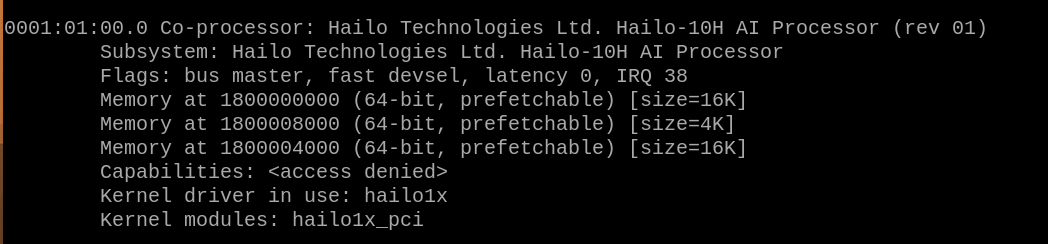
Hello, did you fixed this issue? I see (AI HAT+) in the topic subject but do you realy have (AI HAT+2), I mean are you sure about Hailo10 you need to install but not Hailo8? Here is my “lspci -v“ command output that shows the device is realy connected and identified. If you have no devices here with “Co-processor” it mean’s you have no connection. But if you have Hailo-8 there you just need to chose another firmware

lspci -v

0001:01:00.0 Co-processor: Hailo Technologies Ltd. Hailo-10H AI Processor (rev 01)
Subsystem: Hailo Technologies Ltd. Hailo-10H AI Processor
Flags: fast devsel
Memory at 1800000000 (64-bit, prefetchable) [disabled] [size=16K]
Memory at 1800008000 (64-bit, prefetchable) [disabled] [size=4K]
Memory at 1800004000 (64-bit, prefetchable) [disabled] [size=16K]
Capabilities:

bus master and few other options are missing (maybe it’s the PCIex cable issue), you can try to reconect or change PCIex gen3 to gen1. Also check for the driver files with “find / -name “hailo_pci.ko” 2>/dev/null”. I have next output:
/usr/lib/modules/6.12.47+rpt-rpi-v8/kernel/drivers/media/pci/hailo/hailo_pci.ko.xz
/usr/lib/modules/6.12.47+rpt-rpi-2712/kernel/drivers/misc/hailo_pci.ko.xz
You can try to remove all of them and re-install the driver only again
1 Like