I am working with a Raspberry Pi 5 (8GB RAM) and a Hailo‑8 accelerator.
My goal is to run my own trained models in real-time using the camera connected to the Pi.
So far I managed to run precompiled .hef models from the hailo_model_zoo using hailortcli, but I cannot find how to integrate my own models with the Hailo‑8 on Raspberry Pi.
The main issue is that the hailo-sdk-client package and the Dataflow Compiler (DFC) are not available in the public downloads, so I cannot use ClientRunner in Python to stream from /dev/video0.
Questions:
What is the correct way to obtain the SDK Client and DFC for ARM64/Raspberry Pi?
Is there an official workflow to compile my own models into .hef and deploy them on RPi5 + Hailo‑8?
Are there example projects or documentation specifically for real-time inference with camera input on Raspberry Pi?
Any guidance or links to the proper resources would be greatly appreciated. My main requirement is to run my own models in real-time on Raspberry Pi 5 with Hailo‑8.
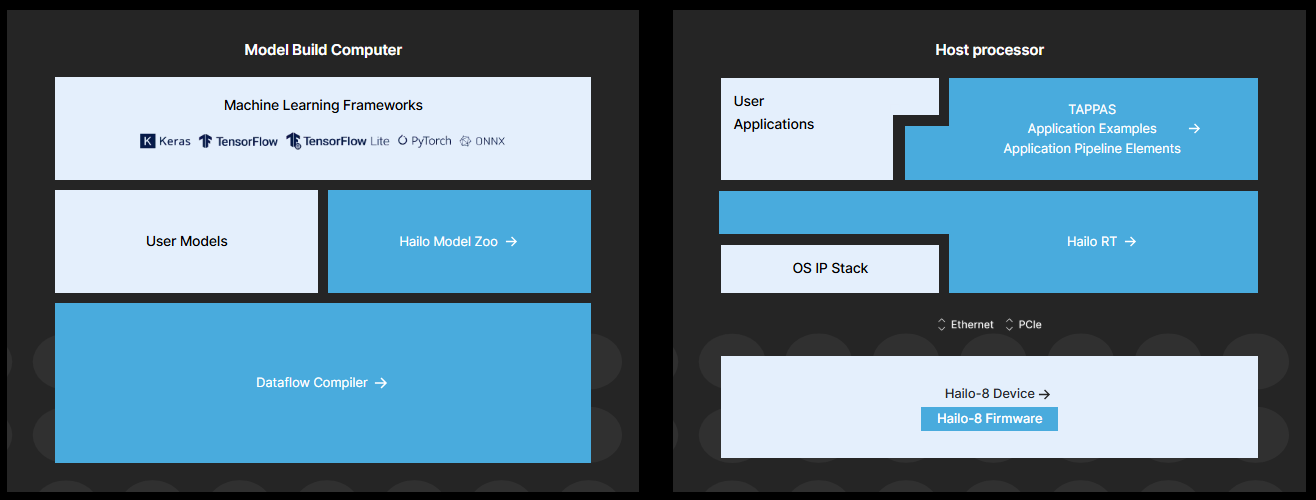
There are two parts to running models on a Hailo device.
Model Build Environment
To convert a model from ONNX/TFLite into the Hailo Executable Format (HEF), you need an x86-based machine running Ubuntu 22.04 or 24.04 with a lot of RAM (Model Build Computer - left side of pciture below). For certain optimizations, a high-performance NVIDIA GPU is recommended.
You can download the Hailo AI Software Suite Docker in the Developer Zone.
HailoRT Runtime
Inference (right side below) can run on a wide range of hosts, including a Raspberry Pi 5 / Compute Module 5 with an AI HAT+ or Hailo-8 M.2 module.
All runtime software is open-source available on GitHub. There are also different packages and documentation available in the Developer Zone.
Once you installed the Hailo AI Software Suite Docker, I recommend working through the built-in tutorials. You can start the Jupyter Notebook server with notebooks for each step of the workflow using the following command inside the Docker: