Hi,
I am using a Raspberry Pi with the Hailo-8L and the IMX290-83 camera. The camera is capable of providing 60 fps.
I am currently following the pipeline example shown below, but I am unable to achieve more than the default 30 fps.
Am I doing something wrong, or is there a setting I need to change? I understand that the camera can output 60 fps, but I cannot seem to go beyond 30 fps in practice.
I would appreciate any guidance on this.
hailo-detect-simple --input rpi --arch hailo8l --width 1920 --height 1080 --frame-rate 60 --show-fps
Hi @user254,
The 30 fps cap is most likely coming from the default sensor mode that libcamera selects for your IMX290 at 1920x1080, not from the Hailo-8L. You might try running libcamera-hello --list-cameras to check which modes actually support 60 fps on your sensor - third-party CSI cameras sometimes need an explicit sensor mode override.
A similar issue was discussed at How to raise fps of rpi camera module 3 where the fix turned out to be in the libcamerasrc/GStreamer configuration rather than the Hailo pipeline.
Thanks,
Michael.
Also, when I use a parameter --show-fps, is it displaying FPS of Hailo without any other bottleneck in the pipeline? Is this the correcy way to see the FPF Halo uses?
In am using the RPI lib, this is what i get
So for the additional messages:
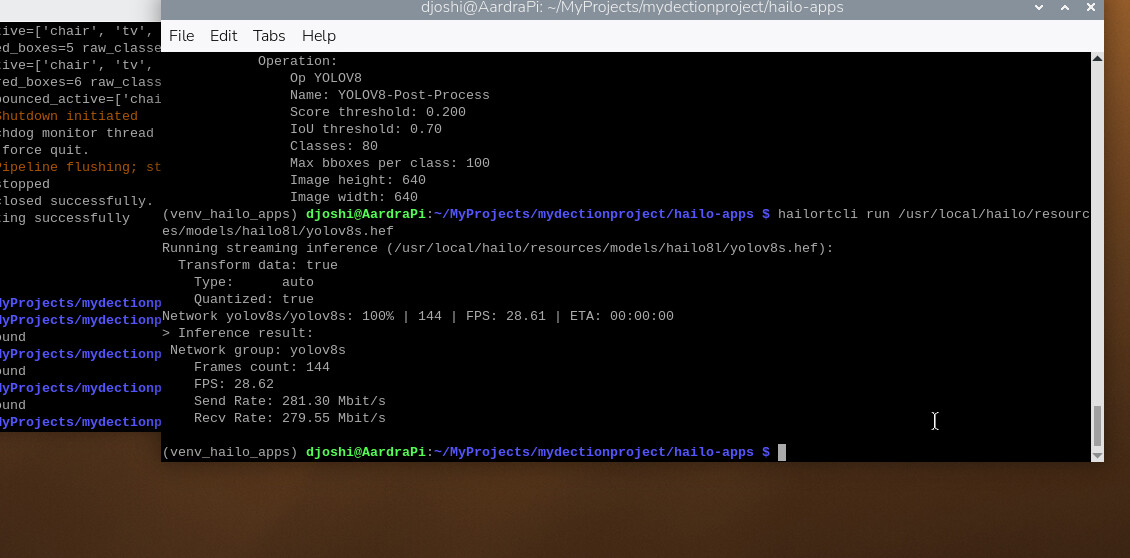
Am I correct in saying that FPS is limited to the actual model, so when I run the following command, I can see what FPS it can achieve?
hailortcli run /usr/local/hailo/resources/models/hailo8l/yolovn.hef
Hi @user254,
The --show-fps flag shows the end-to-end pipeline FPS - that includes camera capture, videoconvert, videoscale, inference, overlay, and display. So if any element in the pipeline is a bottleneck (e.g., the camera capping at 30 fps, or CPU-heavy video conversion), that number will reflect the slowest link, not the Hailo chip alone.
Running hailortcli run yolov8n.hef is the correct way to see the raw inference throughput of the Hailo-8L in isolation - it bypasses the entire GStreamer pipeline and just measures how fast the chip can process frames. So if you see, say, 200+ fps from hailortcli but only 30 fps with --show-fps, that confirms the bottleneck is elsewhere in the pipeline (most likely the camera source or CPU-side processing), not the Hailo device itself. In your case this probably confirms the IMX290 sensor mode or libcamera configuration is what’s capping you at 30 fps.
Thanks,
Michael.
Hi Michael
Thank you for the confirmation. So with Hailortcli, we can test how fast the model performs. It seems that yolov8s.hef is producing about 30fps as well.
Am I correct in understanding that Python will also contribute to slow performance compared to C++
Hi @user254,
Regarding Python vs C++: in our GStreamer pipeline apps, the actual heavy work (inference on Hailo, postprocessing in C++ .so libraries, videoconvert, videoscale) all runs in native C/C++ code. Python only handles the thin orchestration layer and any user callback logic. So Python overhead is typically negligible. The real performance factors are the model size, the Hailo chip throughput, and the camera/display pipeline elements. If your callback does heavy processing (e.g., per-frame OpenCV operations), that could slow things down, but the language choice for the pipeline wrapper itself is not a meaningful bottleneck.
Thanks,
Michael.
Yes, I have been experimenting with different versions of the YOLOv8 model and noticed that variant ‘n’ (nano), if I am correct, can produce higher FPS.
Is there a way to get YOLO 26 to work on pipeline applications?
For a commercial application, is it better to use a standalone application, or could we launch with a pipeline application?
My callback is fairly simple — it aims to analyse what is detected, apply a little analytical debounce to ensure I am not detecting the same object twice, and then call an API or operations function.
Hi @user254,
Pipeline applications are perfect for production, and the default detection app we have in hailo-apps is extremely robust, and the older Yolo models are just fine for detection.
I would recommend exploring the callback function as template for your desired business logic: hailo-apps/hailo_apps/python/pipeline_apps/detection/detection.py at main · hailo-ai/hailo-apps · GitHub - we have the tracker for the “not detecting the same object twice” part, or if that’s the case we have the popular RE-ID app: hailo-apps/hailo_apps/python/pipeline_apps/reid_multisource at main · hailo-ai/hailo-apps · GitHub which uses a different approach and meaning for “not detecting the same object twice”.
Thanks,
Thanks
How do we get the Yolo26 to work with the Pipeline
Hi @user254,
We have Yolo 26 Standalone app: hailo-apps/hailo_apps/python/standalone_apps/yolo26 at main · hailo-ai/hailo-apps · GitHub
To adopt for the pipeline type of application, a custom post-process creation required. Technically it’s doable. I would start inspecting the difference between current detection pipeline vs standalone applications, and develop from there a plan.
Thanks,