Hi Hailo Community,
I am working on my first project (named AAP-VEX) and I’ve hit a wall during the compilation phase.
My hardware setup:
Software Environment:
What I’ve done so far:
-
Trained a custom model using a custom dataset at 640x640 resolution.
-
Tried several architectures: YOLOv8s, YOLOv8n, and YOLOv5n.
-
Successfully converted the models from .pt to .onnx and then to .har.
The Problem: Every time I attempt to compile the .har file into a .hef file, the process fails with the following error: No successful assignments: concat14 errors: Agent infeasible
This happens consistently across all models I’ve tried (v5n, v8n, v8s). Since I am using the Hailo-8L, I suspect it might be a resource allocation issue, but I am unable to bypass this “Agent infeasible” bottleneck.
Questions:
I would prefer to solve this on my end to learn the process, but if anyone is willing to take a look at my files, I am happy to share the model for debugging.
Thanks in advance for your help!
Hi @user1047,
the No successful assignments: concat14 errors: Agent infeasible error is a classic sign that the ONNX graph includes the NMS/post-processing Concat layers that should not be compiled onto the Hailo device. For YOLOv8 (and similarly for YOLOv5), you need to cut the graph before the NMS by specifying the correct end-node-names during parsing. When you run hailo parser onnx your_model.onnx --hw-arch hailo8l , the parser itself will detect the NMS structure and recommend the correct end nodes - for YOLOv8 these are typically:
/model.22/cv2.0/cv2.0.2/Conv
/model.22/cv3.0/cv3.0.2/Conv
/model.22/cv2.1/cv2.1.2/Conv
/model.22/cv3.1/cv3.1.2/Conv
/model.22/cv2.2/cv2.2.2/Conv
/model.22/cv3.2/cv3.2.2/Conv
If you’re using hailomz compile, make sure you pass --hw-arch hailo8l (not hailo8), and verify the YAML config file has the correct end-node-names under parser: nodes: matching your model’s architecture. The NMS post-processing will then run on the host CPU via HailoRT rather than on the device.
Thanks,
1 Like
That was helpful! 640x640 is gone. What's the maximum resolution I can use for Hailo without dropping below 30 fps?
Hi @user1047,
It depends on many factors, so maybe the best option is to explore per your specific case.
Thanks,
thank you for help, Last try - onnx cutted, everything go well, but now it wont work on rpi (something with structure nodes error)
I used commands:
(hailo_virtualenv) hailo@093c81a230e2:/workspace$ hailo optimize best.har --calib-set-path calibration_npy --hw-arch
hailo8l
(hailo_virtualenv) hailo@093c81a230e2:/workspace$ hailo compiler best_optimized.har --hw-arch hailo8l --model-script
yolov8_nms.alls
(hailo_virtualenv) hailo@093c81a230e2:/workspace$ hailo parser onnx best.onnx --hw-arch hailo8l --start-node-names image
s
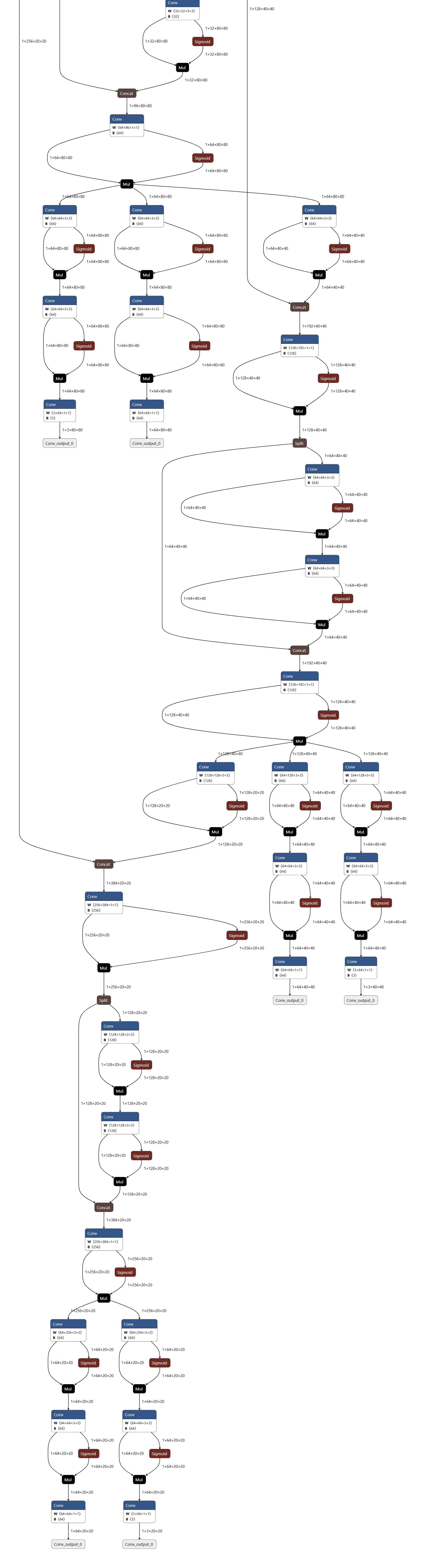
here is cutted onnx graph looks like:
I m soending on this last week without working model 
One time I get hef, but compile without any NMP in it. I try to make postproccesing in .py script but i thing there was problem with output mapping, so my bbox appears without sense.
Onnx was exported from .pt in colab:
model = YOLO(best_pt)
Eksport z 640px i simplify
model.export(
format="onnx",
imgsz=640,
opset=12,
simplify=True,
dynamic=False,
please help!
Can you share the exact error you are getting now?