Kernel module for Ubuntu Only?

Hi folks,

I am guessing my brief check in the git repos, finding “supports linux and windows”, should have been more thorough, before I bought my hailo8.

My goal was to replace my coral device that running fine on my OpenSUSE, providing frigate the hardware it wants.

Although I did have some issues in the beginning, building a new kernel module for the coral device, is a piece of cake these days, whenever I receive a kernel update for Suse.

But it looks like all the hailo kernel stuff, is Ubuntu only? :worried: My attempts at building in the git repos fail completely.

Is there any hope of being able to build an LKM for opensuse? (Currently 15.6)

Br,
Taisto

Thank god for HolgerHees…

But with a fix that’s 7 months old, I am a bit confused why its ignored?

Hey @taisto_qvist,

Welcome to the community!

Great to hear you got it working! If you need any help getting Frigate up and running, feel free to ask.

I’ll pass this issue along to our R&D team so they can look into implementing a proper fix.

I’ve been running frigate with coral for years, so thats easy-piecy :slight_smile: I am a bit confused as to my my inference speed is about three times higher with a much more advanced chip.
My coral had about 6-7 ms, and my hailo is around 15-25+ ms. Running on an i7 nuc, with opensuse 15.6.

#> uname -a
Linux vimes 6.4.0-150600.23.70-default #1 SMP PREEMPT_DYNAMIC Wed Sep 10 10:54:24 UTC 2025 (225af75) x86_64 x86_64 x86_64 GNU/Linux
08:24-Mon_06
root@vimes:~
#> lspci -s 6d:00.0 -vv
6d:00.0 Co-processor: Hailo Technologies Ltd. Hailo-8 AI Processor (rev 01)
        Subsystem: Hailo Technologies Ltd. Hailo-8 AI Processor
        Control: I/O- Mem+ BusMaster+ SpecCycle- MemWINV- VGASnoop- ParErr- Stepping- SERR- FastB2B- DisINTx+
        Status: Cap+ 66MHz- UDF- FastB2B- ParErr- DEVSEL=fast >TAbort- <TAbort- <MAbort- >SERR- <PERR- INTx-
        Latency: 0, Cache Line Size: 64 bytes
        Interrupt: pin A routed to IRQ 133
        Region 0: Memory at 404ab04000 (64-bit, prefetchable) [size=16K]
        Region 2: Memory at 404ab08000 (64-bit, prefetchable) [size=4K]
        Region 4: Memory at 404ab00000 (64-bit, prefetchable) [size=16K]
        Capabilities: [80] Express (v2) Endpoint, MSI 00
                DevCap: MaxPayload 256 bytes, PhantFunc 0, Latency L0s <64ns, L1 unlimited
                        ExtTag+ AttnBtn- AttnInd- PwrInd- RBE+ FLReset+ SlotPowerLimit 25.000W
                DevCtl: Report errors: Correctable- Non-Fatal- Fatal- Unsupported-
                        RlxdOrd+ ExtTag+ PhantFunc- AuxPwr- NoSnoop+ FLReset-
                        MaxPayload 256 bytes, MaxReadReq 512 bytes
                DevSta: CorrErr+ UncorrErr- FatalErr- UnsuppReq- AuxPwr- TransPend-
                LnkCap: Port #0, Speed 8GT/s, Width x4, ASPM L0s L1, Exit Latency L0s <1us, L1 <2us
                        ClockPM- Surprise- LLActRep- BwNot- ASPMOptComp+
                LnkCtl: ASPM L1 Enabled; RCB 64 bytes Disabled- CommClk+
                        ExtSynch- ClockPM- AutWidDis- BWInt- AutBWInt-
                LnkSta: Speed 8GT/s, Width x4, TrErr- Train- SlotClk+ DLActive- BWMgmt- ABWMgmt-
                DevCap2: Completion Timeout: Not Supported, TimeoutDis+, LTR+, OBFF Not Supported
                         AtomicOpsCap: 32bit- 64bit- 128bitCAS-
                DevCtl2: Completion Timeout: 50us to 50ms, TimeoutDis-, LTR+, OBFF Disabled
                         AtomicOpsCtl: ReqEn-
                LnkCtl2: Target Link Speed: 8GT/s, EnterCompliance- SpeedDis-
                         Transmit Margin: Normal Operating Range, EnterModifiedCompliance- ComplianceSOS-
                         Compliance De-emphasis: -6dB
                LnkSta2: Current De-emphasis Level: -6dB, EqualizationComplete+, EqualizationPhase1+
                         EqualizationPhase2+, EqualizationPhase3+, LinkEqualizationRequest-
        Capabilities: [e0] MSI: Enable+ Count=1/1 Maskable- 64bit+
                Address: 00000000fee00378  Data: 0000
        Capabilities: [f8] Power Management version 3
                Flags: PMEClk- DSI- D1- D2- AuxCurrent=0mA PME(D0-,D1-,D2-,D3hot+,D3cold-)
                Status: D0 NoSoftRst+ PME-Enable- DSel=0 DScale=1 PME-
        Capabilities: [100 v1] Vendor Specific Information: ID=1556 Rev=1 Len=008 <?>
        Capabilities: [108 v1] Latency Tolerance Reporting
                Max snoop latency: 3145728ns
                Max no snoop latency: 3145728ns
        Capabilities: [110 v1] L1 PM Substates
                L1SubCap: PCI-PM_L1.2+ PCI-PM_L1.1+ ASPM_L1.2+ ASPM_L1.1+ L1_PM_Substates+
                          PortCommonModeRestoreTime=10us PortTPowerOnTime=10us
                L1SubCtl1: PCI-PM_L1.2+ PCI-PM_L1.1+ ASPM_L1.2+ ASPM_L1.1+
                           T_CommonMode=0us LTR1.2_Threshold=90112ns
                L1SubCtl2: T_PwrOn=44us
        Capabilities: [128 v1] Alternative Routing-ID Interpretation (ARI)
                ARICap: MFVC- ACS-, Next Function: 0
                ARICtl: MFVC- ACS-, Function Group: 0
        Capabilities: [200 v2] Advanced Error Reporting
                UESta:  DLP- SDES- TLP- FCP- CmpltTO- CmpltAbrt- UnxCmplt- RxOF- MalfTLP- ECRC- UnsupReq- ACSViol-
                UEMsk:  DLP- SDES- TLP- FCP- CmpltTO- CmpltAbrt- UnxCmplt- RxOF- MalfTLP- ECRC- UnsupReq- ACSViol-
                UESvrt: DLP+ SDES- TLP- FCP+ CmpltTO- CmpltAbrt- UnxCmplt- RxOF+ MalfTLP+ ECRC- UnsupReq- ACSViol-
                CESta:  RxErr+ BadTLP- BadDLLP- Rollover- Timeout- NonFatalErr-
                CEMsk:  RxErr- BadTLP- BadDLLP- Rollover- Timeout- NonFatalErr+
                AERCap: First Error Pointer: 00, ECRCGenCap+ ECRCGenEn- ECRCChkCap+ ECRCChkEn-
                        MultHdrRecCap- MultHdrRecEn- TLPPfxPres- HdrLogCap-
                HeaderLog: 00000000 00000000 00000000 00000000
        Capabilities: [300 v1] #19
        Kernel driver in use: hailo
        Kernel modules: hailo_pci

08:24-Mon_06
```

Hey @taisto_qvist,

Just wanted to mention - we’re actually getting better performance on Raspberry Pi with just a single PCIe lane, so there might be something we can optimize on your end.

Could you check a few things for me?

  1. Which model are you running?
  2. How many PCIe lanes do you have available, and is it configured for Gen 3?

Also, would you mind running hailortcli run {model.hef} and sharing the FPS output?

Sorry, bit short on time here for fiddling with this stuff, and my hailo seems to have settled at around 13ms now.

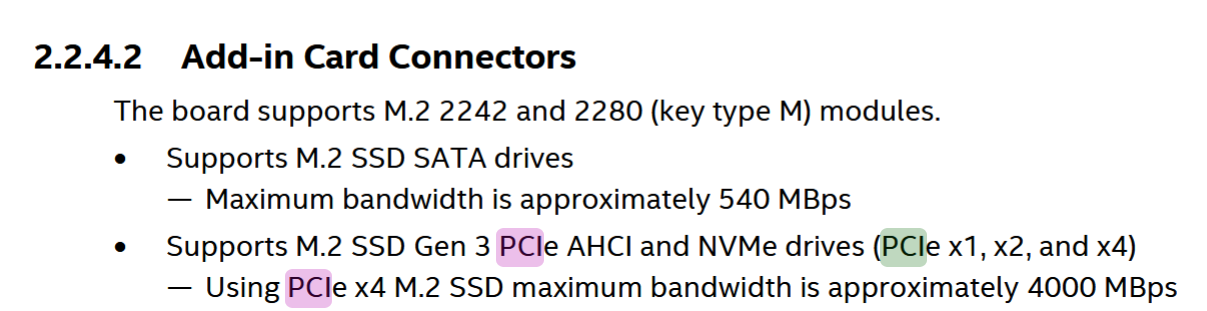
Anyway, the NUC is an Intel NUC8i7BEH, and I found this:

Regarding the hailortctl command (since I’m quite new at this), that would require me to fetch hef files from the frigate-container? #N00b

You can connect to the Frigate container and run this command from inside it.
As you can see from your PCIe configuration, you have one slot with 4 lanes and another with 2 lanes. Use one of these slots, set the PCIe generation to Gen 3, and then run the command inside the container.

But I cant find any .HEF files in my frigate container. And running:

root@8eaaae7959b5:/config# hailortcli run hand_landmark_lite.hef
Running streaming inference (hand_landmark_lite.hef):
Transform data: true
Type: auto
Quantized: true
[HailoRT] [error] CHECK failed - Failed to create vdevice. there are not enough free devices. requested: 1, found: 0
[HailoRT] [error] CHECK_SUCCESS failed with status=HAILO_OUT_OF_PHYSICAL_DEVICES(74)
[HailoRT] [error] CHECK_SUCCESS failed with status=HAILO_OUT_OF_PHYSICAL_DEVICES(74)
[HailoRT] [error] CHECK_SUCCESS failed with status=HAILO_OUT_OF_PHYSICAL_DEVICES(74)
[HailoRT] [error] CHECK_SUCCESS failed with status=HAILO_OUT_OF_PHYSICAL_DEVICES(74)
[HailoRT CLI] [error] CHECK_SUCCESS failed with status=HAILO_OUT_OF_PHYSICAL_DEVICES(74) - Failed creating vdevice

TQ

Although, after stopping frigate temporarily, and various other fiddling, I managed to get:

#> ./hailort/hailortcli/hailortcli run /root/*hef
Running streaming inference (/root/hand_landmark_lite.hef):
Transform data: true
Type: auto
Quantized: true
[HailoRT] [warning] HEF was compiled for Hailo8L device, while the device itself is Hailo8. This will result in lower performance.
[HailoRT] [warning] HEF was compiled for Hailo8L device, while the device itself is Hailo8. This will result in lower performance.
Network hand_landmark_lite/hand_landmark_lite: 100% | 1292 | FPS: 256.65 | ETA: 00:00:00

Inference result:
Network group: hand_landmark_lite
Frames count: 1292
FPS: 256.69
Send Rate: 309.11 Mbit/s
Recv Rate: 0.30 Mbit/s

Althought I havent gotten to the part where I check the PCI setting.

Additionally, I have to ask, now that I read and tried to understand the “Set the PCIe generation” to Gen 3….unless I misunderstood something, it cant be anything else. This is Intel NUC is PCIe Gen3, PCIe4 didnt exist when this NUC was built.

Or did I misunderstand something…?

And since i find another .hef:

#> ./repos/hailo/hailort/build/hailort/hailortcli/hailortcli run yolov8m.hef
Running streaming inference (yolov8m.hef):
Transform data: true
Type: auto
Quantized: true
Network yolov8m/yolov8m: 100% | 333 | FPS: 66.15 | ETA: 00:00:00

Inference result:
Network group: yolov8m
Frames count: 333
FPS: 66.16
Send Rate: 650.37 Mbit/s
Recv Rate: 646.31 Mbit/s