Hi omria,
Thanks so much for the helpful advice — really appreciate it!
I didn’t realize Hailo-8L supports MPS as well, so that information was extremely useful.
I’m sharing a few more details below in case anyone can help me understand what I might be missing.
1. HailoRT daemon status on the host
sudo systemctl status hailort
sudo systemctl status hailort.service
Output:
● hailort.service - HailoRT service
     Loaded: loaded (/lib/systemd/system/hailort.service; enabled; preset: enabled)
     Active: active (running) since Mon 2025-11-24 14:32:29 KST; 2 days ago
The service seems active and running without any issues.
2. I’m running everything inside Docker
Here is the exact command I use:
sudo docker run -it \
  --privileged \
  --ipc=host \
  --net=host \
  -v /dev:/dev \
  -v /lib/modules:/lib/modules:ro \
  -v /usr/src:/usr/src:ro \
  -v /dev/bus/pci:/dev/bus/pci \
  -v /home/rpi2/:/app/tappas/rpi2/ \
  -v /run/hailo:/run/hailo \
  -v /tmp/:/tmp/ \
  -e HAILO_SOCK_PATH=/tmp/hailort_uds.sock \
  --name hailo6 my-hailo-tappas:final /bin/bash
The HailoRT socket (/tmp/hailort_uds.sock) and /run/hailo are mounted correctly.
3. My Python MPS test code
import os
import numpy as np
from multiprocessing import Process
from hailo_platform import (HEF, VDevice, HailoStreamInterface, InferVStreams, ConfigureParams,
    InputVStreamParams, OutputVStreamParams, InputVStreams, OutputVStreams, FormatType, HailoSchedulingAlgorithm)


# Define the function to run inference on the model
def infer(network_group, input_vstreams_params, output_vstreams_params, input_data):
    rep_count = 100
    with InferVStreams(network_group, input_vstreams_params, output_vstreams_params) as infer_pipeline:
        for i in range(rep_count):
            infer_results = infer_pipeline.infer(input_data)


def create_vdevice_and_infer(hef_path):
    # Creating the VDevice target with scheduler enabled
    params = VDevice.create_params()
    params.scheduling_algorithm = HailoSchedulingAlgorithm.ROUND_ROBIN
    params.multi_process_service = True
    params.group_id = "SHARED"
    with VDevice(params) as target:
        configure_params = ConfigureParams.create_from_hef(hef=hef, interface=HailoStreamInterface.PCIe)
        model_name = hef.get_network_group_names()[0]
        batch_size = 2
        configure_params[model_name].batch_size = batch_size

        network_groups = target.configure(hef, configure_params)
        network_group = network_groups[0]

        # Create input and output virtual streams params
        input_vstreams_params = InputVStreamParams.make(network_group, format_type=FormatType.FLOAT32)
        output_vstreams_params = OutputVStreamParams.make(network_group, format_type=FormatType.UINT8)

        # Define dataset params
        input_vstream_info = hef.get_input_vstream_infos()[0]
        image_height, image_width, channels = input_vstream_info.shape
        num_of_frames = 10
        low, high = 2, 20

        # Generate random dataset
        dataset = np.random.randint(low, high, (num_of_frames, image_height, image_width, channels)).astype(np.float32)
        input_data = {input_vstream_info.name: dataset}

        infer(network_group, input_vstreams_params, output_vstreams_params, input_data)

# Loading compiled HEFs:
first_hef_path = '../yolov8s/yolov8s.hef'
second_hef_path = '../yolov8s/yolov8s_seg.hef'
first_hef = HEF(first_hef_path)
second_hef = HEF(second_hef_path)
hefs = [first_hef, second_hef]
infer_processes = []

# Configure network groups
for hef in hefs:
    # Create infer process
    infer_process = Process(target=create_vdevice_and_infer, args=(hef,))
    infer_processes.append(infer_process)

print(f'Starting inference on multiple models using scheduler')

infer_failed = False
for infer_process in infer_processes:
    infer_process.start()
for infer_process in infer_processes:
    infer_process.join()
    if infer_process.exitcode:
        infer_failed = True

if infer_failed:
    raise Exception("infer process failed")
print('Done inference')
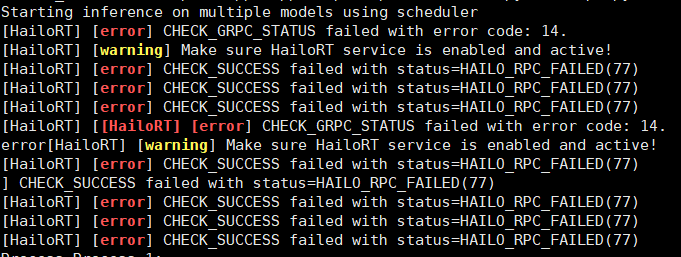
When both processes run concurrently, I consistently get:
Starting inference on multiple models using scheduler
[HailoRT] [error] CHECK_GRPC_STATUS failed with error code: 14.
[HailoRT] [warning] Make sure HailoRT service is enabled and active!
[HailoRT] [error] CHECK_SUCCESS failed with status=HAILO_RPC_FAILED(77)
[HailoRT] [error] CHECK_SUCCESS failed with status=HAILO_RPC_FAILED(77)
[HailoRT] [error] CHECK_SUCCESS failed with status=HAILO_RPC_FAILED(77)
[HailoRT] [error] CHECK_SUCCESS failed with status=HAILO_RPC_FAILED(77)
Process Process-1:
[HailoRT] [error] CHECK_GRPC_STATUS failed with error code: 14.
[HailoRT] [warning] Make sure HailoRT service is enabled and active!
[HailoRT] [error] CHECK_SUCCESS failed with status=HAILO_RPC_FAILED(77)
[HailoRT] [error] CHECK_SUCCESS failed with status=HAILO_RPC_FAILED(77)
[HailoRT] [error] CHECK_SUCCESS failed with status=HAILO_RPC_FAILED(77)
[HailoRT] [error] CHECK_SUCCESS failed with status=HAILO_RPC_FAILED(77)
Traceback (most recent call last):
Process Process-2:
  File "/usr/local/lib/python3.11/dist-packages/hailo_platform/pyhailort/pyhailort.py", line 3540, in _open_vdevice
    self._vdevice = _pyhailort.VDevice.create(self._params, device_ids)
                    ^^^^^^^^^^^^^^^^^^^^^^^^^^^^^^^^^^^^^^^^^^^^^^^^^^^
hailo_platform.pyhailort._pyhailort.HailoRTStatusException: 77
 I’m not sure what I should fix — any suggestions would be appreciated.
Given that:
I’m not sure whether the problem is related to Docker, the Python API, or something else.
So any guidance would be greatly appreciated.
Thanks again!
Best regards,
Minjoo
 Environment