Recently, I ran into the problem that I want to detect small objects at a far distance. I want to take an image from an IMX708 matrix(4608 × 2592 pixels) and pass this image through a pipeline so that I can use hailo npu.
How should I do this and where should I start? I’ve already managed to implement this hailo-rpi5-examples/basic_pipelines/detection.py at 25.3.1 · hailo-ai/hailo-rpi5-examples · GitHub
Should I try to write a script by myself? Or redo some ready-made solution for myself?
I just don’t know where to start. I would be glad if someone could tell me what to read on this topic in order to understand how to approach this issue.
At the moment, I’m faced with the fact that the gstreamer pipeline doing downsampling to lores.
So the command sudo apt install hailo-all Installs hailort ver 4.20 and that’s why I have to clone and checkout to version 3.31.0 of tappas. I hope I’m being clear enough.
here’s the error I’m getting. If you need i can send here full text of error.
Could not load lib /home/user/tappas/apps/h8/gstreamer/libs/post_processes/libmobilenet_ssd_post.so: cannot open shared object file: No such file or directory
#0 0x00007fff8a9cb924 in GI_wait4 (pid=8813, stat_loc=0x7fffdad9816c, options=0, usage=0x0) at ../sysdeps/unix/sysv/linux/wait4.c:30
As I understand it, the problem is that I’m installing tappas incorrectly. I also know that if I use the command ./install.sh my tappas core become broken. I understand this using gst-inspect-1.0 hailotools
So now I can’t start tiling. And my further goal is to use it with custom Yolo hef.
At DeGirum (a SW partner of Hailo), we developed PySDK, a python package, to make application development easy with Hailo devices. We have a bunch of example guides to help hailo users which also includes a detailed guide on how to implement tiling. You can find a detailed implementation guide here.
Also I see you mentioned about compiling a custom yolo hef model. We just launched our cloud compiler. The DeGirum Cloud Compiler can compile your Ultralytics YOLO PyTorch checkpoint (.pt) for Hailo-8 or Hailo-8L. It’s a fast way to validate performance and iterate. It’s currently in early access but you can request access here: https://forms.degirum.com/cloud-compiler
Hi, @omria . Thank you very much for constantly answering questions. I’m sure the entire community is very grateful to you.
Earlier, Klausk wrote to me about the tappas repository. I figured out how to use postprocess_func_name=“filter” to use libyolo_hailortpp_post.so instead default .so file. At first it didn’t work out for me, but now I’ve figured it out and this solution has worked for me, but unfortunately only 8 fps (pipeline synchronization to video is disabled).
It seems to me that fps should be higher, because using the hailortcli run best.hef –-batch-size 8 command I get 174 fps.
Also, the “screenshot” shows that utilization = 100% and 106 fps. If I interpret this correctly, it means that the npu is being used to the maximum. And it can provide ~106 fps. I also used htop to check how busy the CPU was and saw 60-70% load there.
All it looks like bottleneck after npu. For some reason, the processor is not being fully used, although it has the resource to do so. But in theory, even this level of processor usage should be enough to get a higher fps. Do I need to optimize the pipeline somewhere? Maybe there are some parameters that I didn’t take into account and because of them the fps is low?
@shashi I’m using retrained Yolov8n with custom dataset. And I would like to detect both far objects and close objects to camera. Right now i use simple tiling from tappas. And reach only 8 fps, so multiscale will get even less fps. About tiling strategies. I don’t know much about it. I saw the implementation of two strategies in tappas. And it seems that multiscale is more suitable for me. But the main challenge is that I want to run it on the rpi5 with a hailo8l accelerator.
Thanks for the details. By tiling strategy, I meant how many rows and cols: if your program is using tiling and say has 4 cols and 3 rows (just an example), then overall FPS of 8 means, 96FPS on the model as each inference on an image has 12 inferences on the tiles. To fully debug what is going on, the following information is useful: fps from hailortcli when batch=1 (as your program may be using 1) and the number of columns and rows in the tiling. This will give an idea if system is performing correctly or not.
Good evening, @shashi
Thank you so much for giving me the direction. I use 12 tiles. I checked using hailortcli. FPS: 106.37 Send Rate: 1045.69 Mbit/s Recv Rate: 476.28 Mbit/s
With batch = 1, we get 106 fps. And 106fps / 12 tiles = 13 fps per tile. So 5 fps have lost by some reason. But my system needs at least 30 fps. The more the better.
Maybe I’m going to say something stupid or funny, but can I make the pipeline work on batch=8 somehow?
Or could it be that the pipeline itself is not fully optimized? I accidentally came across one of the old documentation of tappas v3.16.0 . DETECTION_PIPELINE="\ hailonet hef-path=$hef_path device-id=$hailo_bus_id is-active=true qos=false batch-size=1 !
In earlier versions you can choose the batch size. It also said there that hailotilecropper divides the pipeline into two streams. Would it be more efficient to create more threads? Or increase buffers for current streams?
I understand that I can use less tiles, but I wouldn’t want. Maybe there is a possibility to optimize/fine-tune it somehow?
Just a small correction: 106/12 = 8.83. So, you did not lose much performance from baseline. Also, our experience with tiling is with our own PySDK and not with Tappas, so I will defer to Hailo folks answering your question. From our side, I will see if we can enable batch size=8 and see better results.
Hi everyone. I’m still working on this issue. I would like to ask two questions.
I need to understand what the bottleneck is. If I understand correctly, hailotilecropper transmits all tiles forward along the pipeline at one moment. Are there any tools to understand if fps is being lost due to the CPU or due to the NPU?
For example, if I rewrite it so that all 12 tiles are transferred to the screen, but the inference only works on one tile and eventually moves to the next tile. Thus, the npu should be less loaded. If the problem is processing by CPU 12 tiles, then this approach won’t help me? If I’m not completely clear, I mean that the inference (1 tile) will literally run through the video source in search of an object to detect.
 (pipeline synchronization to video is disabled).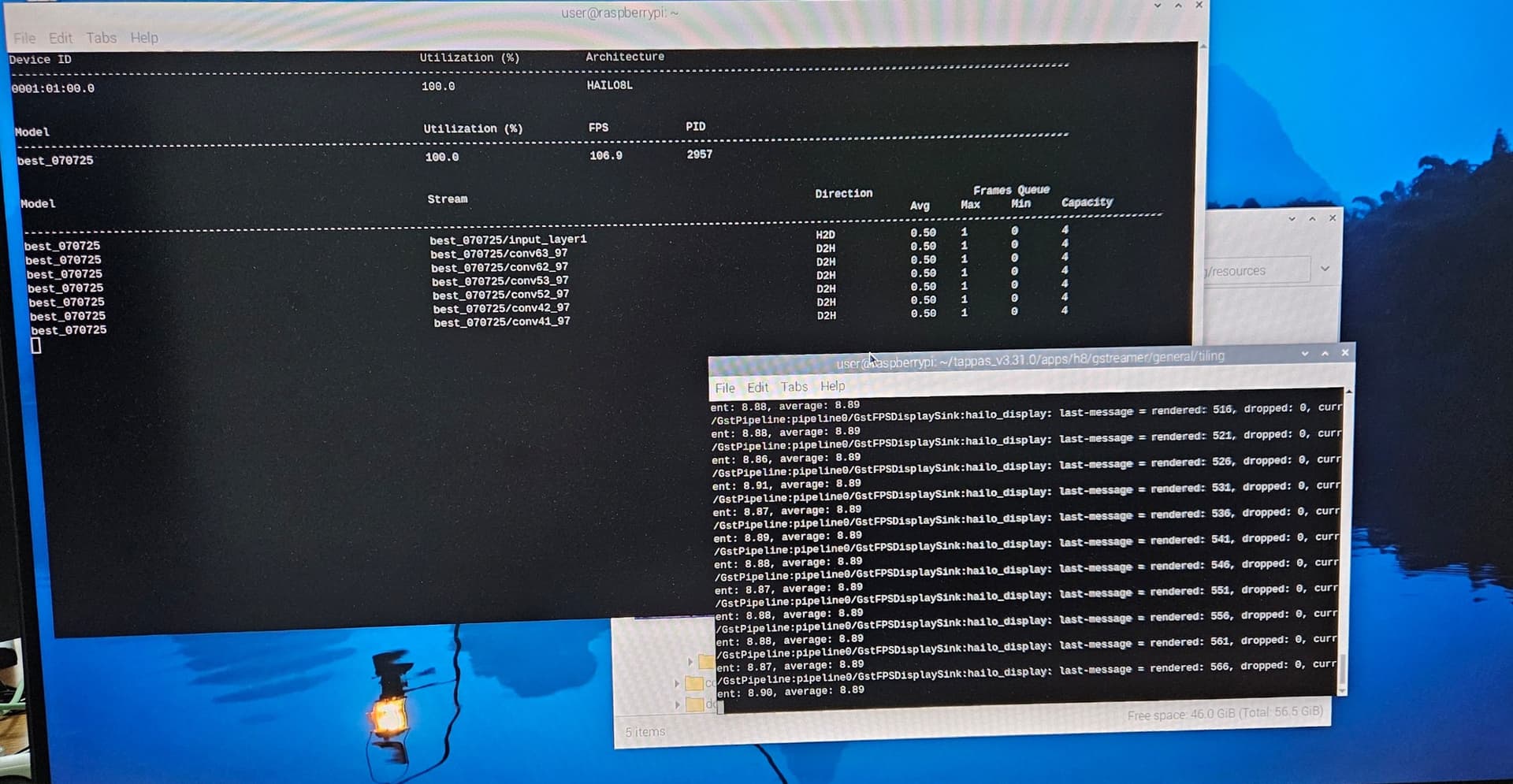
 shows that utilization = 100% and 106 fps. If I interpret this correctly, it means that the npu is being used to the maximum. And it can provide ~106 fps. I also used htop to check how busy the CPU was and saw 60-70% load there.