When encountering an unsupported ONNX operation/layer that can’t be parsed using the DFC, consider where is the unsupported operation in regards to the full network:
-
Near the input - try to keep that part as preprocess and parse the rest into a single HEF.
-
At the net’s middle - crop the problematic block, run it ORT and resume to device,
thus having 2 HEFS: HEF → ORT → HEF →(optional) CPU postprocess -
At the net’s end - This is a short guide for that case.
When the unsupported part is at the end, choose one of two paths:
- Implement operation as native postprocess in Python/C++ (no ORT)
- Crop the ONNX before the problematic layer and use ONNX Runtime as a postprocess on the app.
Thus creating a pipeline of:
Hailo HEF → ORT postprocess → (optional) CPU postprocess*
We’ll use YOLOv8-Seg as an example**.
* CPU postprocess is for any operations that are not in the ONNX (e.g. visualization)
** For most YOLO models, Hailo Model Zoo provides Hailo-postprocess — an optimized postprocessing stage that runs on HailoRT inside the HEF. This model is an exception, and so we’ll run the postprocess on ORT.
Step 1 — Locate the crop point
-
Open the model in Netron .
-
Find the first unsupported op
-
Pick end-nodes right before that op
-
When original model’s parsing fails, check the parser’s recommended end-nodes. They’re usually valid cropping points for your pipeline.
-
If there are a few unsupported ops in different branches, the end-node should be the last supported op the feeds all of them.
-
For YOLOv8-Seg, the unsupported (and also last) operations are performing BBOX decoding, and so our ORT will perform just that. In this case the chosen nodes are 9 conv heads plus the mask prototype tensor.
Note: We chose those nodes because the next operations are Concats, which we excluded from the HEF because of quantization considerations:- Those tensors can have very different value ranges. When quantized together, one scale has to fit the biggest range, which blurs the small details. Doing Concat in float (ORT/CPU) keeps that precision better.
-
This example’s chosen end nodes:
/model.22/cv2.2/cv2.2.2/Conv
/model.22/cv3.2/cv3.2.2/Conv
/model.22/cv4.2/cv4.2.2/Conv
/model.22/cv2.1/cv2.1.2/Conv
/model.22/cv3.1/cv3.1.2/Conv
/model.22/cv4.1/cv4.1.2/Conv
/model.22/cv2.0/cv2.0.2/Conv
/model.22/cv3.0/cv3.0.2/Conv
/model.22/cv4.0/cv4.0.2/Conv
/model.22/proto/cv3/act/Mul
-
-
Tip: In Netron, click a node to see its name - it’ll be our end-node-names
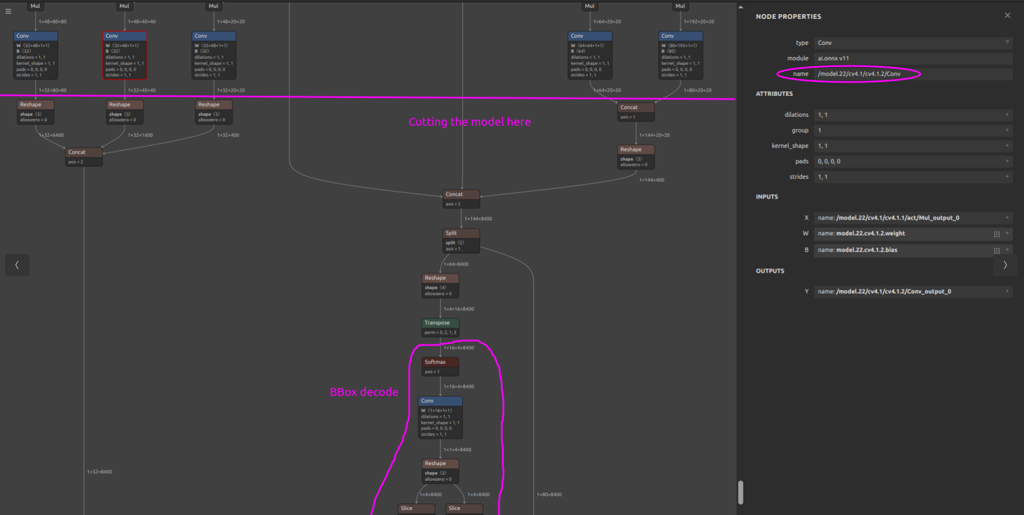
Step 2 — Create the postprocess-only ONNX (two options)
-
Option A — Using Hailo DFC parser (recommended)
hailo parser onnx <original.onnx> --end-node-names <"END_NODE1" "END_NODE2" ..>-
This produces a HAR. Extract it. Inside you’ll find *_postprocess.onnx which starts after your end-nodes.
-
**Sanity checks (**This is a relatively new Hailo tool, so please review these before deploying)
-
Inputs of *_postprocess.onnx match (name/shape/dtype/order) the tensors you’ll get from the HEF.
-
Outputs match your intended postprocess outputs.
-
-
-
Option B — Using standard ONNX tools
Use standard ONNX graph tooling (e.g., onnx.utils.extract_model) to crop the network so that the inputs are your boundary layers and the outputs are the last layers ORT should compute, probably the original model outputs.