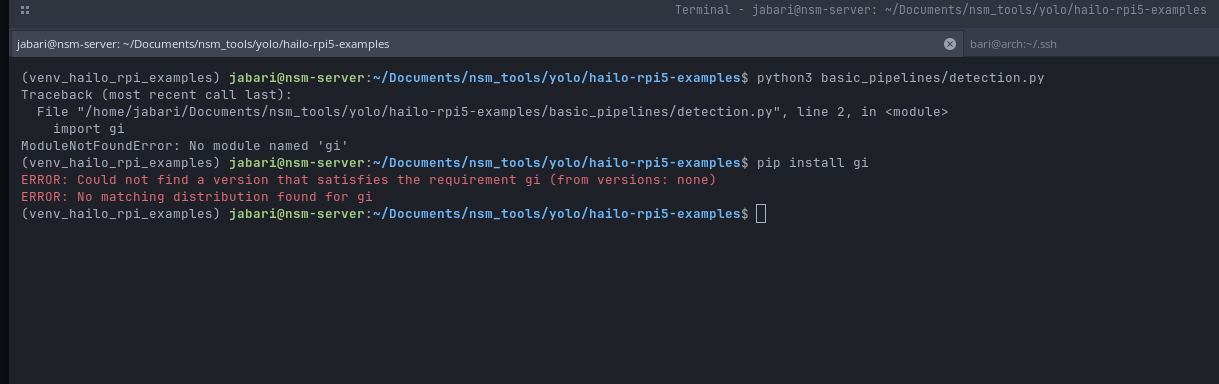
If anybody can help provide me with some help, I have the hardware m.2 hailo-8, I also have the hailortcli it works so i have the software, yet when i do everything right like from the github repo it always says that gi isnt installed and i dont know what to do. Sorry if this questioned has been asked before as im new here. Thank you in advance for whoever might help me.
Hey @nsm_barii,
Welcome to the Hailo Community!
Are you running this on a Raspberry Pi or an x86 machine? If it’s x86, you’ll probably want to check out this repo instead (has the same apps): GitHub - hailo-ai/hailo-apps-infra
For that gi error you’re seeing, try running:
sudo apt install python3-gi python3-gi-cairo
Hope this helps!
1 Like
Yes I am running this on a raspberry PI. Do you by any chance have the instructions to fully get this running, because I have been trying for the last week and its not working.
Did you install the python3-gi and python3-gi-cairo packages? What’s the new error?
You might have the recreate your venv to get the info into it?!
– Marco
Yes I have tried installing that and nothing works, do u think u can help provide more info on what i need, like python version, etc?
I just realized, you’re on RasPiOS Trixie, right?!
I don’t think, that’s officially supported just yet. I don’t know any timeline or anything, But I did read in another thread here about the idea to release 4.23.0 on Trixie.
I’m running Hailo 4.23.0 and friends on Ubuntu 24.04 with Python 3.12;-) So, I don’t expect too many ‘technical’ problems to build things for Python 3.13.
But the older packages for RasPiOS were finally packaged & released by the Pi Foundation, so different orgs have to work together.
– Marco
Nah im using bookworm bro. How do u got it working for u because i even tried ubuntu and it doesnt work for me. Could u please give me any type of info or steps on to how u got this working please ?
Bookworm is on Python 3.11 as far as I know. Ubuntu 24.04 is on Python 3.12. Since you asked about Python 3.13, that should be newer??
So, what did you really do? Just throwing different things together won’t give you a working system:-(
You should start with a plain RasPiOS Bookworm and follow the instructions for that. That will not give you the latest releases, but hopefully, you get things working. After that, you can think about next steps.
– Marco
yea i tried 3.13 but the modules doesnt properly work with that on my end so i have been making the venv specifically in 3.11 or 3.10. and then after that i follow the instructions like normal and i keep on getting this error no matter when i install the dependencies.

So, on a plain RasPiOS Bookworm (in that order):
- Install python3 (will be 3.11) and python3-gi, python3-venv and all the rest via apt-get
- https://www.raspberrypi.com/documentation/computers/ai.html#getting-started
- hailo-rpi5-examples/doc/install-raspberry-pi5.md at main · hailo-ai/hailo-rpi5-examples · GitHub
- hailo-rpi5-examples/README.md at main · hailo-ai/hailo-rpi5-examples · GitHub
If you run into trouble and the troubleshooting tips don’t help you, please come back.
Please try to follow all the steps carefully. All the versions have to match fully.
– Marco