hailo-ollama tools support

hailo-ollama works for plain chat, but fails (HTTP 500 error) when the request includes tools or a JSON-schema object in format. This prevents using hailo-ollama with Home Assistant Assist, which sends these fields.

Plain chat OK:

curl -sS -X POST "http://<host>:8000/api/chat" -H "Content-Type: application/json" -d '{
  "model":"llama3.2:1b",
  "messages":[{"role":"user","content":"hello"}],
  "stream":false
}'

format schema → 500:

curl -sS -X POST "http://<host>:8000/api/chat" -H "Content-Type: application/json" -d '{
  "model":"llama3.2:1b",
  "messages":[{"role":"user","content":"Return {\"greeting\":\"...\"} and nothing else."}],
  "stream":false,
  "format":{"type":"object","properties":{"greeting":{"type":"string"}},"required":["greeting"]}
}'

tools → 500:

curl -sS -X POST "http://<host>:8000/api/chat" -H "Content-Type: application/json" -d '{
  "model":"llama3.2:1b",
  "messages":[{"role":"user","content":"Call the tool."}],
  "stream":false,
  "tools":[{"type":"function","function":{"name":"demo_tool","description":"Returns a fixed string","parameters":{"type":"object","properties":{},"required":[]}}}]
}'

Error includes: TreeToObjectMapper::mapString(): Node is NOT a STRING.

Feature request: implement Ollama-compatible tool calling + JSON-schema structured outputs (object format) so Assist integrations work.

Thanks.

5 Likes

Thanks for the feedback.
”Feature request: implement Ollama-compatible tool calling + JSON-schema structured outputs (object format) so Assist integrations work.”: We are looking into that.

1 Like

Is the hailo-ollama code hosted anywhere? I couldnt find it in github but I have also noticed some differences between the ollama api and the hailo one (for example pull wants model not name)

I did get tool calling working by following the hailo-apps repo. @Phil_Spence I stripped it down to just the tool calling part here: GitHub - jordanskole/hailo-apps-prototype: Bootstrap a hailo apps genAI app without the extra from hailo-apps

1 Like

Hi @TheRubbishRaider

Hailo-Ollama is part of GitHub - hailo-ai/hailo_model_zoo_genai: Model zoo for Gen AI models for Hailo products.

Thanks,

1 Like

Woohoo! I believe I have tool/function calling working the ollama way (with tool calls in the message payload) on the 10H/AI+ 2.

I wanted to go as low as possible to strip everything out except the hailo_server bin that can be included when you compile hailort from source. That opens a few ports for RPC.

In order to make this work I (claude) had to modify the hailort c++ code a bit. I opened a PR targeting hailoai/hailrt but if you want to test it out you should be able to build from source from my repo: GitHub - jordanskole/hailort: An open source light-weight and high performance inference framework for Hailo devices

It’s not trivial, but its not that difficult either.

Start by cleaning all your old hailo libraries so you can install hailort v5.2.0

You will need to make sure that you build with the server and genai flags set to true:

# from /hailort
cmake -S . -B build -DCMAKE_BUILD_TYPE=Release \\ 
-DHAILO_BUILD_EXAMPLES=ON 
-DHAILO_BUILD_CLIENT_TOKENIZER=ON \\ 
-DHAILO_BUILD_HAILORT_SERVER=ON \\ 
-DHAILO_BUILD_GENAI_SERVER=ON

cmake --build build --config Release -j$(nproc)

and then to install hailortcli and hailortlib

sudo cmake --install build

That will install the hailortcli and hailortlib binaries and add them to your path

Then you will need to manually copy hailo_server

sudo cp build/hailort_server /usr/local/bin/hailort_server

I added a service to systemctl to start all the hailo_server’s on boot

You should now have all the hailo rpc servers running! Next step is to expose an http server that mimics the ollama spec. This is of course already implemented in hailo-ai/hailo_model_zoo_genai like @Michael said above but it has some minja / schema validation middleware that bonks if you include tools in your payload.

I am working through it in node, and you can use this node library GitHub - jordanskole/hailo-node: Node.js client for HailoRT GenAI server if you want to play along at home.

3 Likes

@TheRubbishRaider Amazing work and thanks for sharing! Great contribution to the community!

This is just what I was looking and hoping for…I have too many Claude projects right now and couldn’t find time to do this. Great work!

However, I think I need to start fresh or something, because the /dev/hailo_pci_ep device is not getting created.

Feb 04 20:18:18 llama HailoRT-Server[1090]: [driver_os_specific.cpp:34] [open_device_file] CHECK failed - Failed to open device file /dev/hailo_pci_ep with error 2
Feb 04 20:18:18 llama HailoRT-Server[1090]: [hailort_driver.cpp:140] [create] CHECK_SUCCESS failed with status=HAILO_DRIVER_OPERATION_FAILED(36)
Feb 04 20:18:18 llama HailoRT-Server[1090]: [hailo_session_internal.cpp:43] [create_server_shared] CHECK_SUCCESS failed with status=HAILO_DRIVER_OPERATION_FAILED(36)
Feb 04 20:18:18 llama HailoRT-Server[1090]: [hailort_server.cpp:180] [create_unique] CHECK_SUCCESS failed with status=HAILO_DRIVER_OPERATION_FAILED(36)
Feb 04 20:18:18 llama HailoRT-Server[1090]: [server_main.cpp:86] [main] CHECK_SUCCESS failed with status=HAILO_DRIVER_OPERATION_FAILED(36)

I can wipe my Pi 5, rebuild it, and have this compiled in no time. I’ll be right back :slight_smile:

1 Like

Oh yes! You are right, I forgot to include that I downloaded the driver separately from the developer portal and installed that with dpkg

2 Likes

I must be missing something else. I completely wiped my Pi5 to be sure I had no extra libraries. Installed the driver from the .deb files like you suggested, but that device file is not getting created. My Hailo10h is loaded properly using the driver from that .deb, but your hailort_server is not detecting it.

$ /usr/local/bin/hailortcli scan
Hailo Devices:
[-] Device: 0001:01:00.0

$ lsmod | grep hailo
hailo1x_pci 147456 0

$ ls /dev | grep hailo
hailo0

1 Like

Ahhhh yes! I think this is the part where the custom build comes in.

Here’s the full flow I did:

  1. Wipe the old libraries
  2. Download only the pcie driverhailort-pcie-driver_5.2.0_all.deb and install only the driver
$ sudo dpkg --install hailort-pcie-driver_5.2.0_all.deb 

And then to make it work this is where I needed to modify the hailort library, so you wont be able to pull that directly from hailo yet.

Important caveat, claude helped a lot on that part. I am okay in c++ but its not my strong suit, CMake even less

  1. Download my fork of the repo
$ git clone https://github.com/jordanskole/hailort.git
  1. Now build from source on the pi, but make sure to include hailo_server in the build with these flags -DHAILO_BUILD_HAILORT_SERVER=ON -DHAILO_BUILD_GENAI_SERVER=ON

You don’t need to build the examples but I did as a way to test. Also I ran into ownership issues using sudo to build so notice for these steps notice no sudo

This might take a while so grab a sandwich

$ cd hailort
$ cmake -S . -B build -DCMAKE_BUILD_TYPE=Release -DHAILO_BUILD_EXAMPLES=ON  -DHAILO_BUILD_CLIENT_TOKENIZER=ON -DHAILO_BUILD_HAILORT_SERVER=ON  -DHAILO_BUILD_GENAI_SERVER=ON
$ cmake --build build --config Release -j$(nproc)
  1. Now you can install hailortcli and libhailort
$ sudo cmake --install build

You should be able to test after this to make sure we made it this far

$ which hailortcli
$ which libhailort

But we don’t have hailo_server running yet, so we need to start that up. Important step I forgot from before, hailo_server will try and use the 15 infrastructure for some reason, unless you pass an IP as an argument which will start it up as a SOCKET connection?

$ ./path/to/build/hailo_server/hailo_server 0.0.0.0 # <-- important for some reason

If that does something good you can copy the binary to /usr/local/bin/hailort_server and test

$ which hailo_server

Important though, this is only the rpc server, not the actual “ollama” http server. I implemented that here: https://github.com/jordanskole/hailo-node and was able to connect using the reins ollama last night, but I still havent tested tool calling since I had to work through some message formatting things.

I don’t have access to my pi while I am at work but I will update this thread when I get back home tonight.

2 Likes

@jeff.singleton I left this off of my original response, this might be where you are currently stuck if you already used my repo

1 Like

That’s exactly where I am stuck. Thanks for that.

Now I have a surprise.

I am about test a python backend server to translate your RPC endpoints to REST, and also I have an Nginx config to host it all.

Give me about 30 minutes and I will commit the code.

Jeff

SWEET! I was going to explore porting my hailo-node stack to either python or rust anyway

Well that 30 minutes turned into a really long day. I have the python code working, but I have been and still am struggling with basic chats. I’m using a Qwen2.5 model, but nothing I send is returning a proper response. More to come after some sleep.

This sounds familiar! I think the RPC server talks to the model using ChatML, so I think at this layer you need to parse the json from the http call into ChatML and then when the ChatML comes back from the rpc server parse it back into json for the ollama client.

I am not sure yet if this is something that is dependent on which model you are using.

This was causing my messages to be formatted incorrectly and the model to runaway because it was missing the stops.

It looks like hugging face has a transformer for python though?

tokenizer = AutoTokenizer.from_pretrained(model_name)

prompt = "Give me a short introduction to large language model."
messages = [
    {"role": "system", "content": "You are Qwen, created by Alibaba Cloud. You are a helpful assistant."},
    {"role": "user", "content": prompt}
]
text = tokenizer.apply_chat_template(
    messages,
    tokenize=False,
    add_generation_prompt=True
)

From here: Qwen/Qwen2.5-7B-Instruct · Hugging Face

Here’s where it happens in “my” node library although this part is a bit esoteric for me to read even with ts as my daily language: hailo-node/src/generated/genai_scheme.js at c1a13ebeab01318b16bc3ce00feba2ed429eb0a6 · jordanskole/hailo-node · GitHub

1 Like

I was successful in communicating with Qwen 2.5 (1.5b) through your server using my Python FastAPI translation script without the Nginx proxy. I used my Home Assistant custom device to test with. Let me clean up the code and commit it so you can test as well.

Here is what I do: I start your server with your provided systemd file. Then start the FastAPI server that is pointed at a HEF model. You will communicate over port 11434 like Ollama using the same exact curl commands.

This is very cool.

1 Like

Here is the Python code with systemd service and nginx.conf (though nginx is not needed unless you want SSL).

Quick Start

Step 1. Start hailort_server

Step 2. Set variable to point to a HEF model

Step 3. Start Ollama Gateway

Step 4. Chat over port 11434

netstat output:

tcp 0 0 10.71.1.188:11434 0.0.0.0:* LISTEN ← Ollama Gateway (REST)
tcp 0 0 10.71.1.188:12133 0.0.0.0:* LISTEN ← HailoRT Server (ChatML)
tcp 0 0 10.71.1.188:12149 0.0.0.0:* LISTEN -
tcp 0 0 10.71.1.188:12147 0.0.0.0:* LISTEN -
tcp 0 0 10.71.1.188:12145 0.0.0.0:* LISTEN -

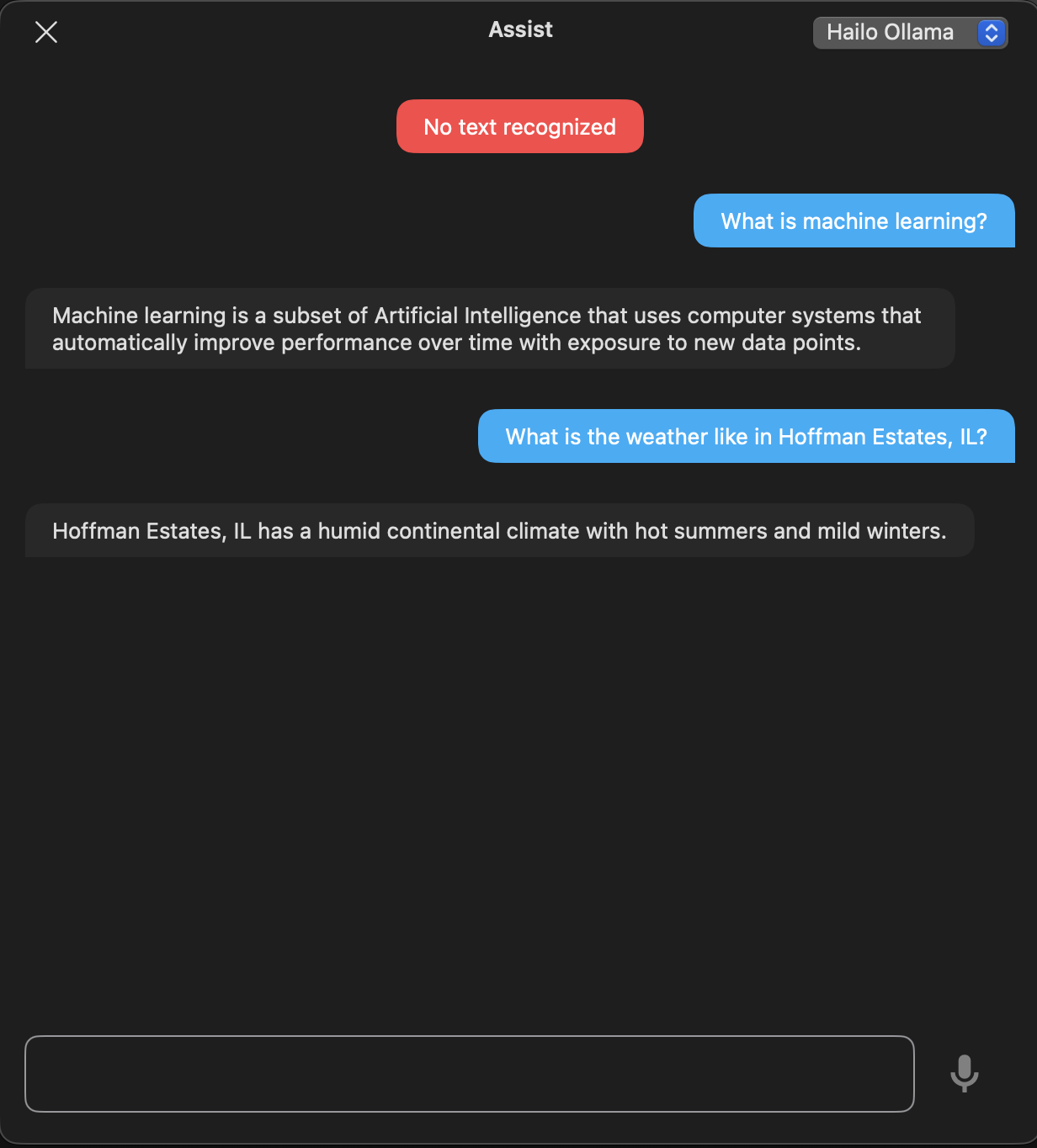
Screenshot from my Home Assistant using everything described in this thread:

1 Like

Bump.

Do we know if / when this is likely to happen? I get the below error when trying to call tools:

curl -s http://localhost:8000/api/chat -H “Content-Type: application/json” -d ‘{
“model”: “llama3.2:3b”,
“messages”: [{“role”: “user”, “content”: “What time is it?”}],
“stream”: false,
“tools”: [
{
“type”: “function”,
“function”: {
“name”: “get_current_time_and_date”,
“description”: “Get the current date and time. Useful for questions about today, now, current schedules, etc.”,
“parameters”: {
“type”: “object”,
“properties”: {},
“required”:
}
}
}
]
}’
server=oatpp/1.4.0
code=500
description=Internal Server Error
stacktrace:

  • [oatpp::data::mapping::TreeToObjectMapper::mapString()]: Node is NOT a STRING
  • [ApiController]: Error processing request
  • Error processing request

Are you sure you are “bumping” to the correct thread? I do not think your question and comment fits here and should be moved to the correct topic. Because we are actively trying to solve the tools issue here.

My understanding is someone has actively solved it above, no?

"
Woohoo! I believe I have tool/function calling working the ollama way (with tool calls in the message payload) on the 10H/AI+ 2.
"