Hi everyone,
I’m trying to measure the power draw of a Hailo 10H m.2 module. I tried using the hailort 5.2.0 Docker but get the following error:
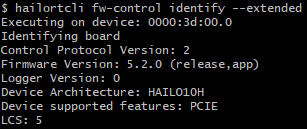
root@50b6b087320e:/local/workspace# hailortcli fw-control identify
Executing on device: 0000:57:00.0
Identifying board
Control Protocol Version: 2
Firmware Version: 5.2.0 (release,app)
Logger Version: 0
Device Architecture: HAILO10H

root@50b6b087320e:/local/workspace# hailortcli measure-power
Executing on device: 0000:57:00.0
[HailoRT CLI] [error] CHECK_SUCCESS failed with status=HAILO_OPEN_FILE_FAILURE(13)
Failed power measurement, status HAILO_OPEN_FILE_FAILURE(13)
Failed to execute on device: 0000:57:00.0. status= HAILO_OPEN_FILE_FAILURE(13)
root@50b6b087320e:/local/workspace#
Does the Hailo 10H currently support power measurement?
Best Regards
Thanks in advance!
1 Like
Hi @Jona_Gass ,
To measure power, make sure you’re running a network, power consumption will depend on the specific model you choose.
hailortcli –-measure-power run2 set-net HEF
Just note that your H10h board needs to have an INA for this measurement to work.
Hi @nina-vilela ,
Thanks for the response! I’ll try that
How can i find out if my H10h board has an INA?
If so, how could I measure power consumption during LLM interference via hailo-ollama?
alex_h
January 26, 2026, 6:35am
4
We wanted to check power consumption on Hailo 10h M2 Module (HM22HB1C2FAE ) just like we did with Hailo 8 modules but couldn’t succeed for now.
In another post measure power consumption - General Discussion - Hailo Community , @user1232 provided a good overview of what to expect feature-wise.
Since the new Raspberry Pi AI Hat 2 was announced, it would be nice to have such an overview also for the 10H. Could that be added here? Also I am wondering why this is not part of the datasheet of the module?
EDIT:
1 Like
I’ve updated the command in my previous answer so it’s compatible with Hailo‑10h.
To check if the INA is available, you can use the command that @alex_h shared (thanks, Alex!).
Another simple way is to just run the measurement command I sent, if the INA isn’t supported, you’ll get something like:
HailoRT CLI] [error] CHECK failed - Power measurement not supported. Disable the measure-power option
[HailoRT CLI] [error] CHECK_SUCCESS failed with status=HAILO_INVALID_OPERATION(6)
For the LLM networks, the command stays the same, you just need to provide the relevant HEF file.
Thanks a lot, i think that answers my Question
Quick update: The Hailo-10H M.2 Starter Kit comes with a M.2 module that has the INA device for power measurement populated. It should be available at our distributors for order in a day or two.