Hi everyone!
I’m following the ‘Quick Optimization Tutorial‘ from the ‘hailo_dataflow_compiler_v3.27.0_user_guide.pdf‘ to evaluate/improve my model accuracy.
My code (adapted from the tutorial’s code) uses ClientRunner to get inferences from my HAR model, as follows:
model_name = ‘yolov8s.har’
runner = ClientRunner(har=model_name)
with runner.infer_context(InferenceContext.SDK_NATIVE) as ctx:
native_res = runner.infer(ctx, image_dataset[:IMAGES_TO_VISUALIZE, :,:, :])
Checking native_res, I realized that the model outputs the state of the penultimate layers [‘yolov8s/conv41’,’yolov8s/conv42’, ‘yolov8s/conv52’, ‘yolov8s/conv53’,’yolov8s/conv62’,’yolov8s/conv63’] instead of the last layer ‘yolov8s/yolov8_nms_postprocess‘.
This is the mentioned .har drawn on https://netron.app/:
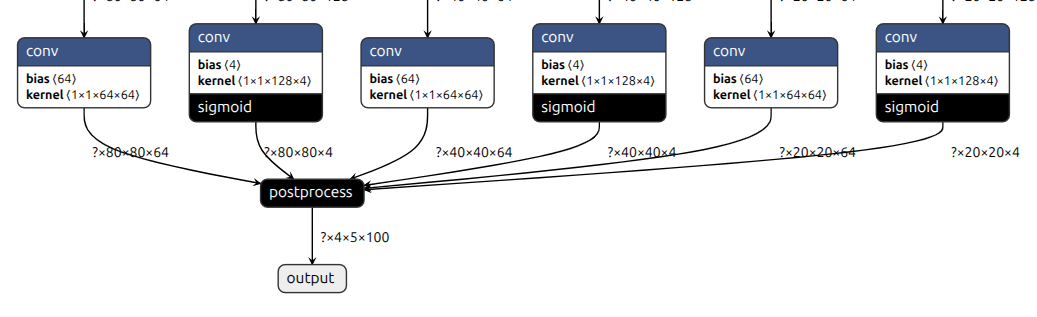
This is the content of yolov8s.alls:
normalization1 = normalization([0.0, 0.0, 0.0], [255.0, 255.0, 255.0])
change_output_activation(conv42, sigmoid)
change_output_activation(conv53, sigmoid)
change_output_activation(conv63, sigmoid)
nms_postprocess(“../../postprocess_config/yolov8s_nms_config.json”, meta_arch=yolov8, engine=cpu)
I found this post, where it is said that we need to implement the postprocess layer to obtain the proper detections. It is not clear to me why, because the .har model already has the postprocess layer.
Can someone help me extract the proper detections from the ClientRunner.inferoutput using a yolov8 model?