Hi everyone,
I’m new here and looking for some help installing my new Hailo-10H.
System Specifications
-
OS: Windows 10 Pro 22H2 (Build 19045.6466)
-
Motherboard: ASRock X99 Extreme4
-
CPU: Intel Xeon E5-2699 v3
-
RAM: 128 GB
-
GPUs: 1x NVIDIA P6000 + 1x NVIDIA GP100
-
PSU: 1 kW
(Note: My current configuration runs engineering workloads with zero issues so far.)
The Problem
I’ve tried installing the Hailo-10H in two ways:
-
Using a PCIe-to-M.2 converter in one of the free PCIe slots.
-
Directly into the M.2 slot on the motherboard.
In both cases, I cannot get it to work. Windows Device Manager reports a “Code 10 - STATUS_DEVICE_POWER_FAILURE” error under the device properties.
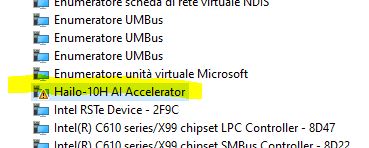
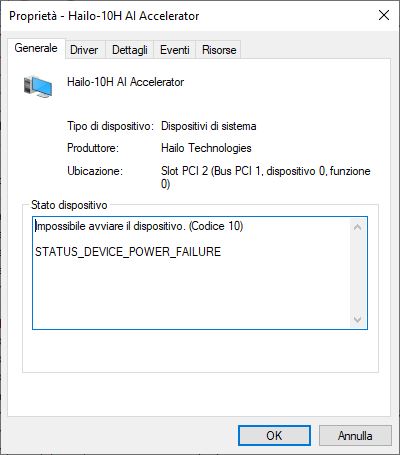
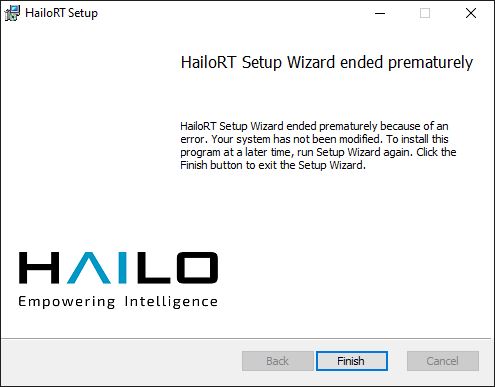
Additionally, when attempting to install the HailoRT package, the installer rolls back near the end of the progress bar due to an internal error (no specific error code given). Ultimately, the Hailo suite fails to install, and the Code 10 error persists in Device Manager.
Does anyone have any ideas on what might be causing this or how to fix it?