An error occurred when compiling the custom model into a HEF file

Using the Dataflow Compiler, I successfully converted a custom ONNX model into a HAR file and completed quantization, but an error occurred when compiling the HAR file into a binary file:
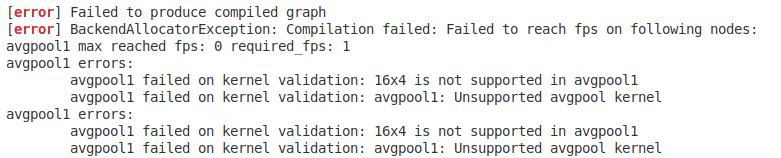
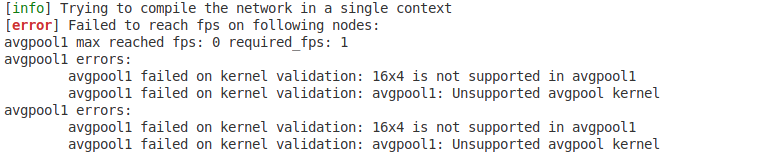
avgpool1 failed on kernel validation: 16x4 is not supported in avgpool1.
Here is my error message:
from hailo_sdk_client import ClientRunner
import os
import cv2
import numpy as np


input_size = 512  # 模型输入的尺寸
chosen_hw_arch = "hailo8"  # 要使用的 Hailo 硬件架构,这里是 Hailo-8
onnx_model_name = "ms_unet"  # 模型的名字
file_path = "/home/zengzixuan/hailo-convert/checkpoint"
onnx_path = os.path.join(file_path, "ms_unet_512.onnx") # 模型的路径
hailo_model_har_path = os.path.join(file_path, f"{onnx_model_name}.har") # 转换后模型的保存路径
hailo_quantized_har_path = os.path.join(file_path, f"{onnx_model_name}quantized.har")  # 量化后模型的保存路径
hailo_model_hef_path = os.path.join(file_path, f"{onnx_model_name}.hef") # 编译后模型的保存路径
images_path = "/home/zengzixuan/hailo-convert/Train/images"  # 数据集图像路径
CALIB_SAMPLE_NUM = 396

# 将 onnx 模型转为 har
runner = ClientRunner(hw_arch=chosen_hw_arch)
hn, npz = runner.translate_onnx_model(
    model=onnx_path, 
    net_name=onnx_model_name, 
    start_node_names=["modelInput"],
    # 复制日志中推荐的end_node_names
    end_node_names=[
    '/encoder1/transformer/Squeeze_1',
    '/encoder1/shortcut/Conv',
    '/encoder1/local_feat/local_feat.5/Mul'
    ]
)
runner.save_har(hailo_model_har_path)

# 校准数据集准备
images_list = [img_name for img_name in os.listdir(images_path) if os.path.splitext(img_name)[1] in [".jpg",".jpeg",".png", "bmp"]][:CALIB_SAMPLE_NUM] # 获取图像名称列表
calib_dataset = np.zeros((len(images_list), input_size, input_size, 3))  # 初始化 numpy 数组
for idx, img_name in enumerate(sorted(images_list)):
    img = cv2.imread(os.path.join(images_path, img_name))
    resized = cv2.resize(img, (input_size, input_size))  # 调整原始图像的尺寸为模型输入的尺寸
    calib_dataset[idx,:,:,:]=np.array(resized)


# 确保校准集数量>0
if len(images_list) == 0:
    raise ValueError(f"校准集为空!请检查:\n1. 图片路径:{images_path}\n2. 路径下是否有.jpeg/.jpg/.png/.bmp格式图片")

# 量化模型
runner = ClientRunner(har=hailo_model_har_path)
alls_lines = [
    'model_optimization_flavor(optimization_level=1, compression_level=2)',
    'resources_param(max_control_utilization=0.6, max_compute_utilization=0.6, max_memory_utilization=0.6)',
    'performance_param(fps=1)'
]
runner.load_model_script('\n'.join(alls_lines))
runner.optimize(calib_dataset)
runner.save_har(hailo_quantized_har_path)

# 编译为 hef
runner = ClientRunner(har=hailo_quantized_har_path)
compiled_hef = runner.compile()
with open(hailo_model_hef_path, "wb") as f:
    f.write(compiled_hef)

Hey @user366,

Welcome to the Hailo Community!

The error you’re running into happens because the compiler is trying to map avgpool1 using a 16×4 average-pool kernel, which isn’t supported on Hailo hardware. Only specific pooling kernel sizes are optimized—things like 2×2, 3×3, 3×4, 5×5, h×W, or global pooling.

Here are the two main ways to fix it:

1. Use global_avgpool_reduction (best option if this is basically a global pool)

If avgpool1 is acting like a global average pool (meaning the kernel size is roughly the size of the input feature map), you can add a pre-quantization optimization that reduces the spatial dimensions first. This splits the pooling into two stages and makes the final global pool compatible with supported kernel shapes.

Add this to your model script:

pre_quantization_optimization(global_avgpool_reduction,
                              layers=avgpool1,
                              division_factors=[4, 4])

2. Turn off 16×4 sub-cluster mode in the compilation params

Sometimes the compiler tries to allocate resources using a 16×4 pattern, which only works for Conv/DW layers—not avgpool. Disabling it can help avoid the mapping issue.

compilation_param({*},
                  resources_allocation_strategy=automatic_scs_selection,
                  use_16x4_sc=disabled)

This doesn’t change your model—it just prevents the compiler from using an allocation strategy that isn’t valid for this layer.


What I recommend next:

  1. Check the avgpool1 layer in your ONNX model:
    Look at the kernel size, stride, and input shape. If the kernel is large (close to the feature map size), then it’s probably a global pool.

  2. If it is global, add the global_avgpool_reduction optimization.

  3. If it’s not global, or you still get the error, try disabling use_16x4_sc in the compilation params.

  4. Re-run the whole pipeline:

    • optimize()
    • compile()
  5. If none of the above works, you may need to slightly adjust the ONNX model so that avgpool1 uses a supported pooling kernel (2×2, 3×3, h×W, etc.).


To help you more effectively, could you share:

  • Output of:

    hailo profiler <path/to/ms_unetquantized.har>
    
  • Screenshot of Layer Details for avgpool1

  • Screenshot of Optimization Details for avgpool1

  • OR a screenshot of avgpool1 from the Accuracy Analysis Tool / Visualizer showing the same info

Happy to take a look and walk you through the fix!

Thank you for your reply. Now the ONNX model can be successfully converted to the HEF model. The reason for the issue was that the model used automatic pooling in the attention module. After changing it to manual pooling, the problem was resolved.

1 Like