Does this mean that you have some working code that can stream out images into an RTMP output? If so, you do not have to use the gizmos. You can just use predict_streamoutputs and stream them to RTMP using your code.
Using PySDK I don’t know how to make it work, as said I’m pretty sure the solution involve dgstreams.VideoStreamer but I am unable to find any use example.
dgstreams.Composition(cam_source >> detector >> streamer, detector >> display).start()
This is the line should be making the connection to the output server, but the lack of output debugging info make it impossible to move on, as I’m unable to know where is the problem coming from…
I need to answer this questions during the execution:
- Is the script even calling ffmpeg?
- Is the ffpemg stabishing connection?
- What is the response from the rtmp server?
The only code I was able to output to RTMP is my original hailo-platform only based script… that script is using almost the same ffmpeg command that your VideoStreamer degirum_tools/degirum_tools/video_support.py at main · DeGirum/degirum_tools · GitHub
I was able to make it work!
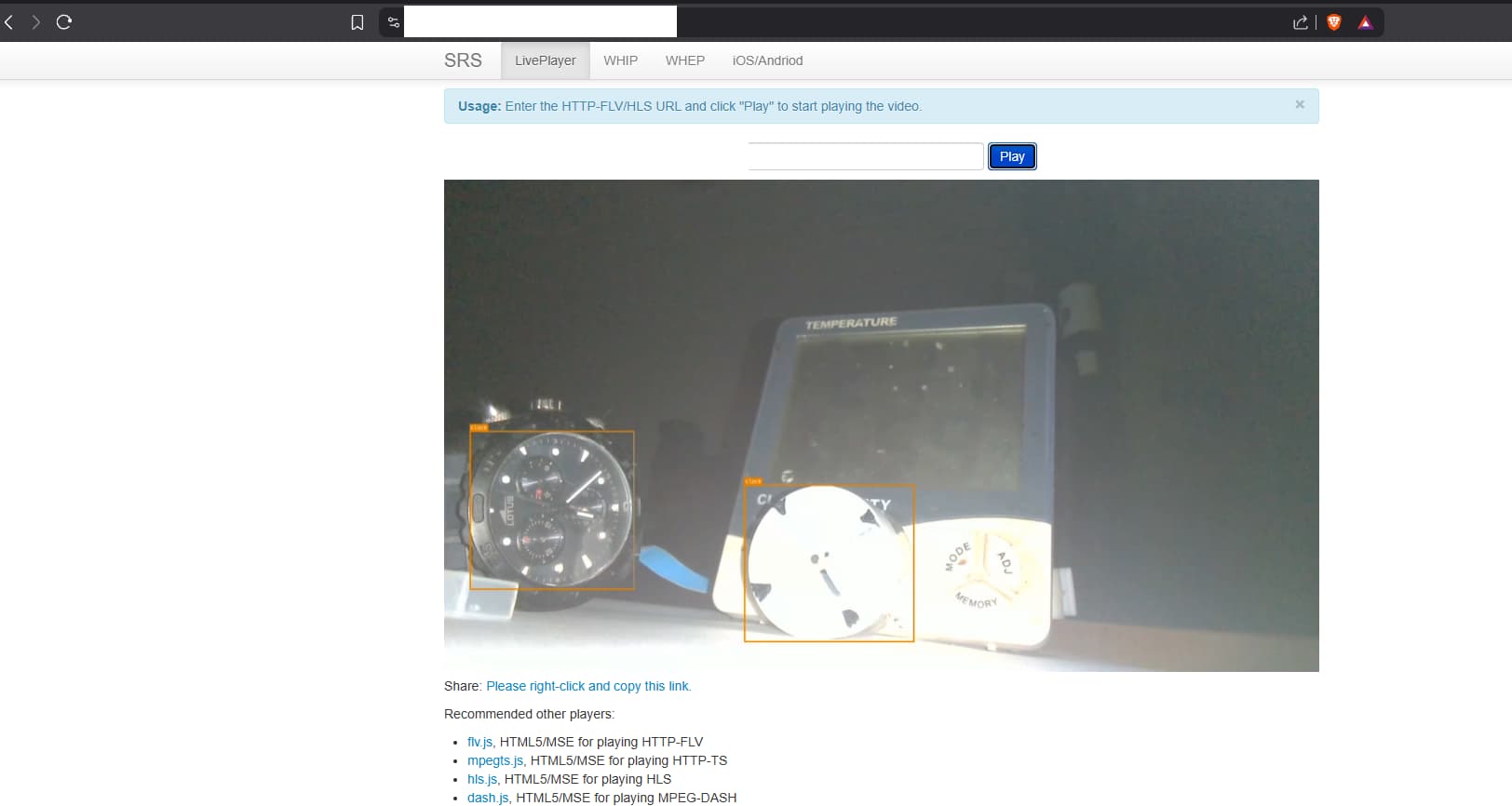
I had to change a few things on the orginal degirum_tools/video_support.py to enable debugging
Once I had debug enabled was more easy.
With this simple mod in video_support.py make output RTMP streaming enabled with VideoStreamer and VideoStreamerGizmo
class VideoStreamer:
    """Streams video frames to an RTMP or RTSP server using FFmpeg.
    This class uses FFmpeg to stream video frames to an RTSP server.
    FFmpeg must be installed and available in the system path.
    """

    def __init__(
        self,
        stream_url: str,
        width: int,
        height: int,
        *,
        fps: float = 30.0,
        pix_fmt="bgr24",
        gop_size: int = 50,
        verbose: bool = True,
    ):
        """Initializes the video streamer.

        Args:
            stream_url (str): RTMP/RTSP URL to stream to (e.g., 'rtsp://user:password@hostname:port/stream').
                            Typically you use `MediaServer` class to start media server and
                            then use its RTSP URL like `rtsp://localhost:8554/mystream`
            width (int): Width of the video frames in pixels.
            height (int): Height of the video frames in pixels.
            fps (float, optional): Frames per second for the stream. Defaults to 30.
            pix_fmt (str, optional): Pixel format for the input frames. Defaults to 'bgr24'. Can be 'rgb24'.
            gop_size (int, optional): GOP size for the video stream. Defaults to 50.
            verbose (bool, optional): If True, shows FFmpeg output in the console. Defaults to False.
        """
        self._width = width
        self._height = height

        # Common FFmpeg input arguments
        input_stream = ffmpeg.input(
            "pipe:0",
            format="rawvideo",
            pix_fmt="bgr24",
            s=f"{width}x{height}",
            framerate=fps,
        )

        output_args = {}

        if stream_url.startswith("rtmp://"):
            output_args = {
                "pix_fmt": "yuv420p",
                "vcodec": "libx264",
                "preset": "ultrafast",
                "tune": "zerolatency",
                "fflags": "nobuffer",
                "max_delay": 0,
                "g": gop_size,
                "format": "flv", # Format FLV for RTMP
                "flvflags": "no_duration_filesize",
            }
        elif stream_url.startswith("rtsp://"):
            output_args = {
                "format": "rtsp", # Formato de salida para RTSP
                "pix_fmt": "yuv420p",
                "vcodec": "libx264",
                "preset": "ultrafast",
                "tune": "zerolatency",
                "rtsp_transport": "tcp",
                "fflags": "nobuffer",
                "max_delay": 0,
                "g": gop_size,
            }

        self._process = (
            input_stream.output(stream_url, **output_args)
            .global_args("-loglevel", "info" if verbose else "quiet")
            .run_async(pipe_stdin=True, quiet=not verbose)
        )
1 Like
Amazing news. We will add the modifications you highlighted in the code snippet you shared.
I am guessing what is left is to make 4 independent processes run at the same time now.
I managed to have several processes working at same time by using the AI Server service and making the script connect to localhost 
But this way I lost the hability to interact with the inference…
Before I was able to count the number of detections or change the color of the boxes, or draw the boxes ony if the detected object is there after X frames.
The goal is to send a notification when a detection is confirmed!!!
Tried to add the tracker following the example:
# create object tracker
tracker = degirum_tools.ObjectTracker(
    class_list=classes,
    track_thresh=0.35,
    track_buffer=100,
    match_thresh=0.9999,
    trail_depth=20,
    anchor_point=degirum_tools.AnchorPoint.BOTTOM_CENTER,
)

# attach object tracker to model
degirum_tools.attach_analyzers(model, [tracker])

detector = dgstreams.AiSimpleGizmo(model)  # tried this before and after ataching the analyzer
and it throws an error:
Traceback (most recent call last):
  File "/root/api_ai_inference/./stream_service.py", line 57, in <module>
    dgstreams.Composition(cam_source >> detector >> streamer).start()
  File "/usr/local/lib/python3.10/dist-packages/degirum_tools/streams/base.py", line 695, in start
    self.wait()
  File "/usr/local/lib/python3.10/dist-packages/degirum_tools/streams/base.py", line 771, in wait
    raise Exception(errors)
Exception: Error detected during execution of VideoStreamerGizmo:
  <class 'degirum.exceptions.DegirumException'>: OpenCV(4.11.0) :-1: error: (-5:Bad argument) in function 'polylines'
> Overload resolution failed:
>  - img is not a numpy array, neither a scalar
>  - Expected Ptr<cv::UMat> for argument 'img'


Traceback (most recent call last):
  File "/usr/local/lib/python3.10/dist-packages/degirum_tools/streams/base.py", line 662, in gizmo_run
    gizmo.run()
  File "/usr/local/lib/python3.10/dist-packages/degirum_tools/streams/gizmos.py", line 475, in run
    img = get_img(data0)
  File "/usr/local/lib/python3.10/dist-packages/degirum_tools/streams/gizmos.py", line 467, in get_img
    frame = inference_meta.image_overlay
  File "/usr/local/lib/python3.10/dist-packages/degirum_tools/result_analyzer_base.py", line 181, in image_overlay
    image = analyzer.annotate(self, image)
  File "/usr/local/lib/python3.10/dist-packages/degirum_tools/object_tracker.py", line 1076, in annotate
    cv2.polylines(
cv2.error: OpenCV(4.11.0) :-1: error: (-5:Bad argument) in function 'polylines'
> Overload resolution failed:
>  - img is not a numpy array, neither a scalar
>  - Expected Ptr<cv::UMat> for argument 'img'
We were going to suggest the AI server usage but looks like you are much faster than us 
I am not sure what you mean by “lost the ability to interact with the inference”. There is no difference in your application code between local and localhost. Can you please elaborate more?
Like the example I wrote.
Now I have it with almost all the original features i had when it was a hailo-only script, now I retake the original question of the post, the tracking id
You pointed me to the examples/005_object_tracking.ipynb file, so I tried to add the tracker to the script.
hw_location="10.0.0.2:8778"
model_name = "yolo11s_coco--640x640_quant_hailort_hailo8_1"
model_zoo_url="aiserver://home/pi/DeGirum/zoo"
video_source = args.input
video_output= args.output
classes = {"clock"}
device_type = "HAILORT/HAILO8"

model_manager = dg.connect(
    inference_host_address=hw_location,
    zoo_url = model_zoo_url
)

model = model_manager.load_model(
    model_name=model_name,
    device_type=device_type,
    output_confidence_threshold=0.4,
    input_pad_method="letterbox",
    image_backend='pil',
    output_class_set=classes
)

# create object tracker
tracker = degirum_tools.ObjectTracker(
    class_list=classes,
    track_thresh=0.35,
    track_buffer=100,
    match_thresh=0.9999,
    trail_depth=20,
    anchor_point=degirum_tools.AnchorPoint.BOTTOM_CENTER,
)

# attach object tracker to model
#degirum_tools.attach_analyzers(model, [tracker])

cam_source = dgstreams.VideoSourceGizmo(video_source)

detector = dgstreams.AiSimpleGizmo(model)

streamer = dgstreams.VideoStreamerGizmo(video_output, show_ai_overlay=True)

dgstreams.Composition(cam_source >> detector >> streamer).start()
and I got the error shown:
Traceback (most recent call last):
  File "/root/api_ai_inference/./stream_service.py", line 57, in <module>
    dgstreams.Composition(cam_source >> detector >> streamer).start()
  File "/usr/local/lib/python3.10/dist-packages/degirum_tools/streams/base.py", line 695, in start
    self.wait()
  File "/usr/local/lib/python3.10/dist-packages/degirum_tools/streams/base.py", line 771, in wait
    raise Exception(errors)
Exception: Error detected during execution of VideoStreamerGizmo:
  <class 'degirum.exceptions.DegirumException'>: OpenCV(4.11.0) :-1: error: (-5:Bad argument) in function 'polylines'
> Overload resolution failed:
>  - img is not a numpy array, neither a scalar
>  - Expected Ptr<cv::UMat> for argument 'img'


Traceback (most recent call last):
  File "/usr/local/lib/python3.10/dist-packages/degirum_tools/streams/base.py", line 662, in gizmo_run
    gizmo.run()
  File "/usr/local/lib/python3.10/dist-packages/degirum_tools/streams/gizmos.py", line 475, in run
    img = get_img(data0)
  File "/usr/local/lib/python3.10/dist-packages/degirum_tools/streams/gizmos.py", line 467, in get_img
    frame = inference_meta.image_overlay
  File "/usr/local/lib/python3.10/dist-packages/degirum_tools/result_analyzer_base.py", line 181, in image_overlay
    image = analyzer.annotate(self, image)
  File "/usr/local/lib/python3.10/dist-packages/degirum_tools/object_tracker.py", line 1076, in annotate
    cv2.polylines(
cv2.error: OpenCV(4.11.0) :-1: error: (-5:Bad argument) in function 'polylines'
> Overload resolution failed:
>  - img is not a numpy array, neither a scalar
>  - Expected Ptr<cv::UMat> for argument 'img'
Can you please retry with image_backend='opencv'? In the meantime, we will see if we can replicate this on our side.
Nice, thank you! You nailed it!
Now a tag with same name and the track_id number is uder the actual label
Something I noticed is that each tie the script runs, the bbox color is different even for the same class
Do you know if it is possible to use this track_id to do something else?
I mean print a line in the terminal if clock 1 is detected more than X seconds, or print in the screen the total number of detected clocks¿?
Hi @Dario_Quesada ,
In order to access inference results in your main thread you can do this change:
- Define sink gizmo:
sink=dgstreams.SinkGizmo() - Route detector output to sink:
, detector >> sink - Modify composition launch to put it under
withblock. - In
withblock, iterate over data in sink:for data in sink(): datais an object ofStreamDatatype. It has two attributes: data and meta. data is your frame and meta is complex object, which aggregates all pipeline metadata (see more here: Streams Base | DeGirum Docs).- You do
data.meta.find_lastto find appropriate meta by tag. Usedata.meta.find_last(dgstreams.tag_inference)to find last inference meta, which will be PySDK inference result.
Below is some sample code to use sink, find meta, and access inference result from the main thread:
sink = dgstreams.SinkGizmo() # << define sink

# connect sink to some other gizmo, which result you want to observe:
with dgstreams.Composition(cam_source >> detector >> streamer, detector >> sink):

    for data in sink(): # iterate over data in sink

        # find last inference meta - this will be your PySDK inference result
        detection_result = data.meta.find_last(dgstreams.tag_inference)
        # just for illustration: find video meta
        video_meta = data.meta.find_last(dgstreams.tag_video)
        print(
            f"Frame: {video_meta['frame_id']}, {len(detection_result.results)} detections"
        )
1 Like
Hmm, cannot reproduce it with the code you provided. Color is always the same.
My code (I replaced streaming with local video display for clarity):
from degirum_tools import streams as dgstreams
import degirum as dg, degirum_tools

hw_location = "@cloud"
model_name = "yolo11s_coco--640x640_quant_hailort_hailo8_1"
model_zoo_url = "degirum/hailo"
video_source = 0
classes = {"person"}
device_type = "HAILORT/HAILO8"

model_manager = dg.connect(inference_host_address=hw_location, zoo_url=model_zoo_url)

model = model_manager.load_model(
    model_name=model_name,
    device_type=device_type,
    output_confidence_threshold=0.4,
    input_pad_method="letterbox",
    # image_backend='pil',
    output_class_set=classes,
)

# create object tracker
tracker = degirum_tools.ObjectTracker(
    class_list=classes,
    track_thresh=0.35,
    track_buffer=100,
    match_thresh=0.9999,
    trail_depth=20,
    anchor_point=degirum_tools.AnchorPoint.BOTTOM_CENTER,
)

# attach object tracker to model
degirum_tools.attach_analyzers(model, [tracker])

cam_source = dgstreams.VideoSourceGizmo(video_source)

detector = dgstreams.AiSimpleGizmo(model)

# streamer = dgstreams.VideoStreamerGizmo(video_output, show_ai_overlay=True)
streamer = dgstreams.VideoDisplayGizmo(show_ai_overlay=True)

sink = dgstreams.SinkGizmo()

with dgstreams.Composition(cam_source >> detector >> streamer, detector >> sink):
    for data in sink():
        detection_result = data.meta.find_last(dgstreams.tag_inference)
        video_meta = data.meta.find_last(dgstreams.tag_video)
        # print(
        #     f"Frame: {video_meta['frame_id']}, {len(detection_result.results)} detections"
        # )
Yes, you can do that - see my sink example above. Object tracker adds extra key into each tracked bbox result: “track_id”. It contains the bbox track id. Also it adds trails and trail_classes dictionaries into result object top level. (see Object Tracker | DeGirum Docs)
But you can do even more fancier things: you can use a combo of EventDetector, and EventNotifier gizmos to generate events based on some condition, and on such events send notifications or even save video clips.
Event Detector | DeGirum Docs
Notifier | DeGirum Docs
See this example for typical usage: PySDKExamples/examples/applications/smart_nvr.ipynb at main · DeGirum/PySDKExamples
Thank you very much!!!
The detector example is exactly what I was looking for… 
Do you know if there is some way to customize the bbox? like selecting the color (I would prefer red, more “alarm” style ) or maybe changing the text on the labels?
I noticed that the text on the bbox label and the text on track_id label is the same text:
---------
| Clock  |
-----------------
|Clock:  1       |
|                |
|        |       |
|    X  º  III   |
|       VI       |
and it seems a liitle bit weird having two times the same text, maybe if both has to be shown the track id label would be better to simpy have ‘ID: 1’ as label instead ‘Clock: 1’
Maybe the color problem had something to do with the model, I was testing all the yolovX-coco models to do benchmark, maybe one of them was changing the color
found about the color in the docs.
annotation_color : Customize overlay appearance
Sorry I was very exited and answered before reading the documents
The Clock: 1 label comes from the object tracker. To disable showing Clock: 1 label under the box, add either show_overlay=False parameter to degirum_tools.ObjectTracker instantiation to completely disable it, or show_only_track_ids=True to show just the track ID.
To change the annotation color for bbox, add parameter overlay_color=(r, g, b), to model_manager.load_modelcall, where (r, g, b) is the desired color tuple. This will change bbox and box upper label color to given for all classes. You may pass a list of color tuples as overlay_color parameter, in this case those colors will be cyclically iterated for classes.
You may control what to show in bbox label by specifying the following parameters in model_manager.load_model:
overlay_line_width - to set line width for inference results drawing on overlay image
overlay_show_labels - to set flag to enable/disable drawing class labels on overlay image
overlay_show_probabilities - to set flag to enable/disable drawing class probabilities on overlay image
overlay_alpha - to set alpha-blend weight for inference results drawing on overlay image
overlay_font_scale - to set font scale for inference results drawing on overlay image
ok now I’ve read the docs
And as I only am detecting one class, found that the color can be setup in the load_model() function, using the argument:
overlay_color=[255,0,0]
I’m rigth in the case of several classes to use something like
overlay_color={[255,0,0],[255,0,0]}
Also found how to remove the trackID label:
tracker = degirum_tools.ObjectTracker(
    class_list=classes,
    track_thresh=0.35,
    track_buffer=100,
    match_thresh=0.9999,
    trail_depth=20,
    anchor_point=degirum_tools.AnchorPoint.BOTTOM_CENTER,
    show_only_track_ids = True,
    show_overlay = True,
    annotation_color = [255,0,0]
)
1 Like
Hi @Dario_Quesada , you are reading the docs faster than I am writing answers Thank you for using DeGirum tools!
1 Like
The overlay_color property is used to define the color to draw overlay details. In the case of a single RGB tuple, the corresponding color is used to draw all the overlay data: points, boxes, labels, segments, etc. In the case of a list of RGB tuples the behavior depends on the model type:
-
For classification models different colors from the list are used to draw labels of different classes.
-
For detection models different colors are used to draw labels and boxes of different classes.
-
For pose detection models different colors are used to draw keypoints of different persons.
-
For segmentation models different colors are used to highlight segments of different classes.
If the list size is less than the number of classes of the model, then overlay_color values are used cyclically, for example, for three-element list it will be overlay_color[0], then overlay_color[1], overlay_color[2], and again overlay_color[0].
So, if you want the same color for all bboxes, you can just specify 1 color. There is no need to specify the same color multiple times as a list.
This is fascinating so I read quick
Thanks for your help, this is detection, so I will keep my red color for all.
There is one thing I don’t get yet in the notifier, it realys on the event detector but what is the purspose of the zone counter ?
If I ony have one zone (all the video surface) but the video source can have several resolutions, how can I get the correct zone size or it is the resolution of the model like 640x640 besides the origina video is 1920x1080?
I don’t plan to have a window for mouse selection of the zone yet so I cannot do it automaticaly
ok, got it zone_count does not count zones but detections on the zones 
1 Like